6. To install a new full-length PCIe card, do the following:
a. Remove the new PCIe card from its static-protective package.
b. If necessary, remove the appropriate metal slot cover on the rear of the chassis.
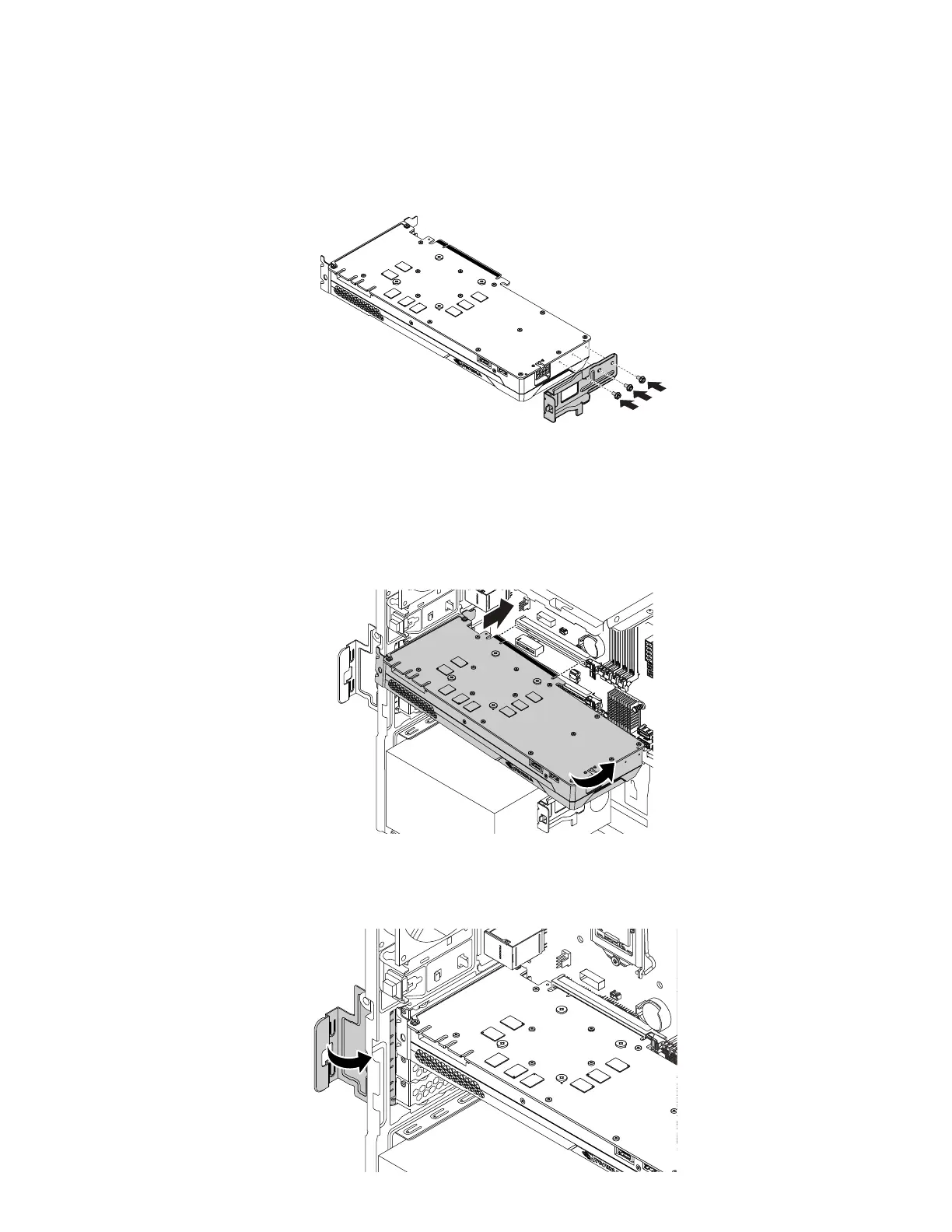
c. Install the three screws to secure the bracket to the new full-length PCIe card.
Figure 32. Installing a full-length PCIe card bracket
d. Install the new card into the appropriate slot on the system board. See “Parts on the system board”
on page 38.
Note: If you are installing a PCIe x16 graphics card, ensure that the memory-slot retaining clips are
closed before you install the card to avoid any interference during the installation.
Figure 33. Installing a new full-length PCIe card
e. Rotate the PCIe card retainer to the closed position.
Figure 34. Rotating the PCIe card retainer
108 P330 Hardware Maintenance Manual














 To Next Page