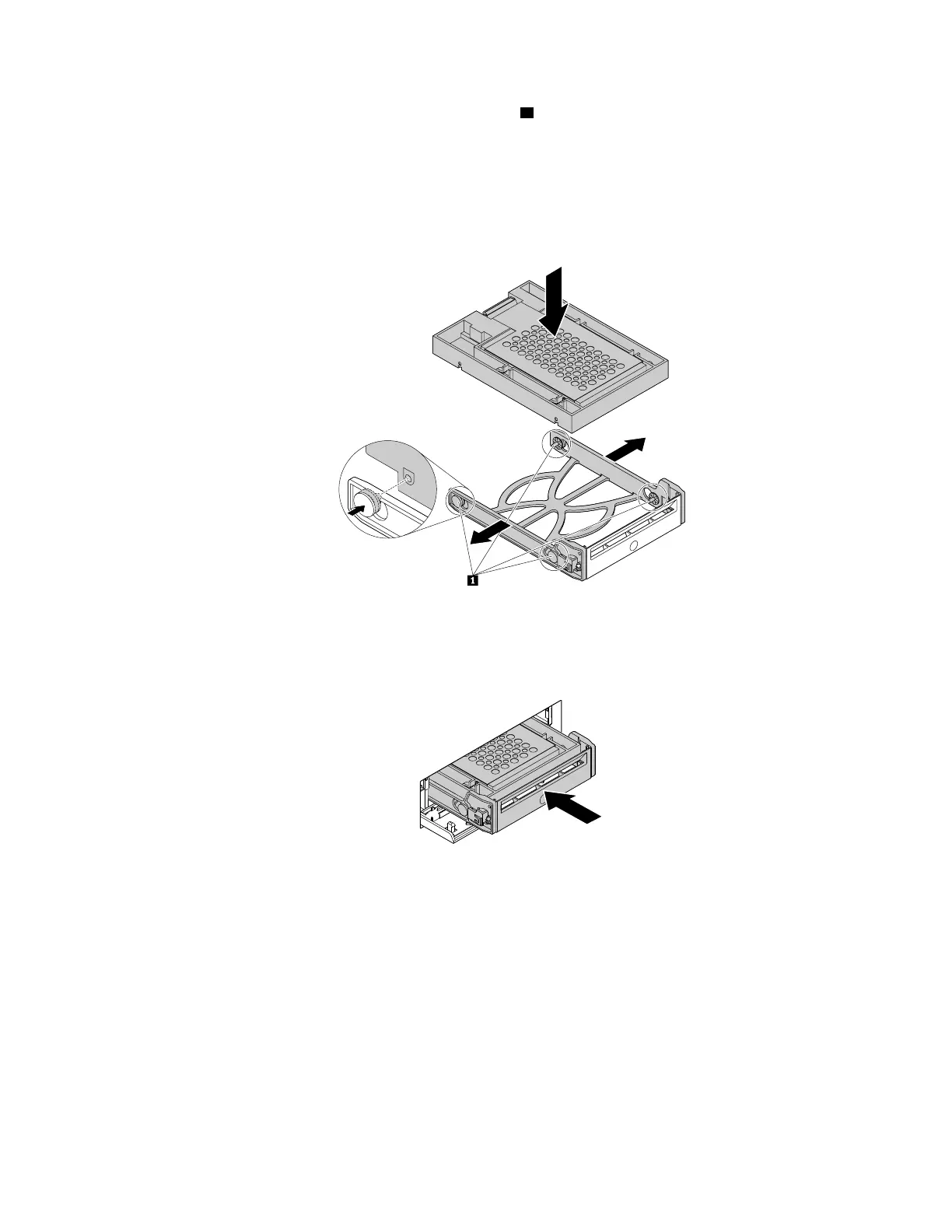
c. Flex both sides of the plastic bracket and align pins 1 on the plastic bracket with the corresponding
holes in the plastic frame of the converter.
Notes:
• Ensure that the circuit board faces downward and the connectors face toward the rear of the
bracket.
• Do not touch the circuit board on the storage drive.
Figure 67. Installing the converter with the 2.5-inch storage drive into the plastic bracket
d. Slide the plastic bracket with the new 2.5-inch storage drive into the front-access storage enclosure
until it snaps into position.
Figure 68. Installing the plastic bracket with the 2.5-inch storage drive into the front-access storage enclosure
e. Press the notch to secure the enclosure cover and lock the enclosure cover with the key.
What to do next:
• To work with another piece of hardware, go to the appropriate section.
• To complete the installation or replacement, go to “Completing the parts replacement” on page 187.
Device in the flex storage enclosure
Attention: Do not open your computer or attempt any repair before reading and understanding the Chapter
1 “Read this first: Important safety information” on page 1.
Chapter 9. Hardware removal and installation 125














 To Next Page