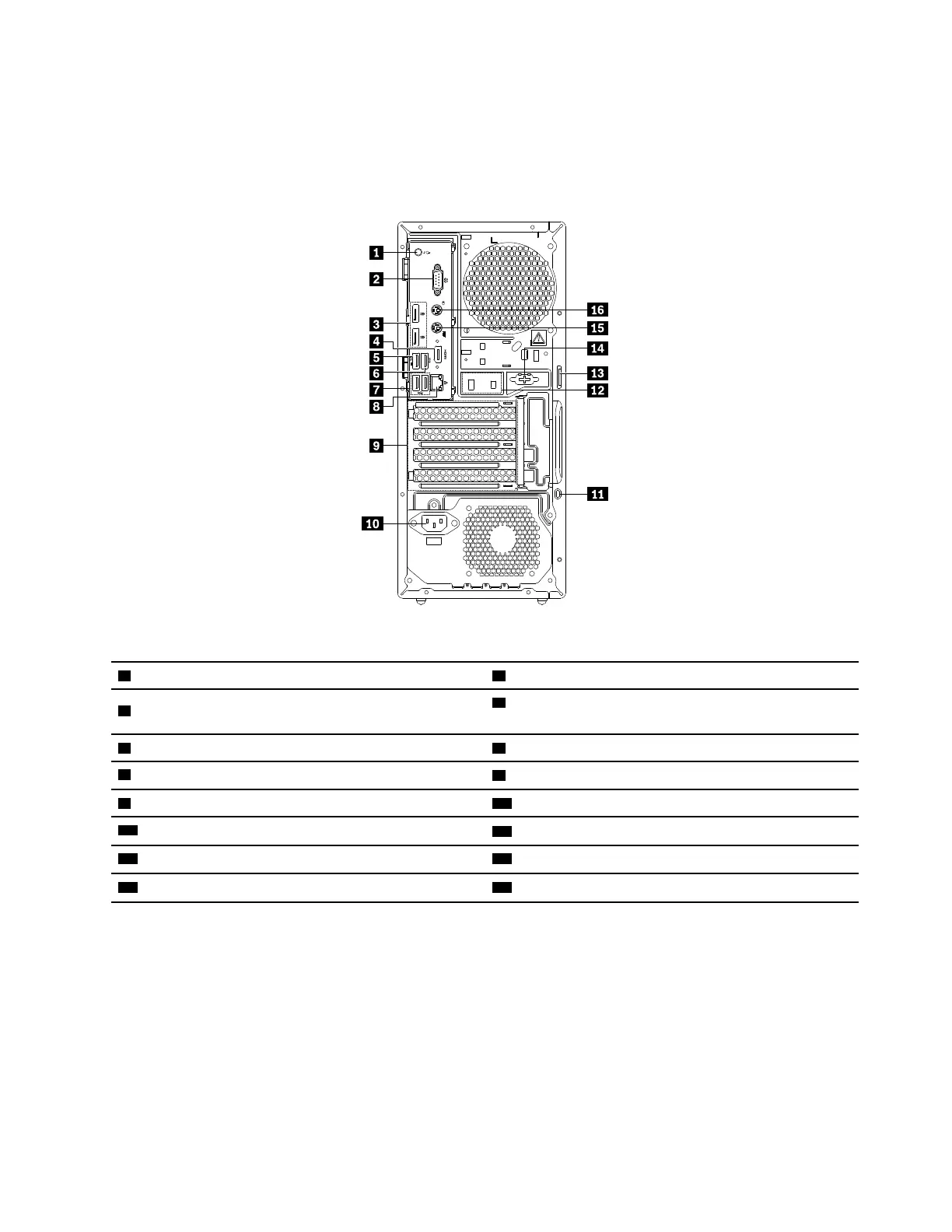
Rear view
Some connectors on the rear of your computer are color-coded to help you determine where to connect the
cables on your computer.
Note: The computer hardware might look slightly different from the illustration.
Figure 2. Rear view
1 Audio line-out connector
2 Serial connector
3 DisplayPort connectors (2)
4 DisplayPort connector or HDMI™ connector (available
on some models)
5 USB 3.1 connector Gen 1 6 USB 3.1 connector Gen 1
7 USB 2.0 connectors (2)
8 Ethernet connector
9 PCIe card area*
10 Power-cord connector
11 Security-lock slot
12 Cable-lock slots
13 Padlock loop
14 Serial connector (available on some models)
15 PS/2 keyboard connector (available on some models)
16 PS/2 mouse connector (available on some models)
Notes: * A discrete graphics card or a network adapter can be installed in the appropriate Peripheral
Component Interconnect Express (PCIe) card slot. If such a card is installed, use the connectors on the card
instead of the corresponding connectors on the computer to optimize the performance. Depending on your
computer model, the preinstalled cards might vary. One or more graphics cards might be installed to provide
the following connectors:
• Digital Visual Interface (DVI) connector
• DisplayPort
®
connector
• Mini DisplayPort
®
connector
DVI monitor connector
Chapter 2. Product overview 31














 To Next Page