What to do next:
• To work with another piece of hardware, go to the appropriate section.
• To complete the installation or replacement, go to “Completing the parts replacement” on page 187.
Heat-sink-and-fan assembly
Attention: Do not open your computer or attempt any repair before reading and understanding the Chapter
1 “Read this first: Important safety information” on page 1.
CAUTION:
Avoid contact with hot components inside the computer. During operation, some components
become hot enough to burn the skin. Before you open the computer cover, turn off the computer,
disconnect power, and wait approximately 10 minutes for the components to cool.
To remove or install the heat-sink-and-fan assembly, do the following:
1. Prepare your computer. See “Preparing your computer” on page 98.
2. Lay the computer on its side for easier access to the system board.
3. To remove the heat-sink-and-fan assembly, do the following:
a. Disconnect the heat-sink-and-fan assembly cable from the microprocessor fan connector on the
system board. See “Parts on the system board” on page 38.
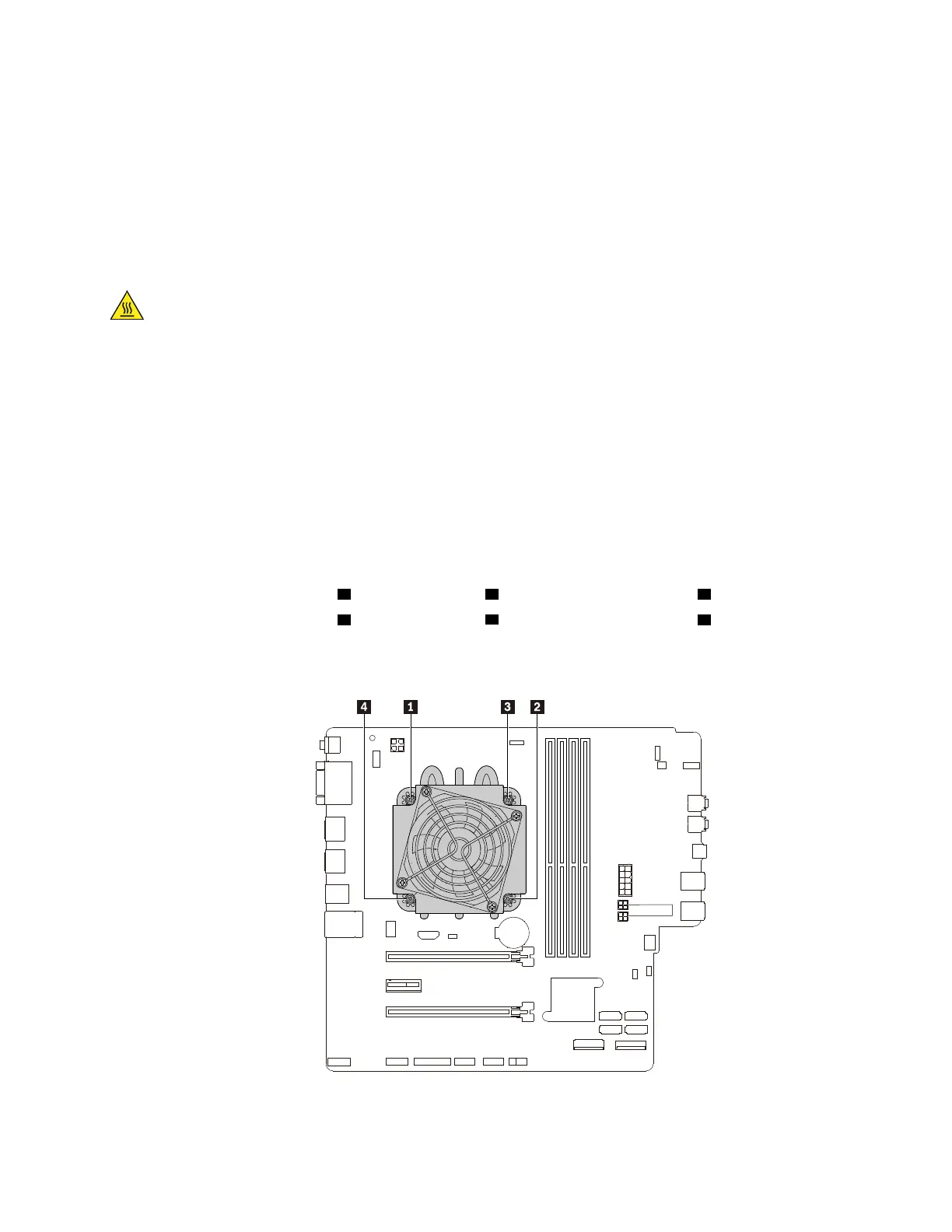
b. Follow the following sequence to loosen the four screws that secure the heat-sink-and-fan assembly
to the system board:
• Partially loosen screw
1 , fully loosen screw 2 , and then fully loosen screw 1 .
• Partially loosen screw
3 , fully loosen screw 4 , and then fully loosen screw 3 .
Note: Carefully loosen the four screws to avoid any possible damage to the system board. The four
screws cannot be removed from the heat-sink-and-fan assembly.
Figure 126. Removing the heat-sink-and-fan assembly
Chapter 9. Hardware removal and installation 159














 To Next Page