A flex storage enclosure might be equipped with one of the following components:
• 3.5-inch storage drive
• 2.5-inch storage drive
3.5-inch storage drive
To remove or install a 3.5-inch storage drive in the flex storage enclosure, do the following:
1. Prepare your computer. See “Preparing your computer” on page 98.
2. Locate the flex bay. See “Internal storage drives” on page 40.
3. Slide the enclosure out of the chassis. See “Device in the flex bay” on page 117.
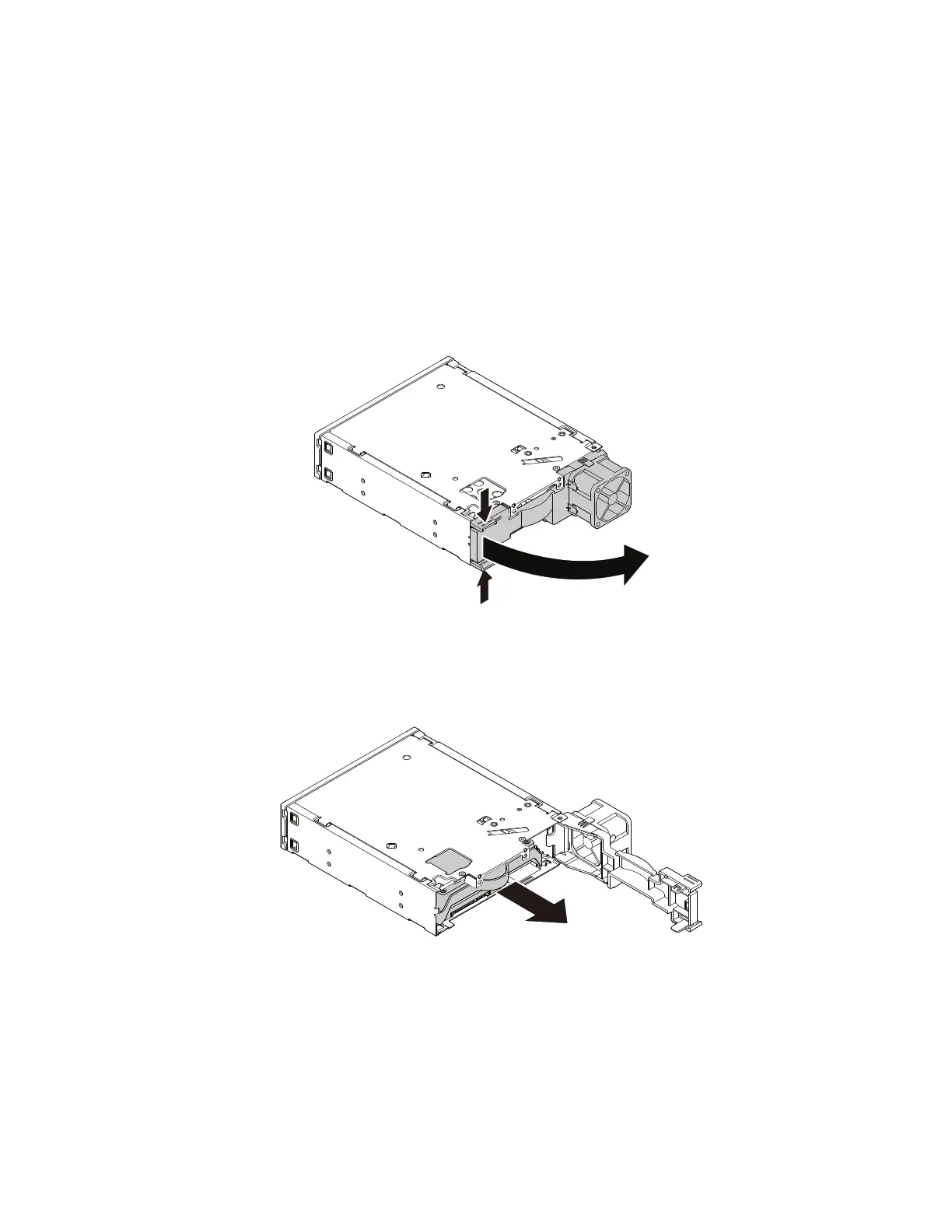
4. Pinch the two clips toward each other as shown to open the rear cover of the enclosure.
Figure 69. Opening the enclosure from the rear
5. To remove a 3.5-inch storage drive, do the following:
a. Slide the 3.5-inch storage drive out of the rear of the enclosure.
Figure 70. Removing the 3.5-inch storage drive from the rear
b. Flex two sides of the bracket to remove the 3.5-inch storage drive from the 3.5-inch storage-drive
bracket.
6. To install a new 3.5-inch storage drive into the bracket:
a. Slide the 3.5-inch storage-drive bracket out of the rear of the enclosure.
126
P330 Hardware Maintenance Manual














 To Next Page