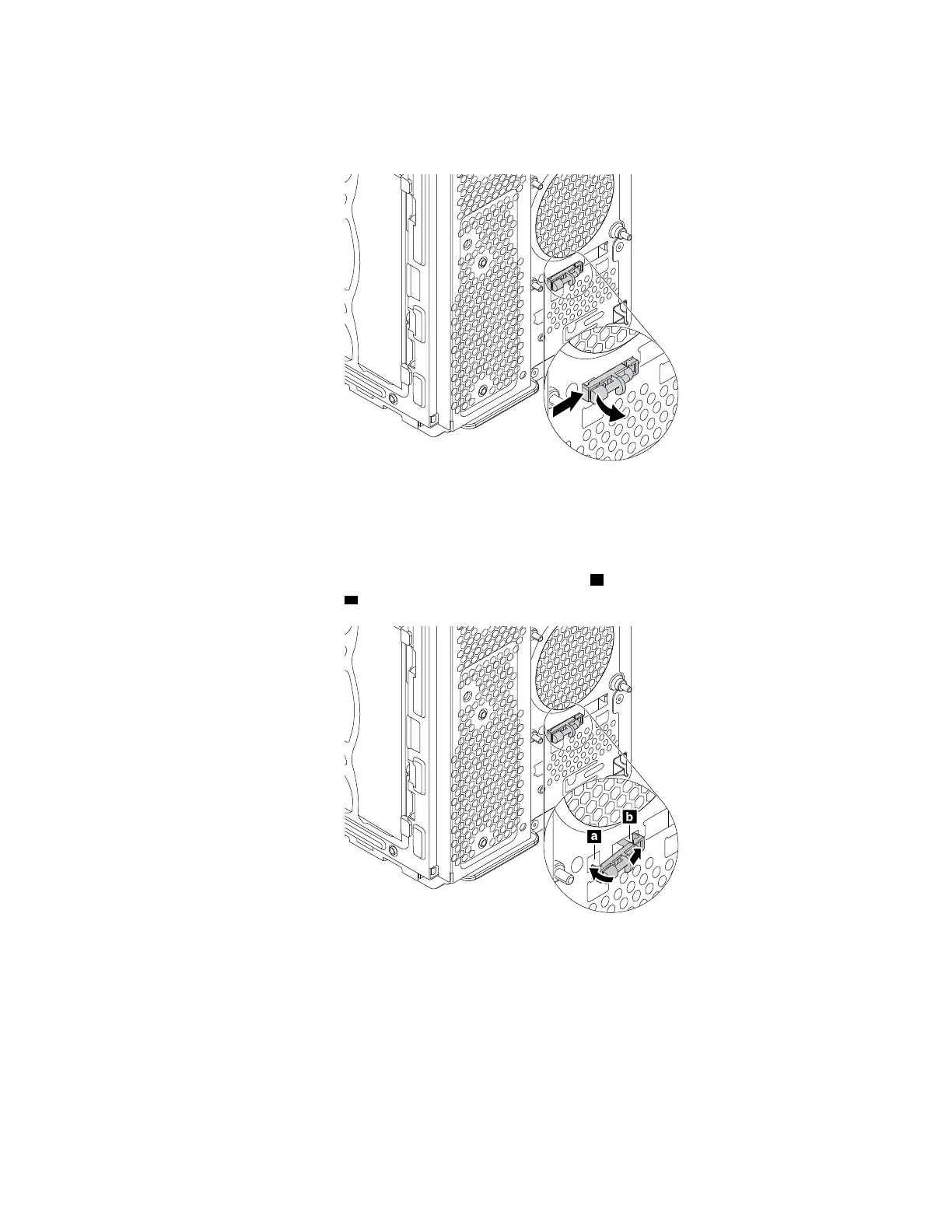
b. From the inner side of the chassis, press the left retaining clip that secures the plastic holder of the
thermal sensor and push the clip outward to release the plastic holder. Then, disengage the plastic
holder from the chassis.
Figure 127. Removing the thermal sensor
c. Pull the entire thermal sensor out of the chassis.
4. To install the thermal sensor, do the following:
a. Align the right retaining clip on the plastic holder with the hole
b in the chassis. Then, pivot the left
retaining clip into the hole
a until it snaps into position.
Figure 128. Installing the thermal sensor
b. Connect the thermal sensor cable to the thermal-sensor connector on the system board. See
“Completing the parts replacement” on page 187.
What to do next:
• To work with another piece of hardware, go to the appropriate section.
• To complete the installation or replacement, go to “Completing the parts replacement” on page 187.
Chapter 9. Hardware removal and installation 161














 To Next Page