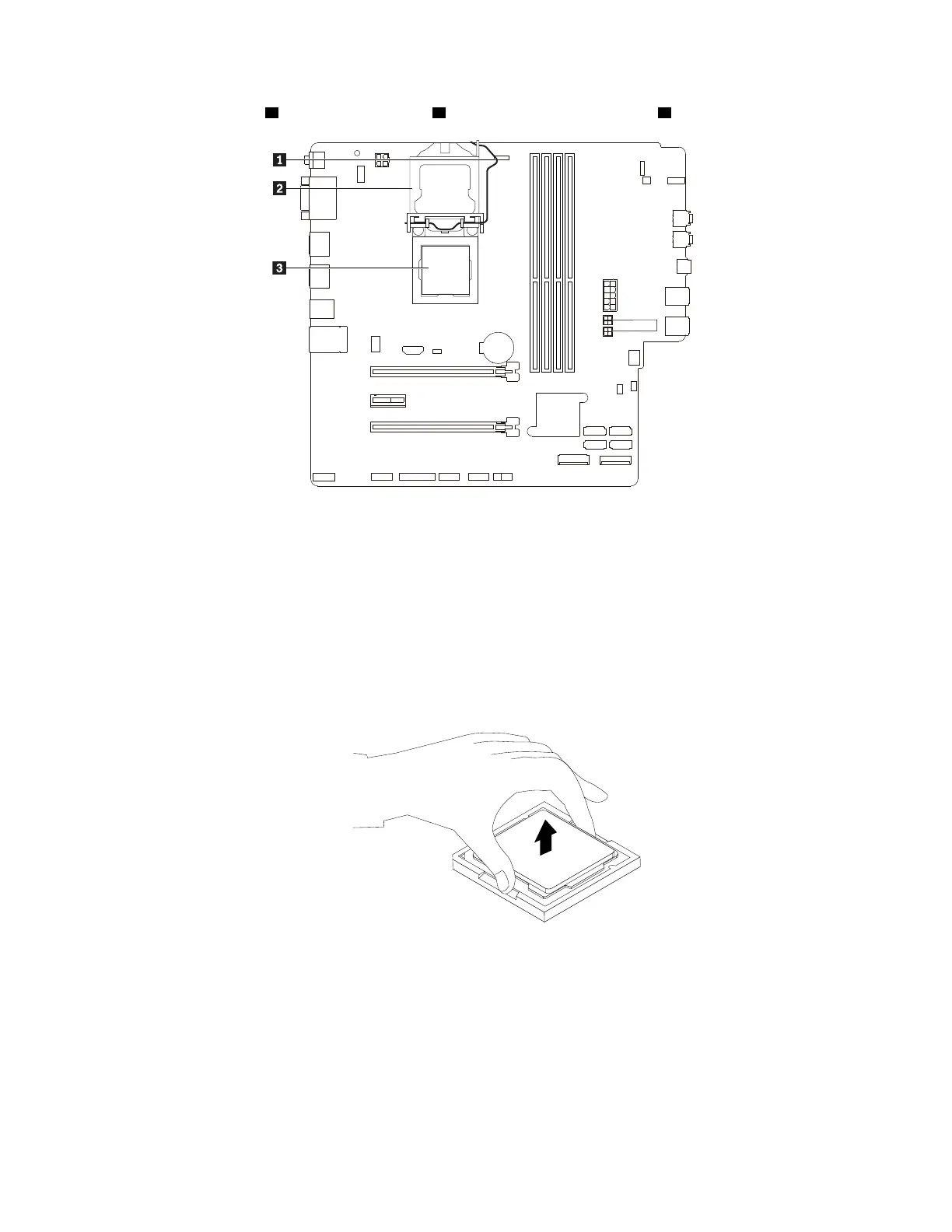
5. Lift the small handle 1 and open the retainer 2 to access the microprocessor 3 .
Figure 151. Accessing the microprocessor
6. Lift the microprocessor straight up and out of the microprocessor socket. Place the old microprocessor
on a static-protective surface.
Notes:
• Your microprocessor and socket might look different from the one illustrated.
• Touch only the edges of the microprocessor. Do not touch the gold contacts on the bottom.
• Do not drop anything onto the microprocessor socket while it is exposed. The socket pins must be
kept as clean as possible.
Figure 152. Removing the microprocessor
7. Ensure that the small handle is in the raised position and the microprocessor retainer is fully open.
8. Remove the protective cover that protects the gold contacts of the new microprocessor.
9. Touch the static-protective package that contains the new microprocessor to any unpainted surface on
the outside of the computer. Then, remove the new microprocessor from the package.
174
P330 Hardware Maintenance Manual














 To Next Page