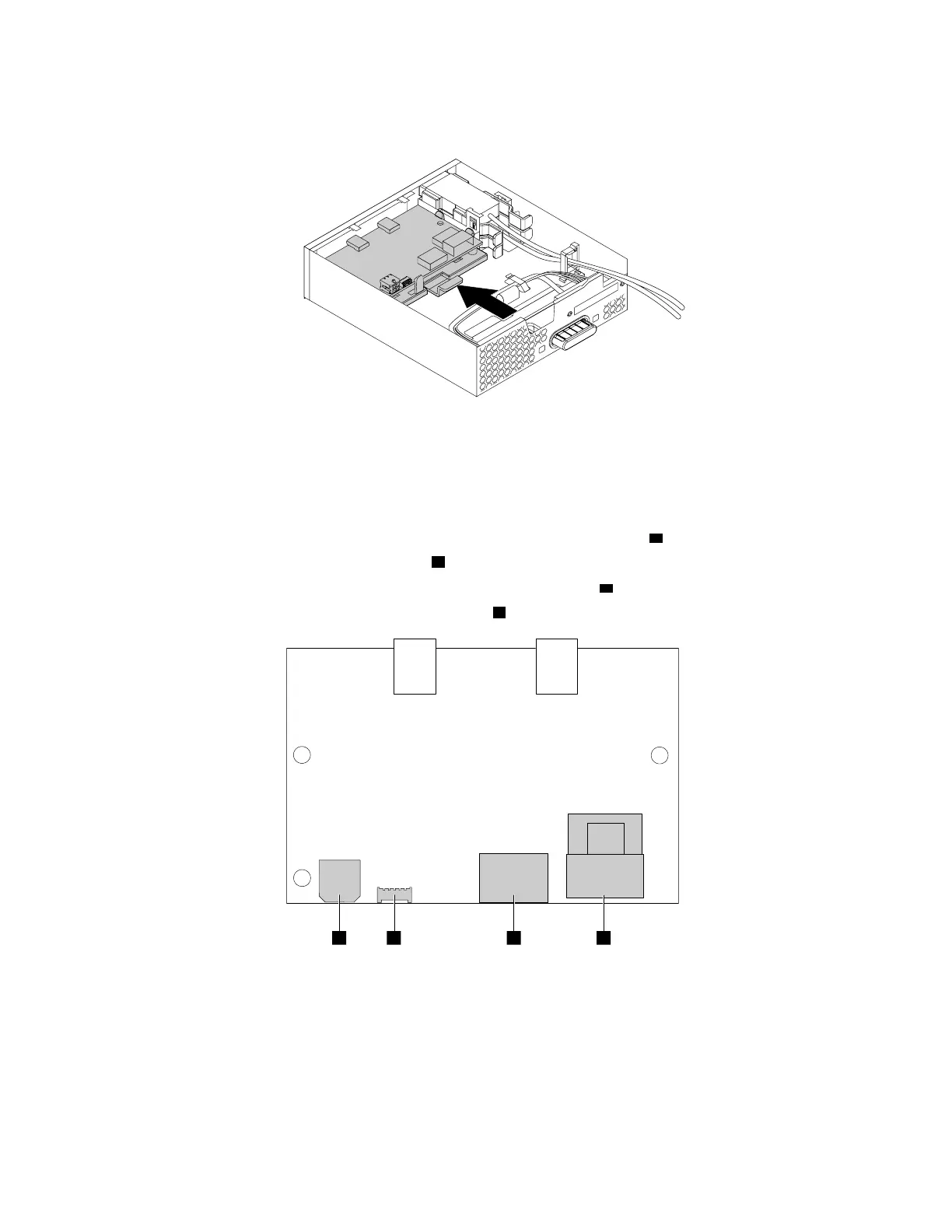
c. Hold the clip on the retaining bracket. Then insert the front Thunderbolt I/O adapter and the retaining
bracket into the flex module as shown until they snap into position.
Figure 173. Installing the front Thunderbolt adapter and the retaining bracket into the flex module
7. Install the front Thunderbolt PCIe x4 card into the PCIe x16 card slot (negotiable link width x4) on the
system board. See “PCIe card” on page 103 and “Parts on the system board” on page 38.
8. Connect the cables to the front Thunderbolt I/O adapter.
• Connect the power cable in the flex module to the 4-pin power connector
a .
• Connect the GPIO cable to the connector
b .
• Connect the internal DP-to-DP cable to the DisplayPort connector
c .
• Connect the mini-SAS cable to the SAS connector
d .
Figure 174. Front Thunderbolt adapter cable connection
186 P330 Hardware Maintenance Manual














 To Next Page