Lenze EDBZAEDE1001 DE/EN/FR/ES/IT 1.0 9
3 Operation
3.1 Install (or Replace) the Battery
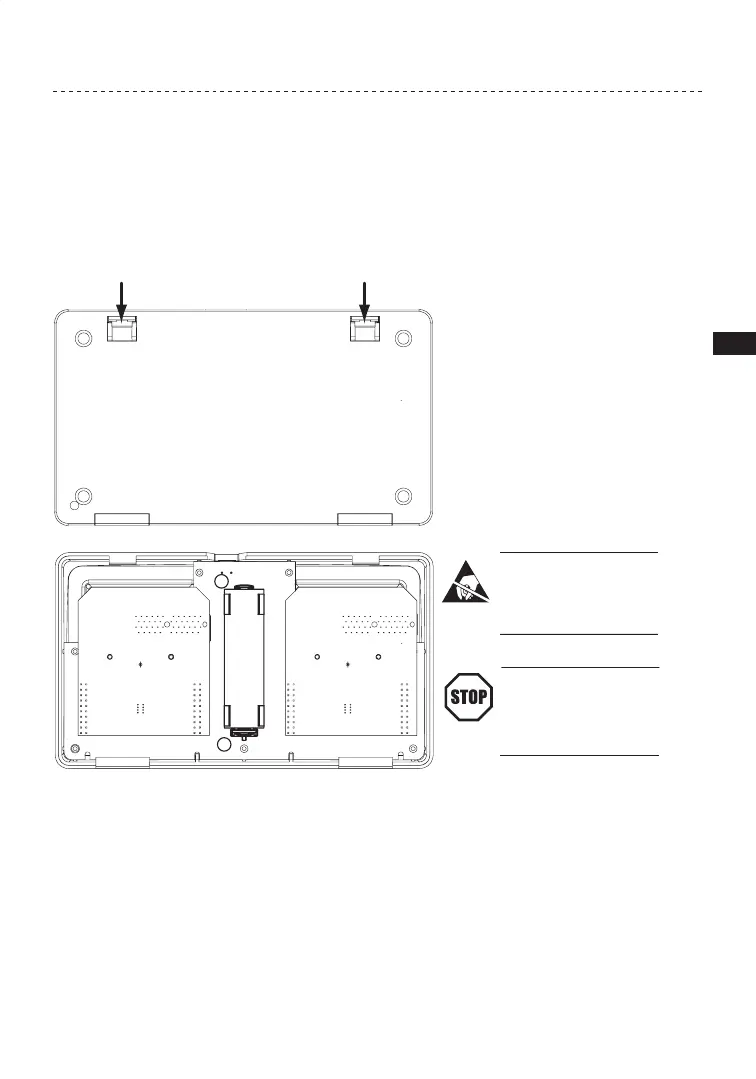
1. To install the battery, turn the Memory Module Copier over.
2. Pull the two recessed clips toward the center of the back cover and lift off back cover.
+
-
STOP!
Circuit boards are sensitive
to Electro-Static Discharge.
Follow proper ESD protocol
when cover is removed.
STOP!
Use caution when handling
Lithium Ion batteries. They
can burn or explode if charged
or discharged improperly.
3. If replacing the battery, remove old lithium ion battery. Recycle and/or dispose of battery
properly.
4. Install one Lithium Ion 3.7VDC battery. The unit is supplied with an Ultra-Fire 18650
Lithium Ion battery: 3.7VDC 2400mAh, length 65.5mm, diameter 18.4mm.
5. Replace back cover. Make sure hinged clips click into place.
Figure 5: Battery


 To Next Page