A
Aimee KennedySep 15, 2025
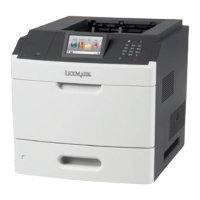
How to fix remove paper from standard output bin on Lexmark MS810 Printer?
- RRyan BuckleySep 15, 2025
Remove the paper stack from the standard bin.


How to fix remove paper from standard output bin on Lexmark MS810 Printer?
Remove the paper stack from the standard bin.
How to fix check tray connection on Lexmark Printer?
To address the 'Check tray [x] connection' message on your Lexmark printer, try the following: 1. Turn the printer off, then turn it back on. 2. If that doesn't work, turn off the printer, unplug the power cord from the electrical outlet, remove the specified tray, reattach the tray, connect the power cord to a properly grounded electrical outlet, and then turn the printer back on. 3. You can also select Continue on the printer control panel.
What does 'Maintenance kit low [80.xy]' mean on my Lexmark Printer?
If your Lexmark printer displays 'Maintenance kit low [80.xy]' message, you may need to order a maintenance kit. For more information, contact customer support. If necessary, select Continue to clear the message and continue printing.
How to fix insert hole punch box on Lexmark MS810 Printer?
Insert the hole punch box into the finisher, and then select Continue on the printer control panel to clear the message.
How to fix paper changes needed on Lexmark Printer?
Select Use current supplies on the printer control panel to clear the message and continue printing, or cancel the current print job.
What to do if Lexmark MS810 Printer says maintenance kit very low?
If your Lexmark printer displays 'Maintenance kit very low', you may need to replace the maintenance kit very soon. If necessary, select Continue on the printer control panel to clear the message and continue printing.
How to fix install tray [x] message on Lexmark Printer?
To resolve the 'Install Tray [x]' message on your Lexmark printer, install the specified tray: Turn off the printer, unplug the power cord from the electrical outlet, install the specified tray, connect the power cord to a properly grounded electrical outlet, and turn the printer back on. You can also cancel the print job or reset the active bin.
How to fix incompatible tray [x] on Lexmark MS810?
Remove the specified tray, or select Continue from the printer control panel to clear the message and continue printing without using the specified tray.
How to fix remove paper from linked set bin name on Lexmark MS810 Printer?
Remove paper from the specified bin.
What to do if my Lexmark MS810 displays 'Close door or insert cartridge'?
If your Lexmark printer displays the message 'Close door or insert cartridge', it means the toner cartridge is either missing or not installed correctly. To resolve this, insert the cartridge properly, and then ensure all doors and covers are securely closed.
Explains how to find instructions for your printer using the table of contents or search function.
Details the process of installing various internal hardware components like memory cards and hard disks.
Covers the order of installation for hardware options and specific instructions for installing optional trays.
Explains common error messages related to cartridges, paper, and disk issues.
Addresses issues like jagged characters, clipped pages, uneven density, and streaked lines.
| Print Technology | Monochrome Laser |
|---|---|
| Print Speed | Up to 55 ppm |
| Print Resolution | 1200 x 1200 dpi |
| Monthly Duty Cycle | Up to 300, 000 pages |
| Processor Speed | 800 MHz |
| Standard Memory | 512 MB |
| Maximum Memory | 2560 MB |
| Connectivity | USB, Ethernet |
| Duplex Printing | Standard |
| Media Types Supported | Card Stock, Envelopes, Labels, Plain Paper, Transparencies |
| Maximum Paper Size | Legal |
| Operating System Compatibility | Windows, Mac, Linux |
| Input Capacity | 650 pages (Standard) |
| Maximum Paper Input | 4400 pages |