270
8-2. Setup
the top of the screen.
Select to set display of the con-
tact/history transfer completion
message on/off.
The phone top screen can be set to
be displayed on the multi-informa-
tion display or system screen.
Select to reset all setup items.
● Depending on the type of Bluetooth
®
phone, these functions may not be avail-
able.
Contacts can be transferred from a
Bluetooth
®
phone to this system. Con-
tacts and favorites can be added,
edited and deleted. Also, the call his-
tory can be deleted.
1 Display the phone settings screen:
“MENU” button “Setup”
“Phone”
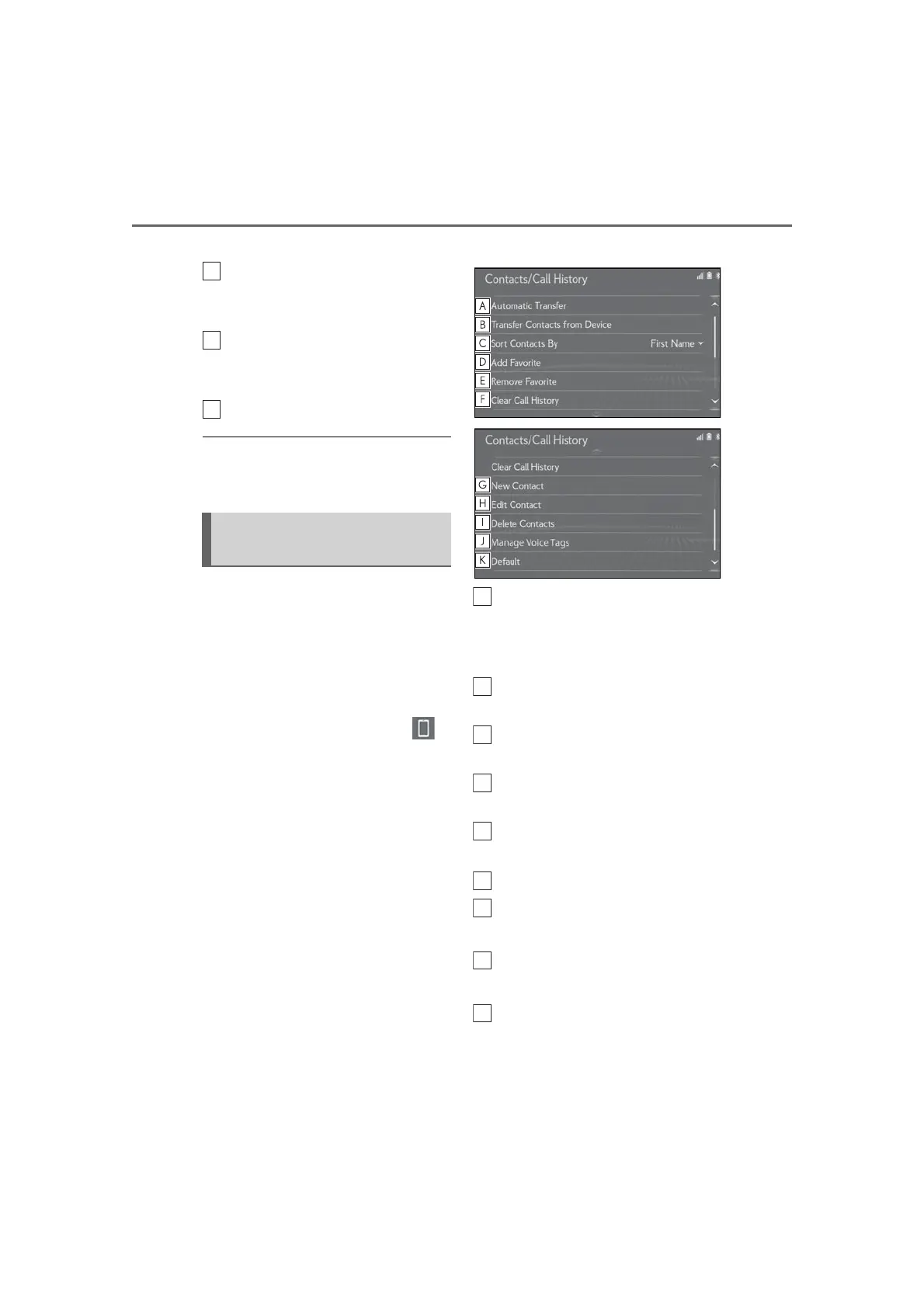
2 Select “Contacts/Call History”.
3 Select the desired item to be set.
For PBAP compatible Bluetooth
®
phones: Select to change the con-
tact/history transfer settings.
(P.271)
Select to update contacts from the
connected device. (P.272)
Select to sort contacts by the first
name or last name field.
Select to add contacts to the favor-
ites list. (P.274)
Select to delete favorites from the
favorites list. (P.275)
Select to clear the call history.
*
Select to add new contacts to the
contact list.
*
(P.273)
Select to edit contacts in the con-
tact list.
*
(P.274)
Select to delete contacts from the
contact list.
*
(P.274)
Contacts/Call history settings
screen



 To Next Page