10
ENG
ENGLISH
ASSEMBLING AND PREPARING
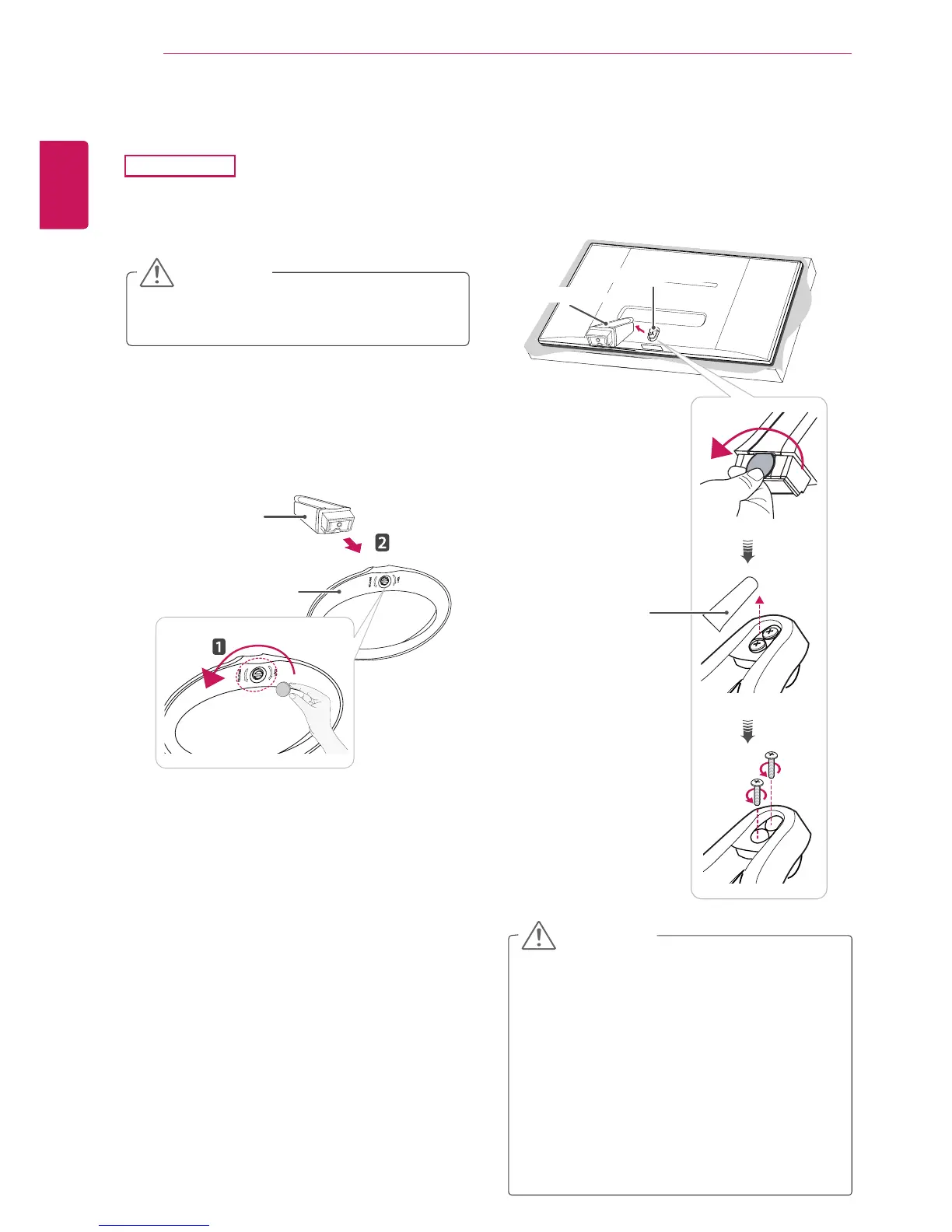
Detaching the stand base
2
Usingacoin,turnthescrewinthestandbase
counterclockwise.Removethestand base
from the stand body.
Toprotectthescreenfromscratches,cover
thesurfacewithasoftcloth.
CAUTION
Stand Base
Illustrationsinthisdocumentrepresenttypi-
calprocedures,sotheymaylookdifferent
fromtheactualproduct.
Donotcarrythemonitorupsidedownbyjust
holdingthestandbase.Thismaycausethe
monitortofalloffthestandandcouldresult
inpersonalinjury.
Whenliftingormovingthemonitor,donot
touchthemonitorscreen.Applyingforceor
pressuremaydamagethemonitorscreen.
Instead,holdthestandbodyortheplastic
frameoftheproduct.
CAUTION
1
Placethescreenfacedown.
29EA73
Stand Body
3
Openthescrewcoversonthebackofthe
standbodyandremovethetwoscrewswitha
screwdriver.
Asshownintheillustration,disconnectthe
stand body from the stand hinge.
Stand Hinge
Stand Body
Screw Cover



 To Next Page