33
ENG
ENGLISH
CUSTOMIZING SETTINGS
Settings
1
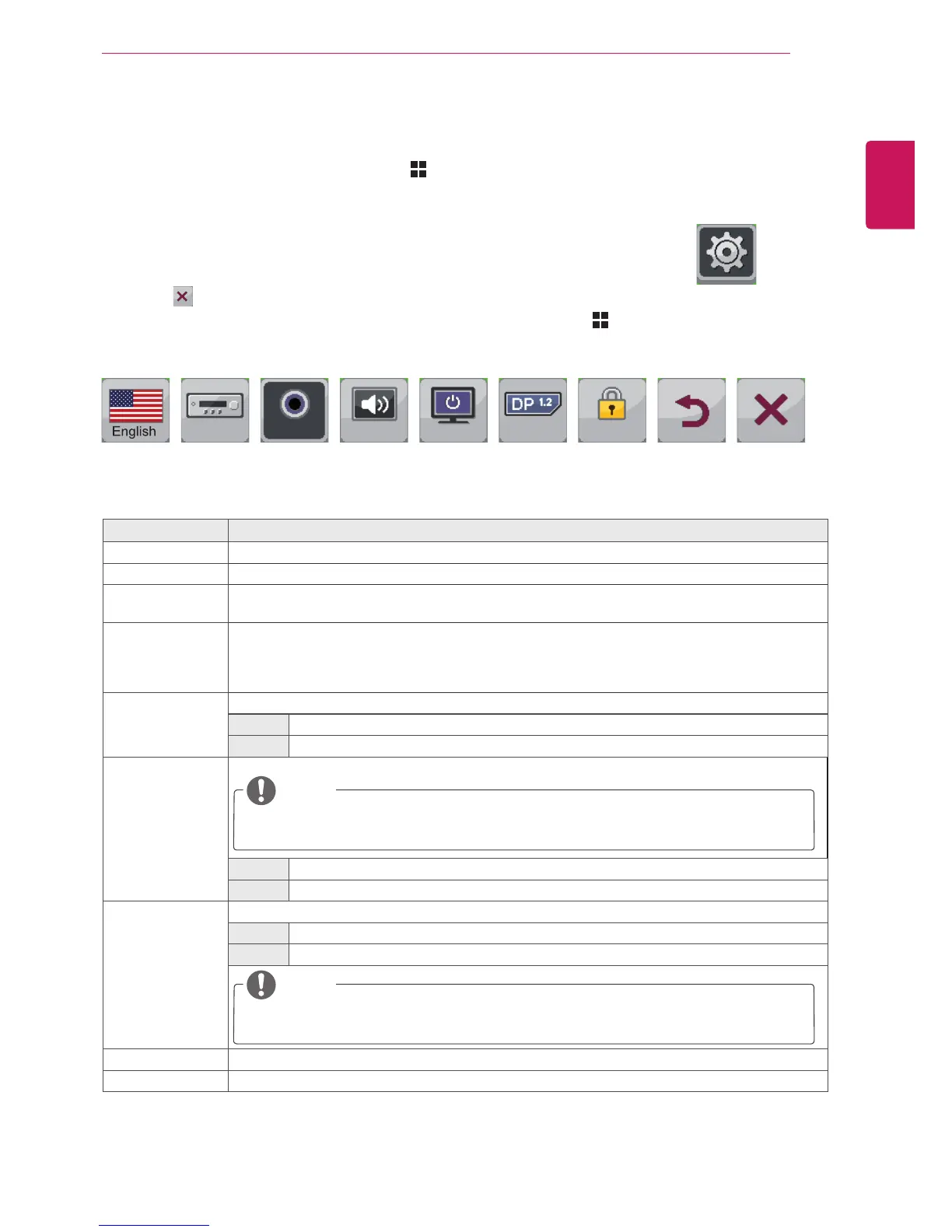
ToviewtheMenuOSD,presstheMenu( )buttonatthebottomofthemonitor.
2
Press<or>togotoSettings.
3
PressOK/PBPtoselectSettings.
4
Usethe<or>buttonstosettheoptions.
5
Select toexittheOSDmenu.
Toreturntotheuppermenuorsetothermenuitems,usetheMenu( )button.
Eachoptionisdescribedbelow.
Menu > Settings Description
Language Setsthemenuscreentothedesiredlanguage.
PC/AV Mode EnabledinHDMImodeonly.
Main Audio ThesoundcomingthroughtheAudioInportofthedigitalinputsignal(HDMI,HDMI2/MHL,Display
Port)canbeheardthroughthemonitor'sspeakers.
Button Sound Controlsthebuttontone.
Thebuttontoneisheardforthefollowingactions.
DCPowerOn/Off
MenuOSDOn/Off
Power LED Turnsthepowerindicatoronthefrontsideofthemonitoron/off.
On Thepowerindicatorisautomaticallyturnedon.
Off Thepowerindicatoristurnedoff.
DP1.2
(DisplayPort1.2)
ActivatesordeactivatesDisplayPort1.2.
NOTE
MakesuretoactivateordeactivateaccordingtotheDisplayPortversionsupportedbythe
graphicscard.Setittooffifitisnotcompatiblewiththegraphicscard.
On DisplayPort1.2isactivated.
Off DisplayPort1.2isdeactivated.
OSD Lock Preventsincorrectkeyinput.
On Keyinputisdisabled.
Off Keyinputisenabled.
NOTE
AllfunctionsexceptfortheOSDLockmodeandtheExitbuttonforBrightness,Contrast,
Volume,Input,andSettingsaredisabled.
Back MovestothepreviousOSDscreen.
Exit ExitstheOSDmenu.
Settings
Sub Menu
Language
PC/AV
Mode
Button
Sound
Power LED
OSD Lock
AV On On Off Off
Back Exit
Main Audio
Audio-In
DP1.2



 To Next Page