EasyManua.ls Logo

LG 29EA73 - USB Cable-PC Connection

LG 29EA73
40 pages
Print Icon
To Next Page IconTo Next Page
To Previous Page IconTo Previous Page
Loading...
21
ENG
ENGLISH
USING THE MONITOR
USB cable-PC connection
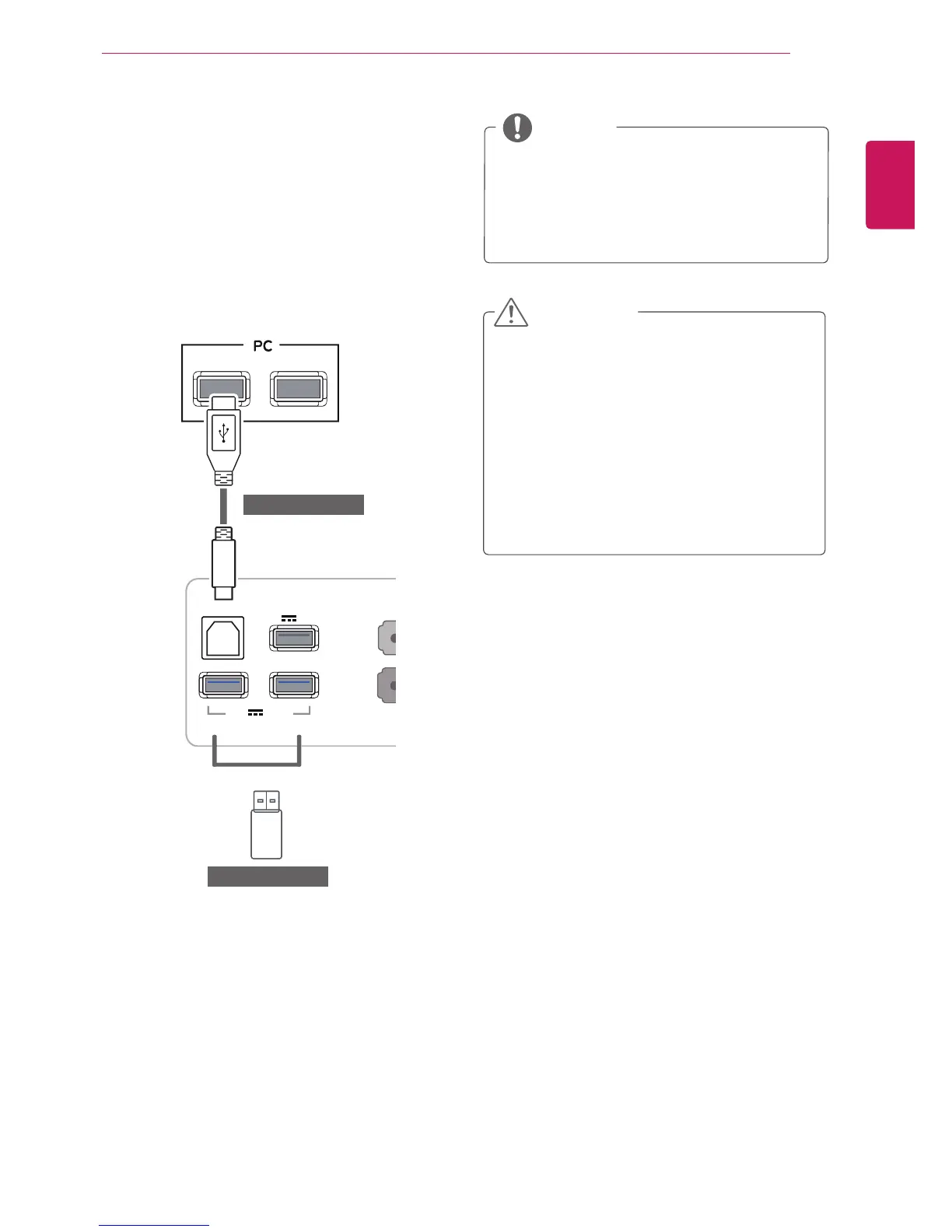
TheUSB3.0functionactsasaUSBhubonthe
product.
TouseUSB3.0,connecttheA-BtypeUSB3.0
cablefortheproducttothePC.
PeripheraldevicesconnectedtotheUSBINport
canbecontrolledfromthePC.
PleaseinstallthelatestWindowsservice
packbeforeuse.
Peripheraldevicesaresoldseparately.
TheUSBportscanbeusedtoconnectthe
keyboard,mouse,andotherUSBdevices.
NOTE
<CautionsWhenUsingaUSBDevice>
AUSBdevicewithanautomaticrecognition
programinstalled,orusingitsowndriver,
maynotberecognized.
SomeUSBdevicesmaynotbesupported
ormaynotworkproperly.
ItisrecommendedtouseaUSBhubor
harddiskdrivewithpowersupplied.(Ifthe
powersupplyisnotadequate,theUSB
devicemaynotberecognizedproperly.)
CAUTION
(soldseparately)
DP OUT
DVI-D IN
H
DMI
1
H
DMI 2
/
MH
L
AUDIO IN(PC)
5 V 0.9 A
5 V 0.5 A
5 V 0.9 A
D
P I
N
H
/
P
US
B IN
1
US
B IN 2
US
B IN
3
US
B
U
P
DVI-I(D) OUT
PC
DVI
-
D
IN
H
DMI
1
H
DMI 2
/
MH
L
A
UDIO IN
(
PC
)
5 V 0.9 A
5 V 0.5 A
5 V 0.9 A
D
P I
N
H/P
US
B IN 1
US
B IN 2
US
B IN
3
US
B UP
AUDIO OUT
PC
DVI
-
D
IN
H
DMI
1
H
DMI 2
/
MHL
A
UDIO IN
(
PC
)
5 V 0.9 A
5 V 0.5 A
5 V 0.9 A
DP IN
H/P
US
B IN 1
US
B IN 2
US
B IN
3
US
B UP
DVI
-
D
IN
HDMI 1
HDMI 2/MHL
A
UDIO IN
(
PC
)
5 V 0.9 A
5 V 0.5 A
5 V 0.9 A
DP
IN
H/P
US
B IN
1
US
B IN 2
US
B IN
3
US
B UP
DVI
-
D
IN
H
DMI
1
HDMI 2/MHL
A
UDIO IN
(
PC
)
5 V 0.9 A
5 V 0.5 A
5 V 0.9 A
D
P I
N
H
/
P
US
B IN
1
US
B IN 2
US
B IN
3
USB UP
DVI-D I
N
HDMI
1
H
DMI 2
/
MHL
A
UDIO IN
(
PC
)
5 V 0.9 A
5 V 0.5 A
5 V 0.9 A
DP
IN
H/
P
USB IN 1 USB IN 2
USB IN 3
USB UP
(soldseparately)

Related product manuals