8
ENG
ENGLISH
ASSEMBLING AND PREPARING
Installing the Monitor
Assembling the stand base
Toprotectthescreenfromscratches,cover
thesurfacewithasoftcloth.
CAUTION
3
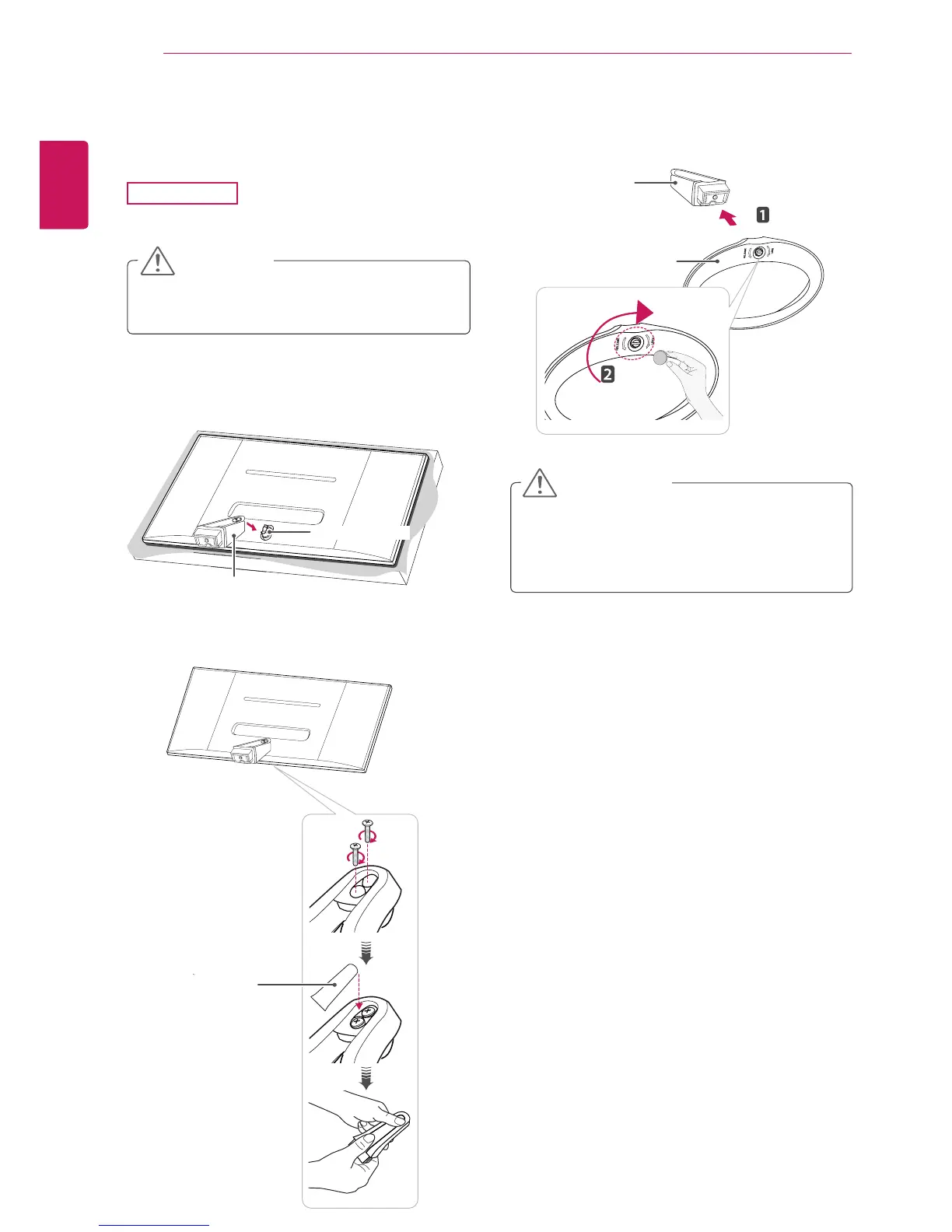
Tightentwoscrewsintothebackofthestand
bodyandclosethescrewcovers.
2
Checkthedirectionofthestandbody(front,
back)andthenmountthestandbodyontothe
standhinge.
1
Placethescreenfacedown.
29EA73
Applyingexcessiveforcewhentightening
thescrewsmaycausedamagetothemoni-
tor.Damagecausedinthiswaywillnotbe
coveredbytheproductwarranty.
CAUTION
4
Fixthestand base to the stand body.Usinga
coin,turnthescrewsinthestandbaseclock-
wise.
Stand Body
Stand Base
Screw Cover
Stand Hinge
Stand Body



 To Next Page