EasyManua.ls Logo

LG 29EA73 - Using the Monitor; Connecting to a PC; DVI Connection

LG 29EA73
40 pages
Print Icon
To Next Page IconTo Next Page
To Previous Page IconTo Previous Page
Loading...
18
ENG
ENGLISH
USING THE MONITOR
USING THE MONITOR
Connecting to a PC
Thismonitorsupportsthe*PlugandPlay
feature.
*PlugandPlay:Afeaturethatallowsyouto
addadevicetoyourcomputerwithouthaving
toreconfigureanythingorinstallanymanual
drivers.
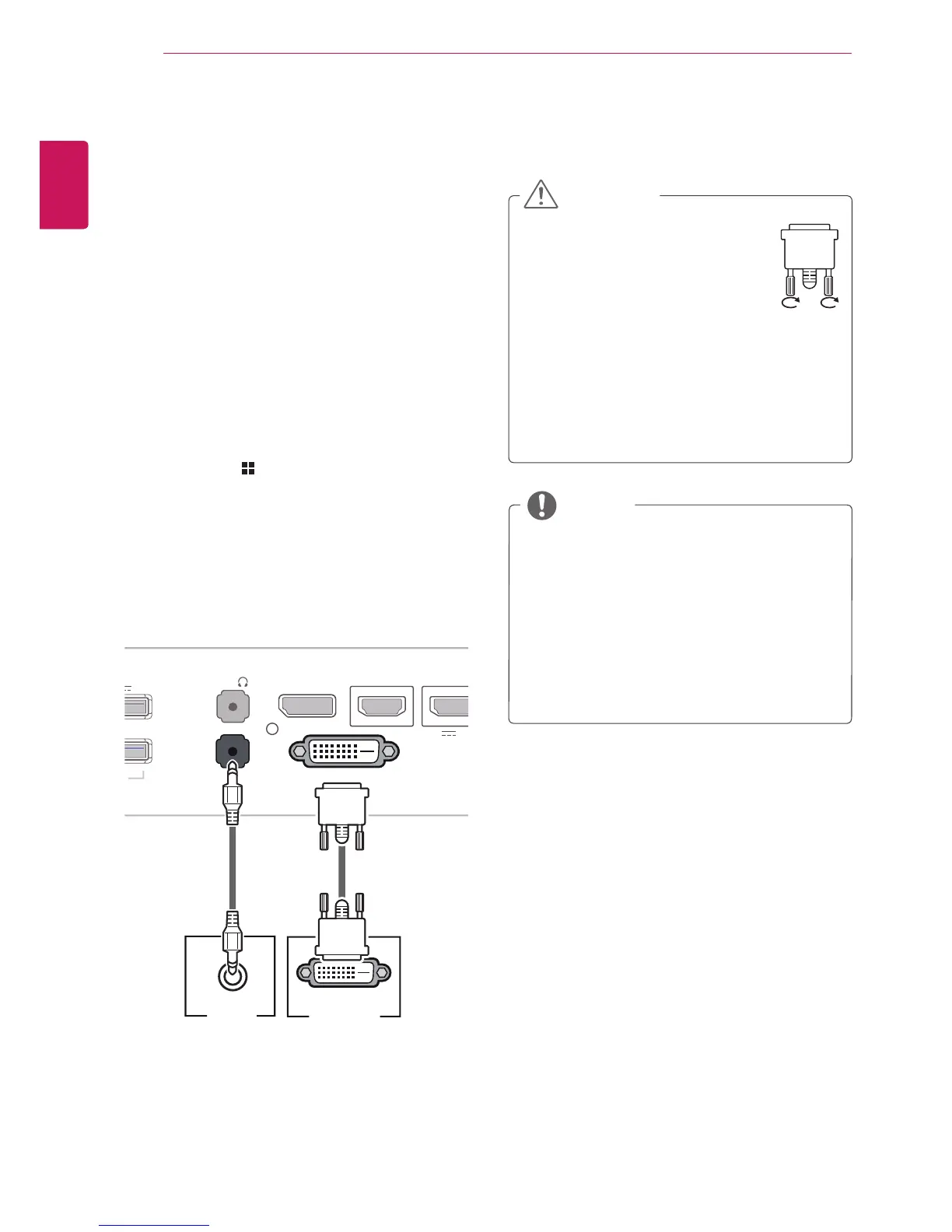
DVI connection
Transmitsdigitalvideosignalstothemonitor.Con-
nectthemonitorusingtheDVIcableasillustrated
below.
Pressthemenu( )buttonandthenselectthe
inputoptionfromtheinputmenu.
TohearthesoundinDVIinputmode,connectthe
PC'sAUDIOOUTporttothemonitor'sAUDIOIN
(PC)portusingtheaudiocablethatcamewiththe
product.
Connecttheinputsignalcableand
turninthedirectionofthearrow.
Topreventdisconnectionsecure
thecabletightly.
Donotpressonthescreenfora
prolongedperiodoftime.Thismaycause
imagedistortion.
Donotdisplayastillimageonthescreen
foraprolongedperiodoftime.Thismay
causeimageretention.Ifpossible,usethe
screensaver.
CAUTION
Whenconnectingthepowercordtotheout-
let,useagrounded(3-hole)multi-socketora
groundedpoweroutlet.
Themonitormayflickerwhenturnedoninan
areaoflowtemperature.Thisisnormal.
Sometimesred,green,orbluespotsmayap-
pearonthescreen.Thisisnormal.
UsingaDVItoHDMIcablemaycausecom-
patibilityissues.
NOTE
DP OUT
DVI-D IN
H
DMI
1
H
DMI 2
/
MH
L
AUDIO IN(PC)
5 V 0.9 A
5 V 0.9 A
D
P I
N
H
/
P
US
B IN
1
US
B IN
2
US
B IN
3
US
B
U
P
DVI-I(D) OUT
PC
DVI
-
D
IN
H
DMI
1
H
DMI 2
/
MH
L
A
UDIO IN
(
PC
)
5 V 0.9 A
5 V 0.5 A
5 V 0.9 A
D
P I
N
H/P
US
B IN 1
US
B IN 2
US
B IN
3
US
B UP
AUDIO OUT
PC
DVI
-
D
IN
H
DMI
1
H
DMI 2
/
MHL
A
UDIO IN
(
PC
)
5 V 0.9 A
5 V 0.5 A
5 V 0.9 A
DP IN
H/P
US
B IN 1
US
B IN 2
US
B IN
3
US
B UP
DVI
-
D
IN
HDMI 1
HDMI 2/MHL
A
UDIO IN
(
PC
)
5 V 0.9 A
5 V 0.5 A
5 V 0.9 A
DP
IN
H/P
US
B IN
1
US
B IN 2
US
B IN
3
US
B UP
DVI
-
D
IN
H
DMI
1
HDMI 2/MHL
A
UDIO IN
(
PC
)
5 V 0.9 A
5 V 0.5 A
5 V 0.9 A
D
P I
N
H
/
P
US
B IN
1
US
B IN 2
US
B IN
3
USB UP
DVI-D I
N
HDMI
1
H
DMI 2
/
MHL
A
UDIO IN
(
PC
)
5 V 0.9 A
5 V 0.5 A
5 V 0.9 A
DP
IN
H/P
USB IN 1 USB IN 2
USB IN 3
USB UP

Related product manuals