14
ENG
ENGLISH
USINGTHEMONITORSET
RGB OUT AUDIO OUT
USINGTHEMONITORSET
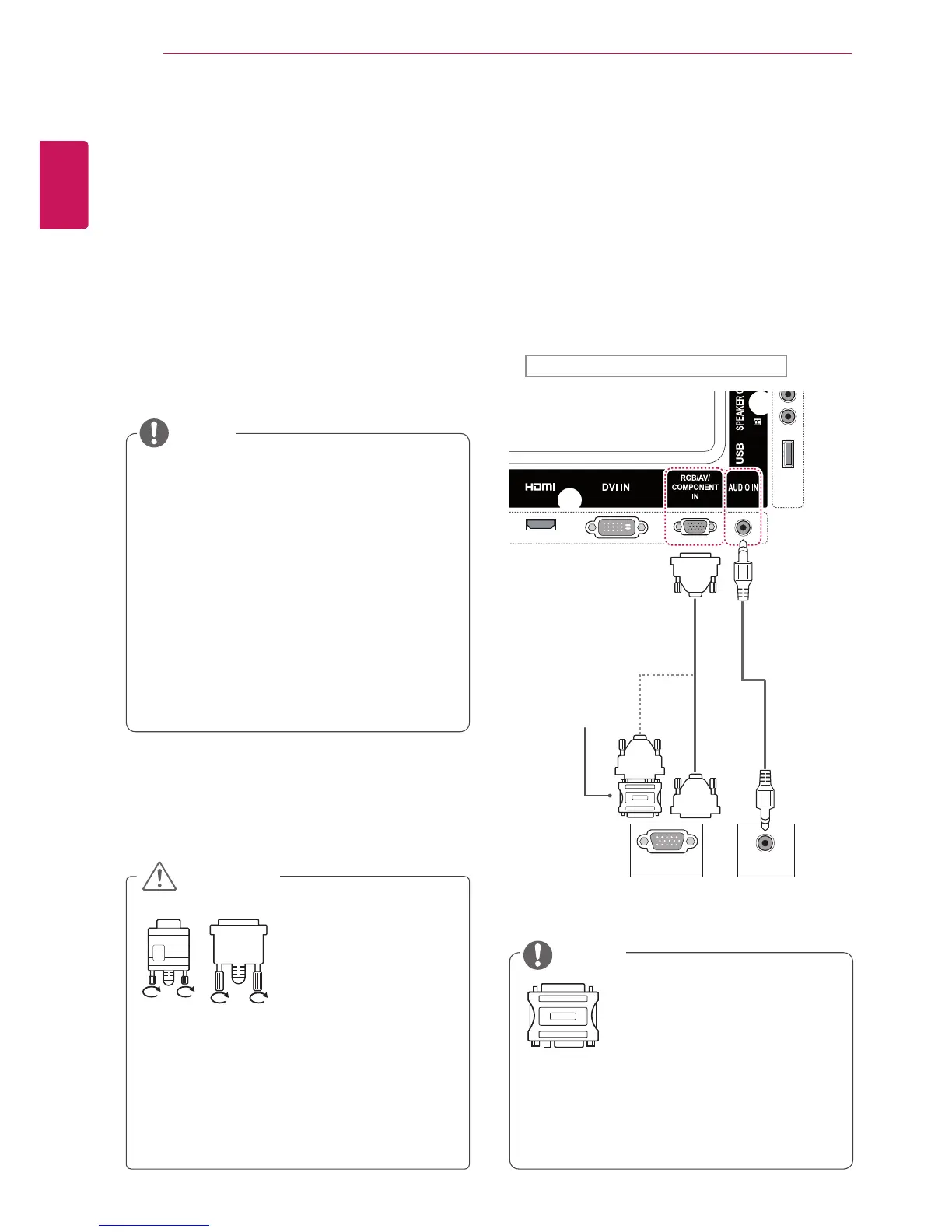
ConnectingtoaPC
YourMonitorsetsupportsthePlug&Play*feature.
*Plug&Play:APCwillhaveabuilt-indriverfor
themonitor,noextrasoftwareisneeded.
Connectthesignal
inputcableandtighten
itbyturningthescrews
clockwise.
RGBconnection
TransmitstheanalogvideosignalfromyourPCto
theMonitorset.ConnectthePCandtheMonitor
setwiththe15pinsignalcableasshownthe
followingillustrations.
SelectRGBinput.
NOTE
ItisrecommendedtousetheMonitorset
withtheHDMIconnectionforthebestimage
quality.
Tocomplywiththespecificationsofthe
product,useashieldedinterfacecablewith
ferritecore,suchasD-sub15pincableand
DVI/HDMIcableprovidedwiththeproduct.
IfyouturntheMonitorsetonwhentheset
becomescold,thescreenmayflicker.Thisis
normal.
Somered,green,orbluespotsmayappear
onthescreen.Thisisnormal.
Donotpressthescreenwithyourfingerfor
alongtimeasthismayresultintemporary
distortiononthescreen.
Avoiddisplayingafixedimageonthe
screenforalongperiodoftimetoprevent
imageburn.Useascreensaverifpossible.
CAUTION
Applecomputersmayrequire anadapterto
connecttothismonitor.Callorvisittheirweb
siteformoreinformation.
UsethestandardMacintosh
adaptersinceanincompatible
adapterisavailableinthe
market.(Differentsignaling
system)
NOTE
Backoftheproduct.
Macintosh
Adapter
(notincluded)
(notincluded)
PC/MAC PC



 To Next Page