38
ENG
ENGLISH
CUSTOMIZINGSETTINGS
PICTUREsettings
1
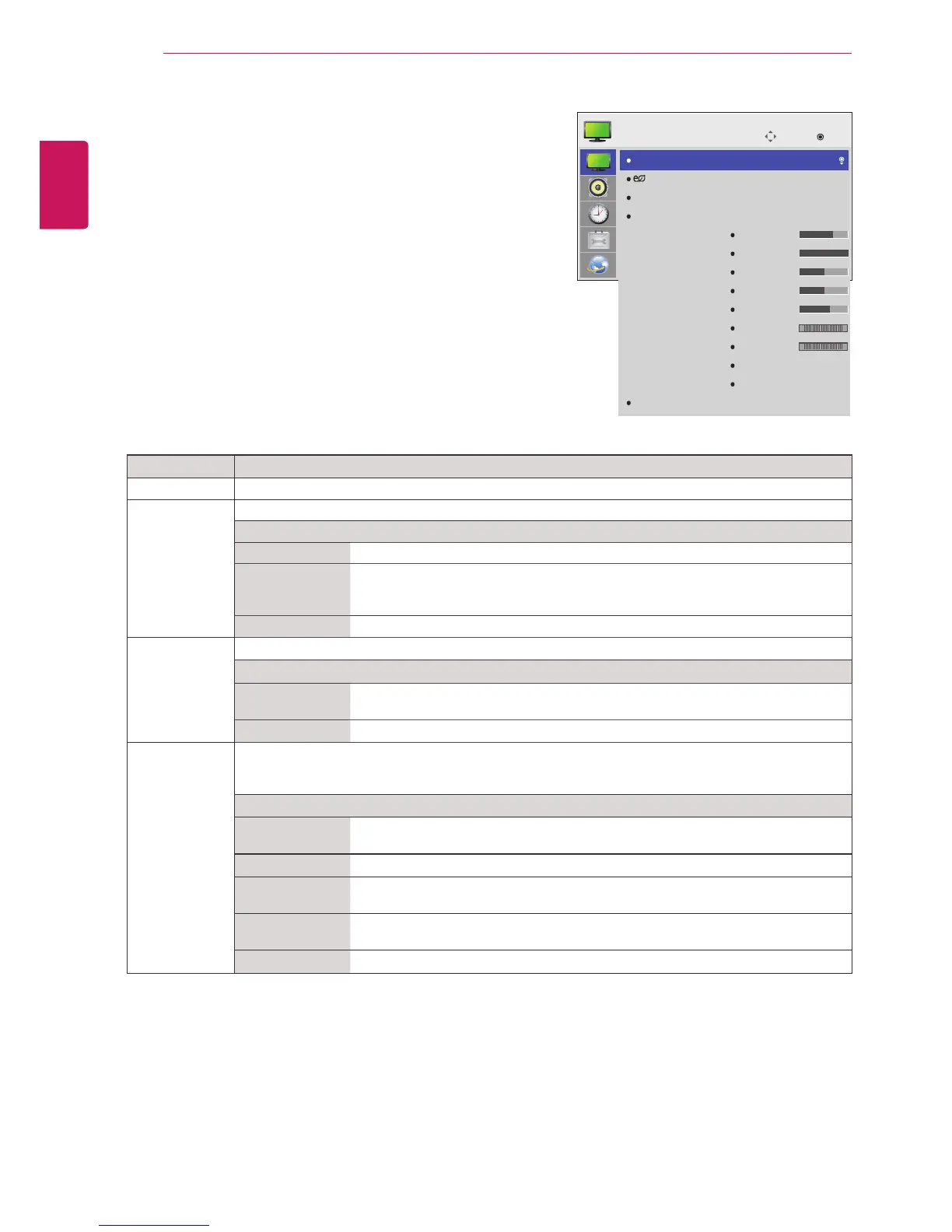
PressMENUtoaccessthemainmenus.
2
PresstheNavigationbuttonstoscrolltoPICTUREand
pressOK.
3
PresstheNavigationbuttonstoscrolltothesettingor
optionyouwantandpressOK.
-Toreturntothepreviouslevel,pressBACK.
4
Whenyouarefinished,pressEXIT.
Whenyoureturntothepreviousmenu,press
BACK.
Theavailablepicturesettingsaredescribedinthefollowing:
Setting Description
AspectRatio Changestheimagesizetoviewimagesatitsoptimalsize(Seep.18).
EnergySaving Setstoautomaticallyadjustthescreenbrightnesscorrespondingtothesurroundings.
Level
Off DisablesEnergySavingfunction.
Minimum/
Medium/
Maximum
Selectsthebrightnesslevelofthebacklight.
ScreenOff Thescreenturnsoffin3seconds.
SmartEnergy
Saving
Adjuststhebacklightandcontrastdependingonthescreenbrightness.
Level
On EnablestheSmartEnergySavingfunctiontosavepowerconsumptionasmuch
asthevaluesetinthesmartenergysavingrate.
Off DisablestheSmartEnergySavingfunction.
PictureMode SelectsoneofthepresetimageorcustomizesoptionsineachmodeforthebestMonitorsetscreen
performance.Youarealsoabletocustomizeadvancedoptionsofeachmode.
TheavailablepresetpicturemodesvarydependingontheMonitorset.
Mode
Vivid Adjuststhevideoimagefortheretailenvironmentbyenhancingthecontrast,
brightness,Color,andsharpness.
Standard Adjuststheimageforthenormalenvironment.
Cinema Optimizesthevideoimageforacinematiclooktoenjoymoviesasifyouareina
movietheater.
Sport Optimizesthevideoimageforhighanddynamicactionsbyemphasizingprimary
Colourssuchaswhite,grass,orskyblue.
Game OptimizesthevideoimageforafastgamingscreensuchasPCsorgames.
Move
OK
PICTURE
AspectRatio
EnergySaving
SmartEnergySaving
PictureMode
Screen
:16:9
:Off
:Off
:Standard
Backlight
Contrast
Brightness
Sharpness
Color
Tint
ColorTemp.
AdvancedControl
PictureReset
70
100
50
50
60
0
0
R G
W C



 To Next Page