40
ENG
ENGLISH
CUSTOMIZINGSETTINGS
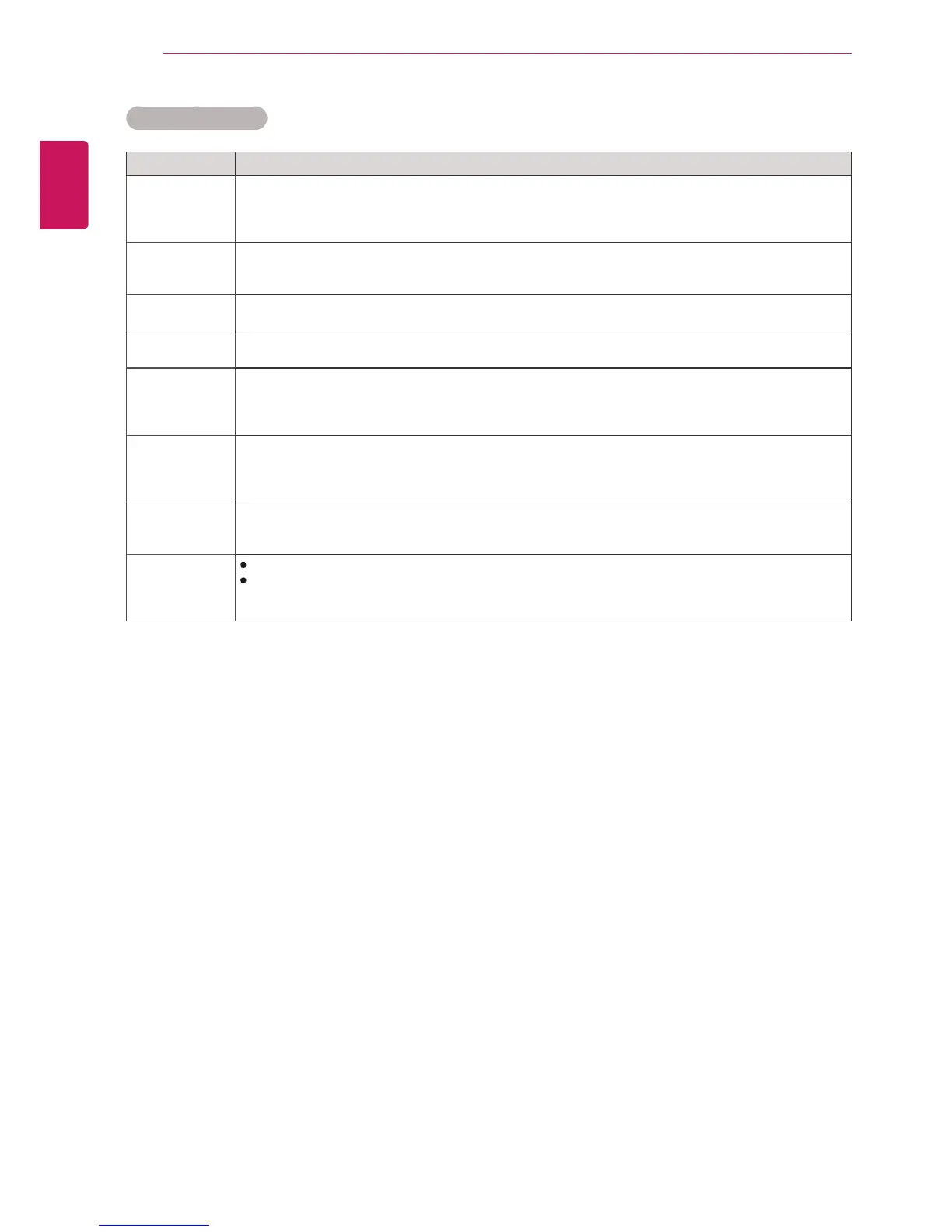
Setting Description
Dynamic
Contrast
(Off/High/
Medium/Low)
Adjuststhecontrasttokeepitatthebestlevelaccordingtothebrightnessofthescreen.The
pictureisimprovedbymakingbrightpartsbrighteranddarkpartsdarker.(Thisfunctioncanbeused
onlyunderComponent.)
DynamicColor
(Off/High/Low)
AdjustsscreenColorssothattheylooklivelier,richerandclearer.Thisfeatureenhances
hue,saturationandluminancesothatred,blue,greenandwhitelookmorevivid.(Thisfunctioncan
beusedonlyComponent.)
ClearWhite
(Off/High/Low)
Makethewhiteareaofscreenbrighterandmorewhite.
SkinColor
(-5to5)
Itdetectstheskinareaofvideoandadjustsittoexpressanaturalskincolor.
Noise
Reduction
(Off/High/
Medium/Low)
Reducesscreennoisewithoutcompromisingvideoquality.(Thisfunctioncanbeusedonlyunder
Component.)
DigitalNoise
Reduction
(Off/High/
Medium/Low)
Thisoptionreducesthenoiseproducedwhilecreatingdigitalvideosignals.
Gamma
(High/Medium/
Low)
Setyourowngammavalue.Onthemonitor,highgammavaluesdisplaywhitishimagesandlow
gammavaluesdisplayhighcontrastimages.
BlackLevel
(High/Low)
Low:Thepictureofthescreengetsdarker.
High:Thepictureofthescreengetsbrighter.
Setblacklevelofthescreentoproperlevel.
(Functionworksinthefollowingmode-Component,HDMI-DTV,DVI-D)
AdvancedControl



 To Next Page