47
ENG
ENGLISH
CUSTOMIZINGSETTINGS
PIP/PBP
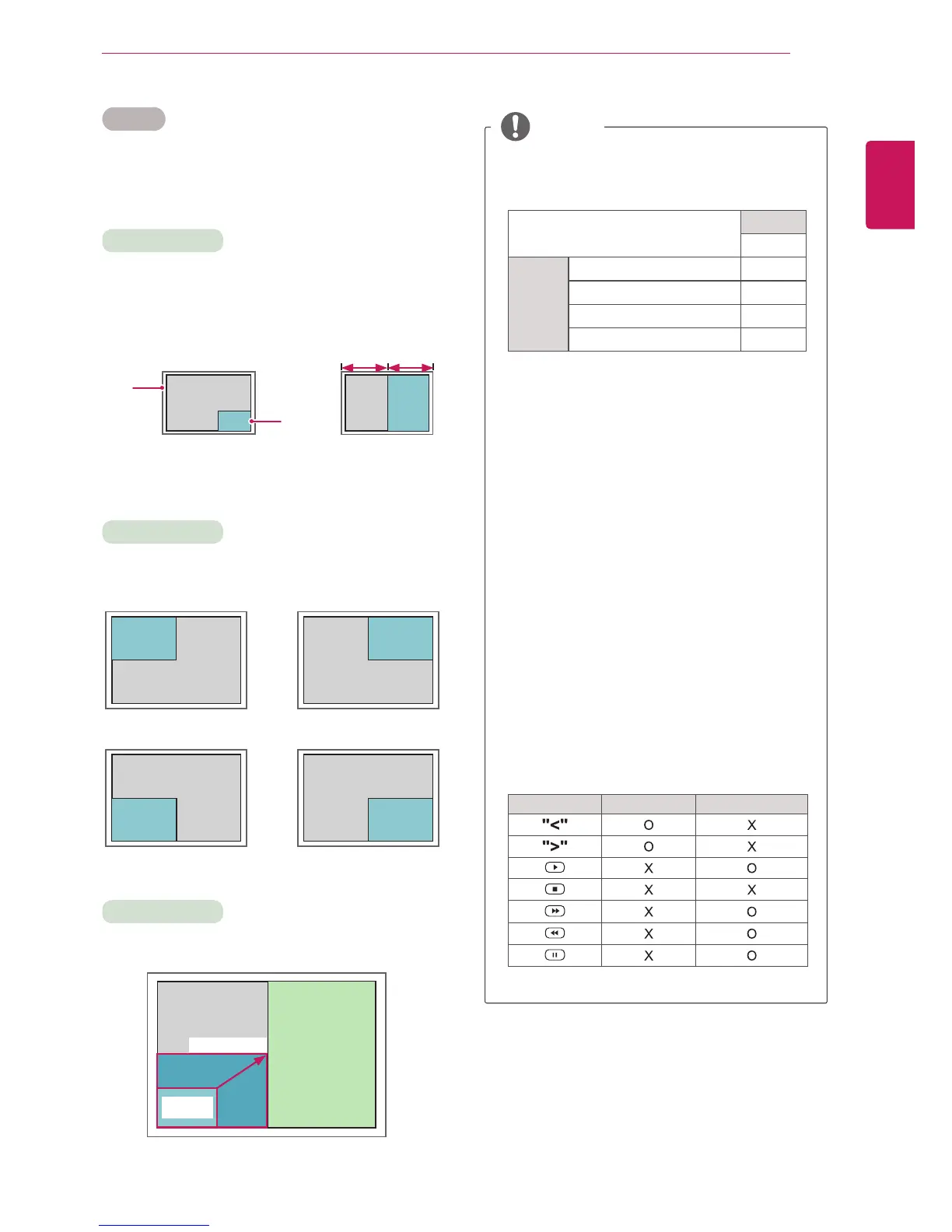
DisplaysvideosorphotosstoredintheUSBdevice
onasinglemonitorbydividingitintothemainand
subscreens.(Seep.36)
Position
Mode
Size
topleft topright
bottomleft bottomright
*PIP(PictureInPicture):DisplaystheSubscreen
inthemainscreen.
*PBP(PictureByPicture):DisplaystheSub
screennexttothemainscreen.
Adjuststhepositionofthesubscreen(topleft,
bottomleft,topright,bottomright)
Adjuststhesizeofthesubscreen(Size0-10).
<1920x1080>
PBP
960x1080
0:
480x270
PIP
10:960x540
Thesubscreenisonlysupportedwhenusingthe
USBdevice.
Sub
USB
Main
Component O
RGB O
HDMI/DVI-D O
AV X
YoucanonlychangethesizeandpositioninPIP
mode.
WithPBPselected,theAspectRatiooptioninthe
PICTUREmenuisdisabled(Fixedas16:9).
WhilerunningthePBPfunction,theTileModefunction
doesnotwork.
Youmustselecttheoutputsoundbeforerunning
thePIPorPBPfunctions.(SelecteitherMainor
Sub.)
IfyoufailtoselectMainorSubfromthesound
selectionbox,andiftheOSDdisappearsafter
eitheraperiodoftimeorwhentheExitorBack
keyispressed,thePIP/PBPsubscreenisnot
activated.
Youcannotchangethesoundwhilerunningthe
PIPorPBPfunctions.Ifyouwanttochangethe
sound,pleaserestartPIP/PBP.
Thepicturequalityofthesubscreenisset
accordingtothevaluesselectedinthemainmenu,
nottheUSBdevice.
IfyouplayvideosyouselectedinPIP/PBPmode,
thevideoswillplaybackrepeatelyinsuccession.
ThebuttonsbelowworkinPIPmode.
Button Photo Movie
NOTE
Main
screen
Sub
screen
PIP
PBP



 To Next Page