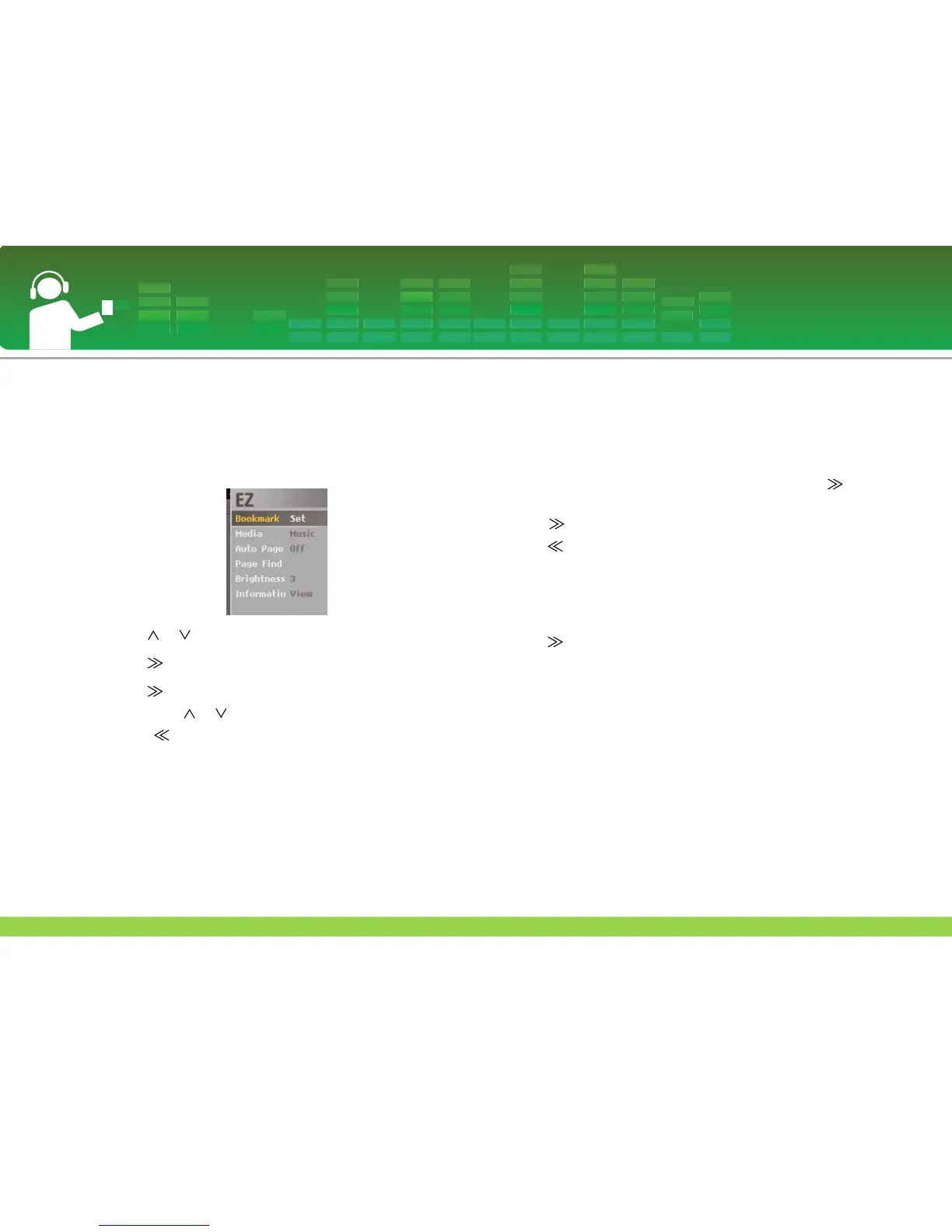
EZ menu
You can set the desired function or switch to the other mode
using EZ menu.
1 Press ez button to display EZ menu screen while viewing
text file.
2 Press or button to move to the desired item.
3 Press or SELECT button to move to the submenu.
4 Press or SELECT button after changing the setting
by pressing or button.
- Press button to exit without change.
5 Press ez button to exit the EZ menu.
Bookmark Set/Move/Cancel
You can move to the point you set while playing the text.
1 ez button > [Bookmark] > [Set]/[Move]/[Cancel]
- If the bookmark is not set, [Move]/[Cancel] is not set.
2 The bookmark is changed to [Set1] when you press
or SELECT button on the [Set] mode.
- Press or SELECT button to save the setting.
- Press button to exit without change.
-You can set the
bookmark up to 10.
- When the list is updated, the bookmark will be automatically
disabled.
- The bookmark is changed to [Move1]/[Cancel1] when you
press or SELECT button on the [Move]/[Cancel] mode.
3 Select bookmark number to move or cancel and then the
bookmark is moved or canceled.
View Text
41


 To Next Page