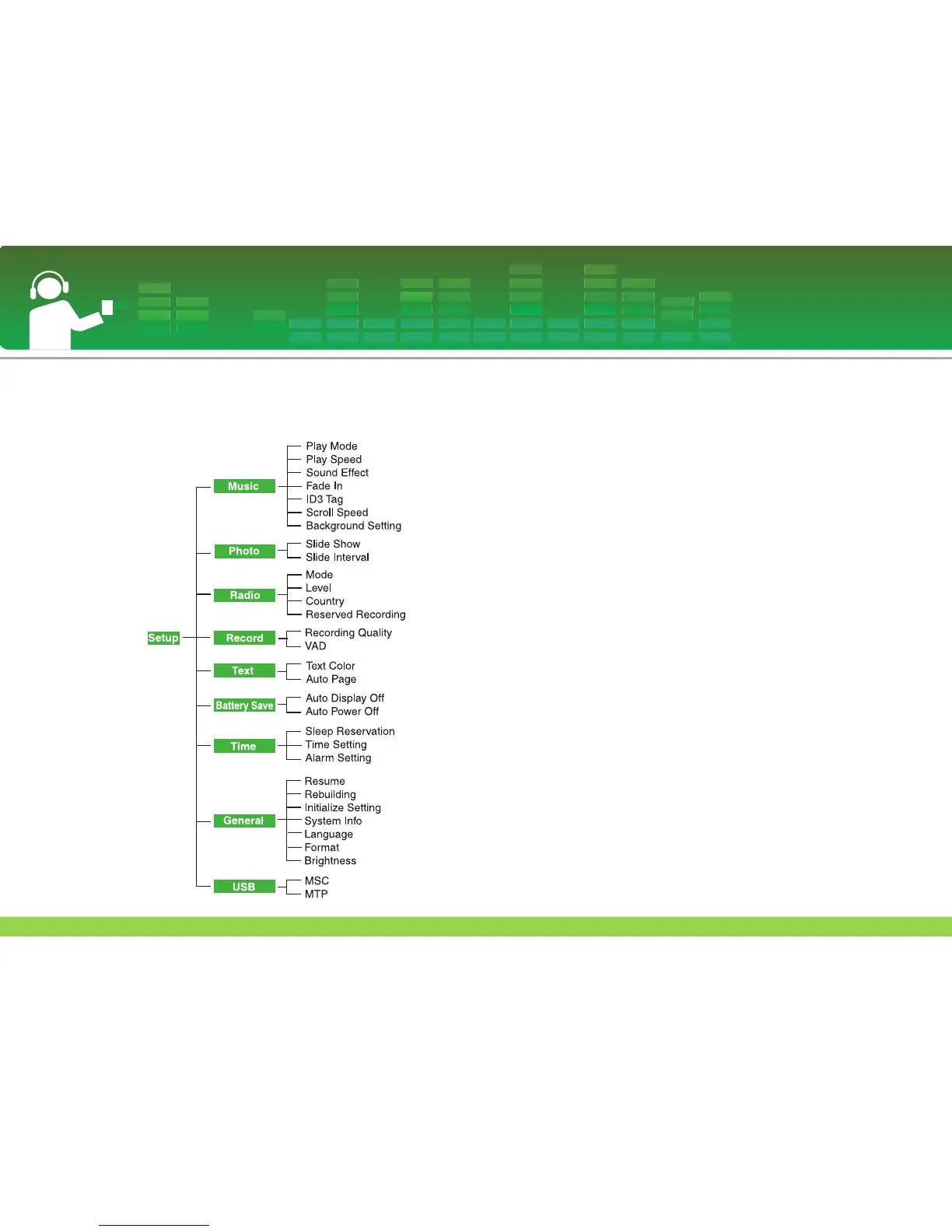
Setup menu structure
* Menu tree structure varies according to product models
(See on page 13)
Music
• Play Mode
- [Repeat One]: Plays the current file repeatedly.
- [Play All]: Plays the music in order within the selected folder.
- [Repeat All]: Plays the music in the repeatedly within the
selected folder.
- [Random Play]: Plays the music randoml within the selected
folder.
- [Random Repeat]: Repeats the music randomly within the
selected folder.
• Play Speed: You can set the playing speed of
MP3 files.
-You can select [0.3 Times], [0.5 Times], [1 Time], [1.5
Times], and [2 Times].
- The default value is X1.
-
MP3 files sampled less than 32KHz can support only X1.
• Sound Effect
- EQ: You can set the sound effect.
(AUTO EQ, NORMAL, POP, ROCK, R&B/SOUL,
HIPHOP/RAP, JAZZ, CLASSICAL, DANCE, LIVE, USER
EQ)
- 3D Sound: You can experience 3D sound effects.
(Off, 3D Expander, Stadium, Concert Hall, Club, Room,
Bass Boost, X-live)
• Fade In: You can gradually increase the volume
to protect ears.
-You can select [On] or [Off].
• ID3 tag: Displays information of the music file.
-You can select [On] or [Off].
- In case you selects [On], the title and the artist will be
displayed.
Setting details
49



 To Next Page