24
USING THE PROJECTOR
USING THE PROJECTOR
Connecting to an
Antenna or Cable
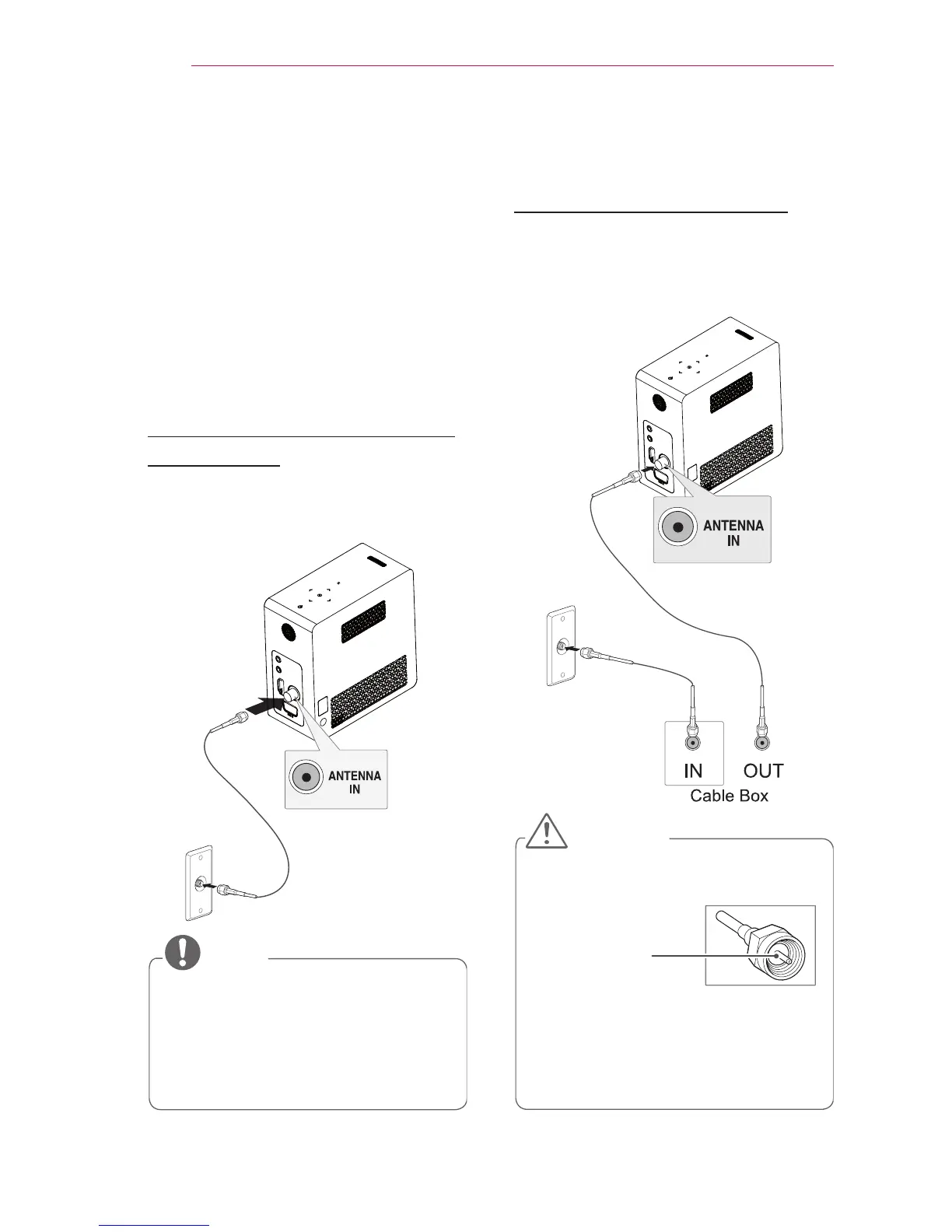
Connect an antenna, cable, or cable
box to watch TV while referring to the
following. The illustrations may differ
from the actual items and a RF cable is
optional.
Connecting an Antenna or
Basic Cable
Connect the projector to a wall antenna
socket with an RF cable (75 Ω).
NOTE
Use a signal splitter to use more
than 2 projectors.
Visit http://lgknowledgebase.com
for more information about the
antenna and cable connection.
Search for antenna.
Connecting a Cable Box
Connect the projector to a cable box
and the cable box to a wall antenna
socket with 2 RF cables (75 Ω).
CAUTION
Make sure not to bend the copper
wire of the RF cable.
Copper wire
Complete all connections between
devices, and then connect the power
cord to the power outlet to prevent
damage to your projector.



 To Next Page