10
2-6 PTZ Operation
PTZ Settings ( RS-485, UTC, and IP camera control ) can be configured in Camera Setup( refer to Chapter 3-3 ).
2-6-1 RS-485 PTZ control
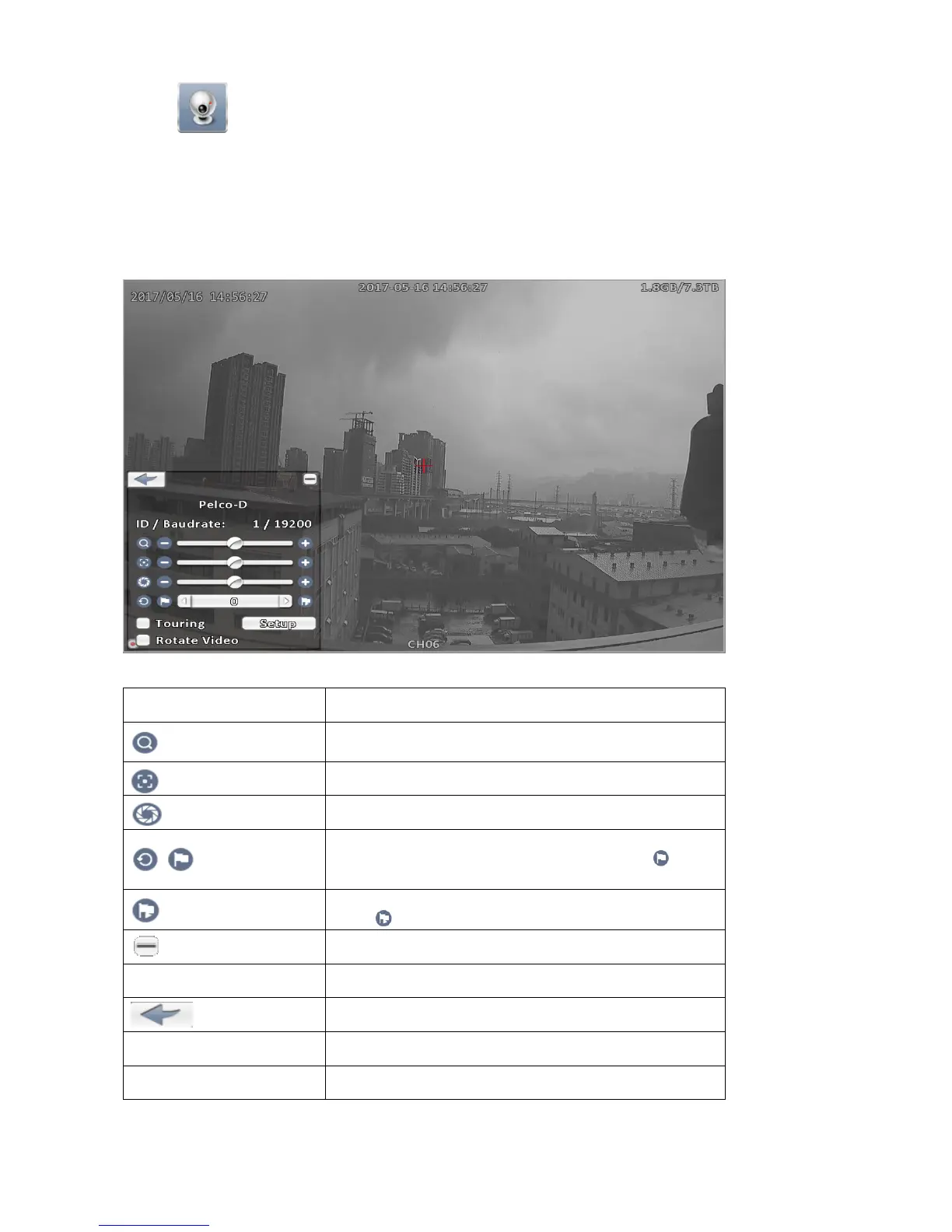
In RS-485 PTZ control mode, a Red Cross appears in the center of the screen. In the window hold down the
left mouse button and drag that can control pan and tilt, the view of the PTZ camera will move to the desired
position accordingly.
RS-485 PTZ control icon description
Icon Description
ZOOM. Press + / - or move the slider to adjust the zoom
level.
FOCUS. Press + / - or move the slider to adjust the focus
IRIS. Press + / - or move the slider to adjust the iris
Press left or right arrow keys to select desired preset point,
adjust view to appropriate position then press to set
the current position as the preset point.
Press left or right arrow keys to select the preset point, and
press to move the view to the selected preset point.
Minimize the PTZ menu.
Rotate Video Make the video upside down.
Exit
Touring Checked, enable auto pan.
Setup Refer to Chapter 2-6-3.



 To Next Page