SMB/SB Installation and Maintenance Manual 140-11000 • July 20034-11
Flow Control Division
Limitorque Actuation Systems
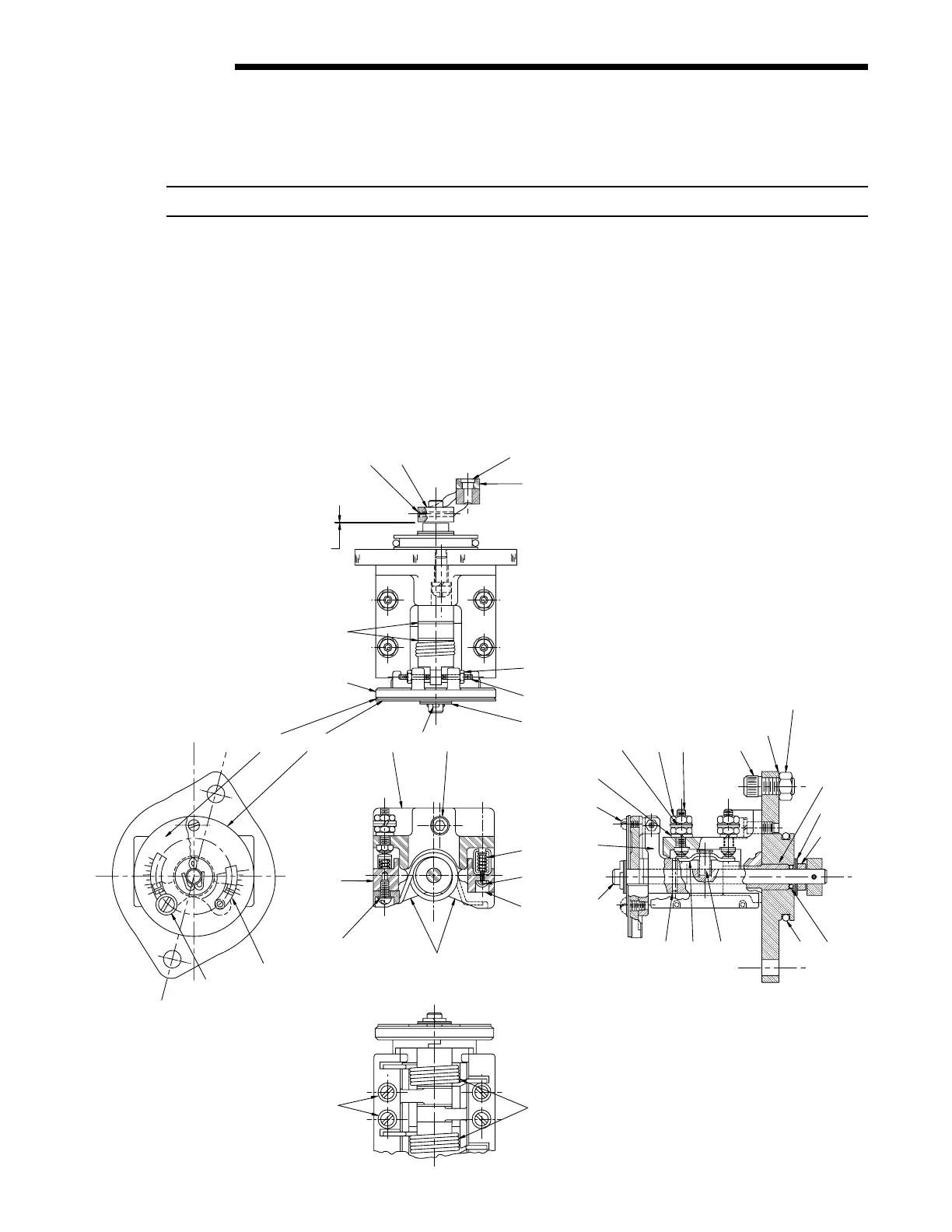
4.5.2 SMB-00 Double Torque Switch
NOTE: Torque settings must be made with the switch mounted in the actuator.
Piece numbers correspond to Figure 4.4 and Table 4.6.
To set the torque switch:
1. Verify all electric power is OFF.
2. For the open or close direction torque switch, loosen Machine Screw (piece #35) and set Pointer (piece #7) at the desired torque
setting. The higher the number, the higher the torque output of the actuator.
3. Tighten Machine Screw (piece #35).
4. For torque seated valves, operate the valve electrically to seat the valve. Ensure tight shut-off by tripping the torque switch
contacts.
Figure 4.4 – SMB-00 Double Torque Switch



 To Next Page