57
8.5 Setting on the APP
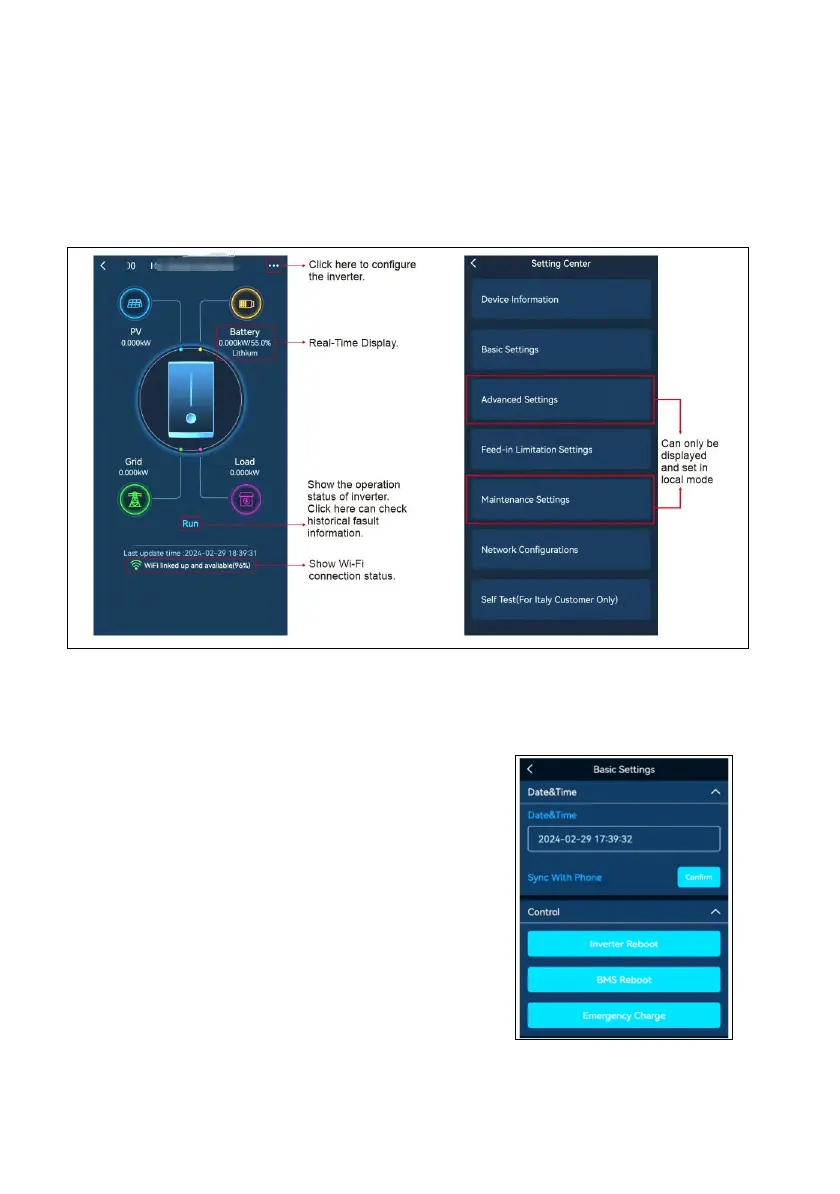
8.5.1 Home Page Overview
You can check Parameters of System. The status and data on this page might be a few minutes
delay from the real-time inverter data
By touch the icons on the diagram, it will show the historical data of each part.
8.5.2 Basic Settings
You can set the inverter time, Restart the inverter, choosing work modes, battery type and set
charging time period in Basic settings.
8.5.2.1 Emergency Charge
•Emergency Charge is design to avoid the damage caused
by long time excessive discharge.
•It is recommended to manually click this button to charge
the battery after installing the battery for the first time.
•The inverter cannot respond to the discharge command
during emergency charge.
•In this mode, the battery will be charged to 54V, and it
will exit this mode after 2 hours. But you can exit this mode
by clicking "Restart" during this process.






 To Next Page