EasyManua.ls Logo

Loepfe YARNMASTER ZENIT+ - Initiating Sensing Head (TK) Update; Update Status Indicators; Confirming Update Completion; Exiting Edit Mode Post-Update

Loepfe YARNMASTER ZENIT+
28 pages
Print Icon
To Next Page IconTo Next Page
To Previous Page IconTo Previous Page
Loading...
15
Quick Guide YM Zenit
+
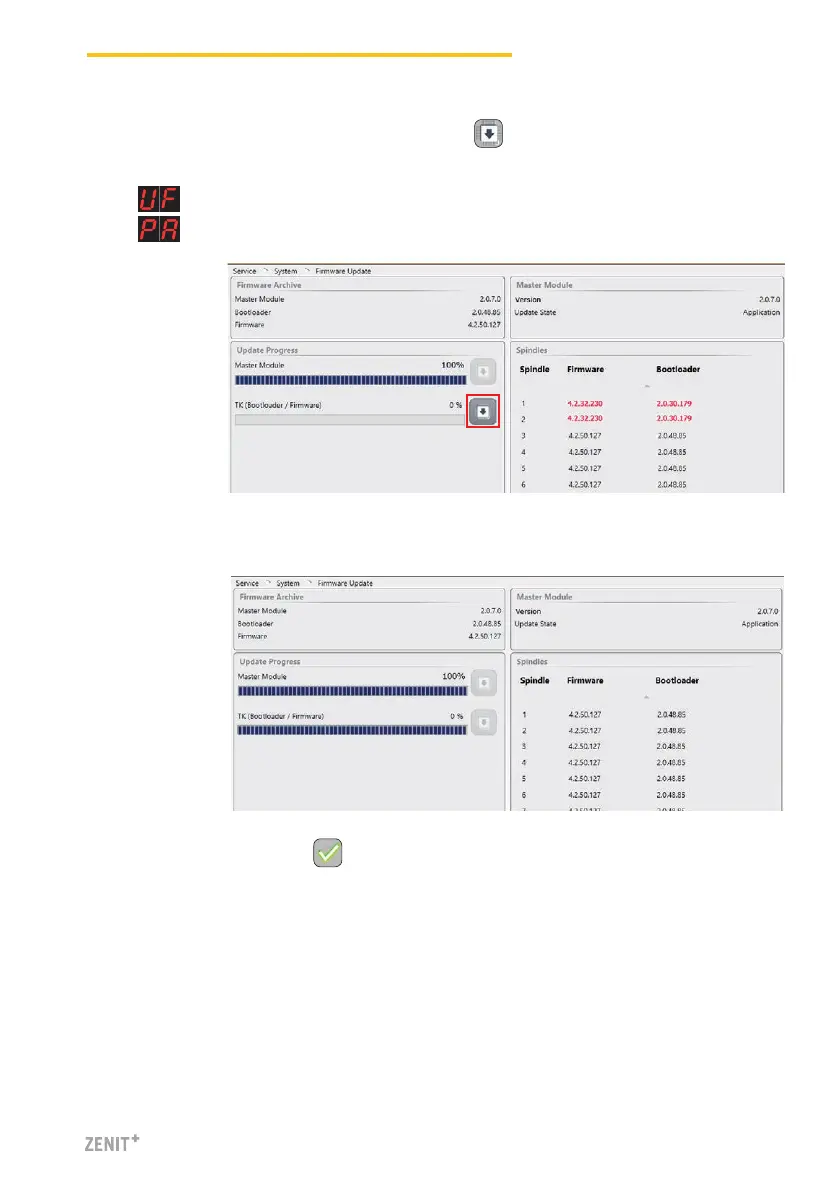
4. After a successful firmware update, both progress bars show 100%.
5. Terminate edit mode with .
3. Start the TK (Bootloader / Firmware) update with .
» The status of the update is displayed in the progress bar.
» (Update Firmware) is displayed for all sensing heads which do not match.
» is displayed after a successful update.


Other manuals for Loepfe YARNMASTER ZENIT+

Related product manuals