3. Display
3.7 Service Timers
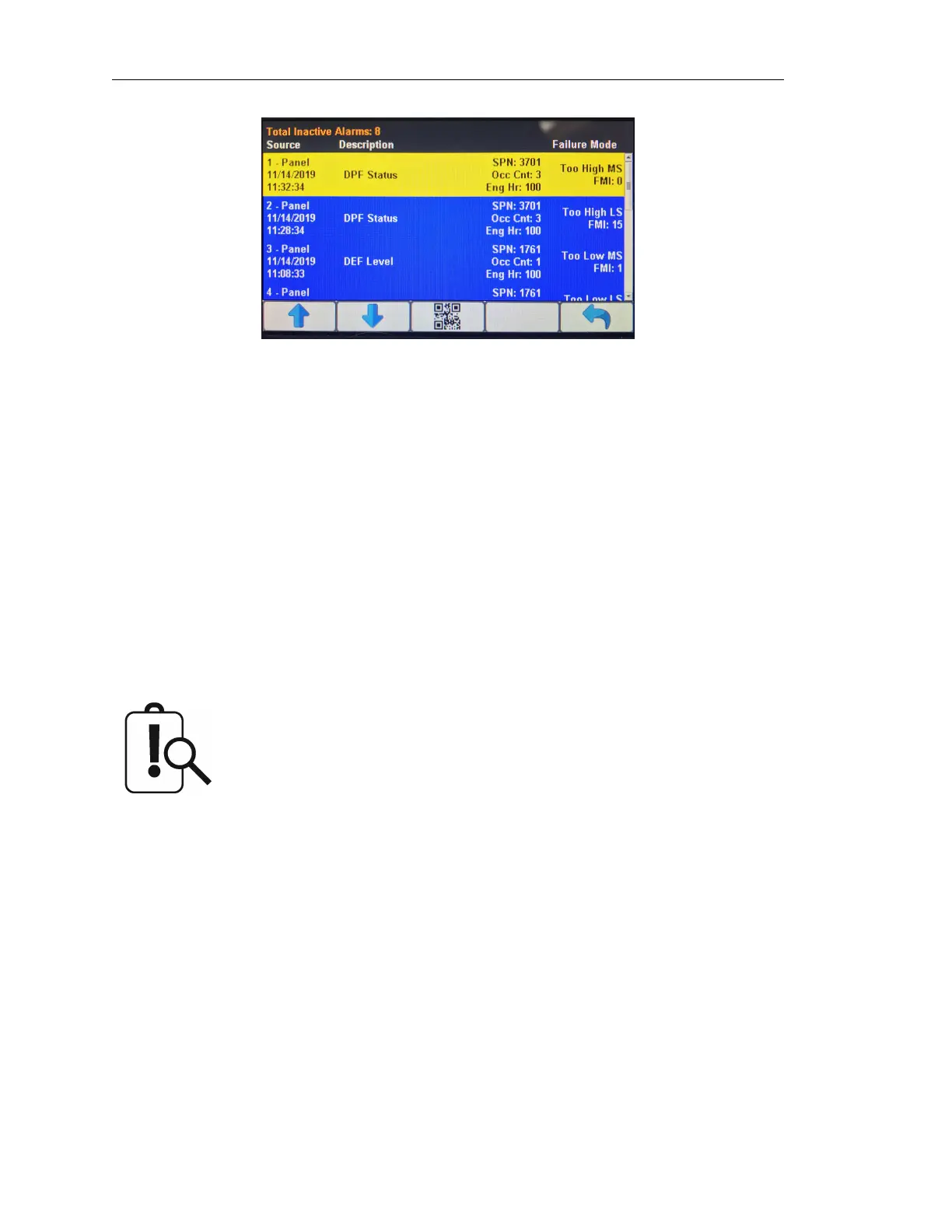
Once an alarm is silenced using the center display button, a QR-code icon will appear on this
button. This button provides access to LOFA’s Equipment Fault Code Diagnostic Information system
(www.lofa.net/Patents). Pressing this button again displays a QR-code specific to this alarm. The
QR-code can be scanned using the camera on most smart phones. When scanned, the phone
will give an option to automatically jump to LOFA’s RemoteIQ (RiQ) Fault website. The website will
automatically pull up the details for this particular fault and possible remedies.
The panel’s display provides sixteen (16) service timers to alert the operator of required maintenance.
The time interval for each timer can be adjusted in increments of ten (10) hours. A popup message
is displayed after the display’s self-test if a timer (or timers) has expired alerting the user that service
is required. The message is displayed on each power up until the elapsed timer is disabled or
reset. The service timers can have their respective names customized to monitor engine- and
machine-related parameters. All sixteen (16) service timers can be monitored via wireless telemetry.
Only active faults are displayed in the alarm list. Once a fault is corrected it
is automatically removed from the list. To view previously active faults press
the ”STORED” button.
3.8 Menus
The menu pages can be accessed by pressing button 5. The top-level menu page will then appear.
From there the functions of the five display buttons change to allow navigation and selecting and
modifying parameters.
Page 10 LOFA document No. 463-3002-59 Page 10


 To Next Page