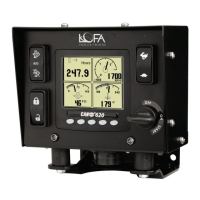
5. Manual Operation
5 Manual Operation
1. Ensure that the Auxiliary Engine Stop (if fitted) is not activated.
2. Turn the keyswitch to the run position.
3. Press and hold the Run button.
4. Release button when engine starts.
5.1 Throttle Control
The ECU determines how the engine responds to the throttle requests and will not allow the engine
speed to fall below the ECU minimum RPM or go above the ECU maximum RPM. The ECU minimum
and maximum RPM values are determined by the ECU ”payload” and typically require the engine
manufacturer’s configuration tool to adjust. The ECU will honor RPM requests that are above the
ECU’s minimum RPM as well as RPM requests that are below the ECU’s maximum RPM.
Therefore, to avoid confusion it is best to NOT set the panel’s Minimum Requested RPM below the
ECU’s minimum RPM or above the ECU’s maximum RPM.
Example: The panel’s Minimum Requested RPM is set to 800 RPM yet the ECU payload defines the
engine minimum speed to be 900 RPM. In this case, the engine will not run at 800 RPM despite the
control panel requesting a lower engine speed. The ECU will ignore all RPM requests that are below
900 RPM, resulting in a minimum speed of 900 RPM.
The panel’s Minimum Requested RPM and Maximum Requested RPM can
be configured using the CANplus
®
Suite Software, or via menus within the
display (if enabled by PIN). See Configuration section for more information.
5.2 Ramp Throttle
The standard Ramp Throttle uses a momentary rocker switch to adjust the requested engine speed.
All throttle requests are sent directly to the engine using CAN throttle control.
Throttle control requires CAN throttling to be enabled in the ECU. CAN
throttling is also known as Torque Speed Control or TSC1.
When first started, the requested engine speed is Idle RPM.
LOFA document No. 463-3002-59 Page 21


 To Next Page