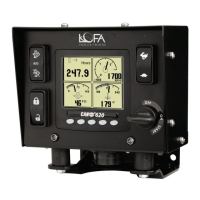
3. Display
Communications
• CAN bus Settings
– TSC1 Address
– Panel Address
– CM1 Address
– Interlock Address
– Config Address
– Termination
• Modbus
– Baud
– Parity
– Address
– Master/Slave
3.8.2 Access Levels
The available menu items are dependent upon the current access level. The current access level
is shown in the upper right corner while in the menus. The CP1000 supports up to three (3)
independent PINs that are configurable. The standard LOFA configuration has the following PINs
settings:
• User = 1000
• Tech = 1111
• Admin = 2222
• Menu PIN Required = OFF
Elevate Access Level
When the panel is turned on, the access level reverts to the User level. To gain access to
Tech or Admin levels, use the Elevate Access Level menu
Configuration System PIN Settings
Elevate Access Level
.
The panel will prompt for a PIN input. User, Tech, or Admin level access will be granted based on
which PIN is entered. Example: If the Tech level PIN is entered, Tech level access will be granted
and similarly if Admin or User level PINs are entered. If the entered PIN does not match User, Tech,
or Admin, then ”Incorrect PIN” is displayed and the access level reverts to User.
Once elevated, the access level stays in effect until the panel is turned off.
PIN Change
PINs can be changed via the Menu by selecting
Configuration System PIN Settings PIN Change
.
LOFA document No. 463-3002-59 Page 17


 To Next Page