EasyManua.ls Logo

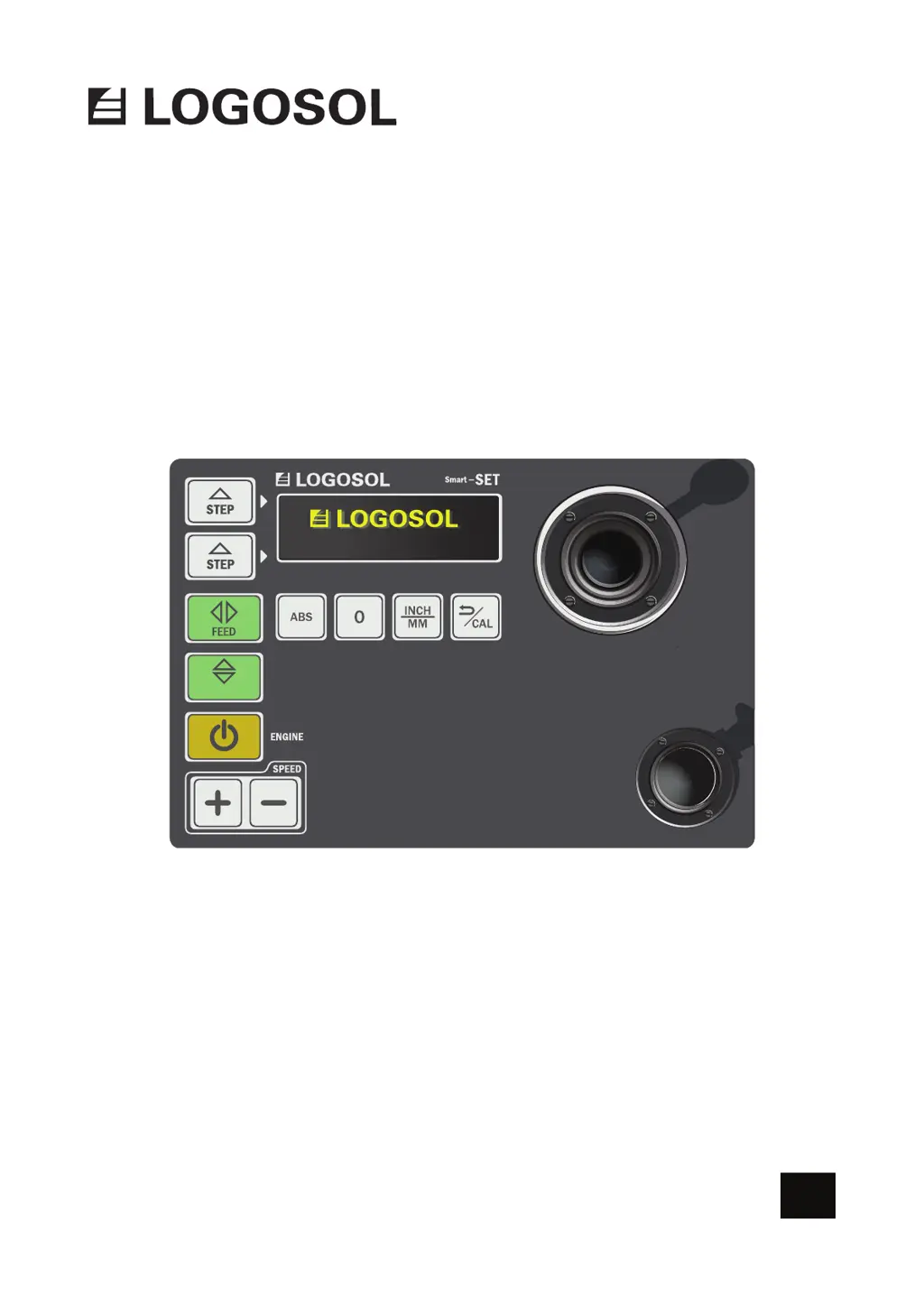
Logosol SMART SET - User Manual

Logosol SMART SET
40 pages
Print Icon
To Next Page IconTo Next Page
Loading...
SMART SET
/
UP DOWN
FOR PETROL ENGINE
REV:1
USER MANUAL
EN
SKU. 0458-395-5352

Questions and Answers

  • R
    Robin SalazarAug 17, 2025
    Why does my Logosol Saw Smart Set lose contact with the motor?
    • F
      fitzgeraldoliviaAug 17, 2025
      The Smart Set may lose contact with the FEED or UP/DOWN motor due to low battery voltage. Try charging or replacing the battery. If the issue persists, inspect the cables, referring to separate instructions for guidance.
  • J
    Jessica MorrowAug 19, 2025
    What to do if the Logosol SMART SET control panel is not responding?
    • B
      Brent BarnesAug 19, 2025
      If the control panel is unresponsive, open the box and check the cable connected to the keypad. Unplug and then re-plug the cable. If it remains unresponsive, the keypad is likely faulty.
  • J
    jessicaperryAug 22, 2025
    How to troubleshoot a non-working FEED motor on a Logosol SMART SET Saw?
    • M
      Mary ThompsonAug 22, 2025
      To troubleshoot a non-working FEED motor, move all the motor’s cables to the up/down motor controller. Activate UP/DOWN and move the control lever back or forth. If the motor works, the motor controller for FEED is likely faulty. If the motor doesn't work, the motor itself is likely malfunctioning.
  • R
    Rebecca WilsonAug 25, 2025
    What causes the UP/DOWN motor to fail on a Logosol SMART SET?
    • L
      lperryAug 26, 2025
      If the UP/DOWN motor isn't working, move all its cables to the FEED motor controller. Activate FEED and move the control lever back or forth. If the motor then works, the controller for UP/DOWN is likely faulty. If the motor still doesn't work, the motor itself is likely malfunctioning.
  • L
    Louis FlemingAug 27, 2025
    Why does the Logosol Saw motor solenoid activate only briefly?
    • K
      Kevin HigginsAug 27, 2025
      The solenoid for motor start may only activate briefly due to a tightly tensioned cable connecting to the engine throttle. To resolve this, completely loosen the cable between the solenoid and the motor. Press the enabling switch button, and then press the start button. Manually check that the solenoid is fully drawn to the bottom and held in place while the enabling switch button is pressed. If the solenoid functions normally disconnected from the engine, the cable tension is likely the issue.
  • J
    Joseph ShawAug 30, 2025
    How to fix a black display on Logosol SMART SET Saw?
    • S
      sherry08Aug 30, 2025
      If the display is black, open the cover and check the cable that goes to the display to ensure it is properly inserted. Unplug and replace the cable at both ends. Verify that pin 1 on the display connects to pin 1 on the circuit board; if not, rotate one of the contacts 180 degrees. If it's still not working, the cable or display is likely faulty.
  • P
    Paula JohnsonSep 2, 2025
    Why does the FEED motor on my Logosol Saw only run backwards?
    • M
      marcusvargasSep 2, 2025
      If the FEED motor only runs backwards, check that the speed isn't set to 0. Press the + button while FEED is activated and the control lever is pressed forward.
  • M
    Matthew FisherSep 5, 2025
    What to do if Logosol SMART SET won't restart after releasing the enabling switch?
    • M
      Mrs. Nancy Hall MDSep 5, 2025
      If you cannot restart the band saw motor after releasing and re-pressing the enabling switch button, push the control lever forward a little and then release it completely. Then, try starting the band saw motor again.
  • A
    Andrew HicksSep 7, 2025
    What does 'MSG fail' mean on my Logosol SMART SET display?
    • P
      Peter GutierrezSep 7, 2025
      The 'MSG fail' message indicates that communication between the control unit and motor controls is interrupted. This may be due to low voltage or a gap in the data cable.
  • M
    Marcus GuzmanSep 10, 2025
    Why does the STEP function on my Logosol Saw not work correctly?
    • A
      Alicia PetersonSep 10, 2025
      If the STEP function doesn't work as intended and the sawhead continues past the set STEP position, activate the engine’s choke between each use of the step function.

Summary

SAFETY INSTRUCTIONS

Key to Symbols

Explains the meaning of various warning and information symbols used in the manual.

OPERATOR AND WORK SITE SAFETY

Operator Safety Guidelines

Details safety precautions for the operator, including PPE and personal condition.

Work Site Safety

Outlines environmental safety requirements like fire extinguishers and first aid.

MAINTENANCE AND OPERATIONS

Lubrication Points

Specifies critical lubrication points for sawmill longevity and smooth operation.

Initial Start-Up Procedure

Guides on checking and calibrating sawhead position before first use.

Storing the Equipment

Instructions for properly storing the control box when not in use.

TECHNICAL SPECIFICATION

Bolts and Nuts Definition

Defines common fasteners used in machine assembly and maintenance.

Dimensions and Length

Explains how fastener dimensions and lengths are specified and measured.

COMPONENTS PARTS: ON DELIVERY

BOX-MF Components

Lists all parts included in the BOX-MF package.

BOX-M Components

Lists all parts included in the BOX-M package.

COMPONENT PARTS: BOX-EC, CB, EP

BOX-EC Components

Details parts contained within the BOX-EC package.

BOX-CB Components

Lists components provided in the BOX-CB package.

BOX-EP Components

Enumerate parts included in the BOX-EP package.

COMPONENT PARTS: BOX-DV

BOX-DV Components

Provides a comprehensive list of parts included in the BOX-DV package.

COMPONENT PARTS: BOX-TP

BOX-TP Components

Lists specific parts included in the BOX-TP package.

ADDITIONAL COMPONENTS

Optional Band Sawmill Models

Lists optional components supplied based on the band sawmill model.

Operation Arm Components

Details parts required for the operation arm assembly.

GETTING STARTED

ASSEMBLY: BOX-MF & BOX-M

Step 1: BOX-MF;BOX-M Attachment

Details the first step in assembling the BOX-MF and BOX-M units.

Step 2: BOX-MF;BOX-M Attachment

Describes the second step for assembling the BOX-MF and BOX-M units.

Step 3: BOX-MF;BOX-M Attachment

Outlines the third step in the assembly of BOX-MF and BOX-M.

ASSEMBLY: BOX-DV (PART 1)

Step 4: BOX-DV Attachment

Details the initial attachment step for the BOX-DV component.

Step 5: BOX-DV Attachment

Continues assembly for BOX-DV with the fifth step.

Step 6: BOX-DV Attachment

Describes the sixth step in the assembly of the BOX-DV.

Step 7: BOX-DV Attachment

Outlines the seventh step for attaching the BOX-DV.

ASSEMBLY: BOX-DV (PART 2)

Step 8: Trailer Kit Mounting

Details mounting the trailer kit on BOX-DV.

Step 9: Chain Tightening

Explains proper chain tightening during BOX-DV assembly.

Step 10: Chain Connection

Guides connecting the chain for BOX-DV assembly.

ASSEMBLY: BOX-EC & BOX-DV MODELS

Step 11: BOX-EC Assembly

Describes the assembly process for the BOX-EC unit.

Step 12: BOX-DV Model Specifics

Highlights model-specific assembly details for the BOX-DV.

ASSEMBLY: BOX-DV CABLE ROUTING

Step 13: Cable Routing

Details routing of cables during BOX-DV assembly.

ASSEMBLY: BOX-DV HOSE ATTACHMENT

Step 14: Hose Attachment

Explains how to attach the hose in the BOX-DV assembly.

Step 15: Hose Length Importance

Stresses the importance of correct hose length for BOX-DV operation.

ASSEMBLY: OPERATION ARM & BOX-CB

Step 16: Operation Arm Attachment

Details the attachment of the operation arm.

Step 17: Operation Arm Components

Lists components relevant to operation arm assembly.

Step 18: BOX-CB Attachment

Describes the step for attaching the BOX-CB unit.

ASSEMBLY: BOX-EP & BOX-DV CABLE

Step 19: BOX-EP Attachment

Outlines the assembly step for the BOX-EP unit.

Step 20: BOX-DV Signal Cable

Details the connection of the signal cable for BOX-DV.

ASSEMBLY: BOX-DV FINAL CONNECTIONS

Step 21: Final Connections

Covers the final connection steps for the BOX-DV assembly.

ASSEMBLY: CABLE AND PACK CONNECTIONS

Step 22: Petrol Engine Saw Pack Items

Identifies items found in the petrol engine saw pack.

Step 23: Cable Connection 1

Details the first cable connection procedure.

Step 24: Cable Connection 2

Describes the second cable connection procedure.

Step 25: Cable Connection 3

Outlines the third cable connection procedure.

CONNECTING MOTOR CONTROLS AND BATTERY

Connecting the Battery

Provides instructions on connecting the machine's battery.

ASSEMBLY: BOX-TP

Step 28: BOX-TP Attachment

Details attachment steps for the BOX-TP unit.

Step 29: BOX-TP Panel Mounting

Guides on mounting the panel for the BOX-TP.

EMERGENCY STOP AND CONTROL BOX CONNECTION

Installing Control Cable

Instructions for installing the control cable for emergency stop and control box.

Fuse Description

Explains fuses on the component panel and battery.

THROTTLE ADJUSTMENT

Throttle Adjustment Warnings

Highlights critical warnings before performing throttle adjustment.

Throttle Adjustment Procedure

Step-by-step guide for adjusting the engine's throttle cable.

STARTING AND STOPPING THE ENGINE

Starting Procedure

Provides a step-by-step guide on starting the machine's engine.

Stopping Procedure

Details correct steps for safely stopping the machine's engine.

FUNCTIONS: CONTROL UNIT

Control Unit Overview

Introduces components of the Logosol Smart Set control unit.

Control Lever Operation

Explains the functionality and progressive nature of the control lever.

Enabling Switch Button

Describes the purpose and function of the enabling switch button.

FUNCTIONS: KEYS AND SETTINGS

Program Keys Explained

Details functions of various program keys on the control panel.

Settings Explained

Explains different settings available on the Smart Set interface.

FUNCTIONS: CALIBRATION

Calibration Procedure

Outlines the process for calibrating sawhead position for accurate measurements.

FUNCTIONS: COMMANDS

Cancel Command Function

Explains how to cancel an operation or return to standby mode.

Enabling Switch Button Details

Provides specific details on enabling switch location and role.

FUNCTIONS: STEP MODE

Step Mode Operation

Explains how Step mode allows repeating preset cut values.

Setting Step Mode

Guides on setting a desired value for Step mode.

Using Step Mode

Describes how to activate and utilize Step mode for cutting.

Turning Off Smart Set

Instructions on turning off the Smart Set control unit.

FUNCTIONS: UP;DOWN AND SAWING LOG

Up;Down Functionality

Explains the Up/Down key for vertical sawhead movement and position display.

Sawing a Log Workflow

Illustrates a typical workflow for sawing a log using the Smart Set.

Start Position for Cutting

Details setting initial sawblade height for making a cut.

FUNCTIONS: PERFORMING OPERATIONS

Performing Functions Overview

General steps for operating functions via the control panel.

Feed Function Operation

Explains using the Feed key and control lever for sawhead movement.

Revving Up Engine

Describes revving up the engine and starting the saw blade.

FUNCTIONS: DIMENSIONING

Dimensioning Interface

Describes the Smart Set interface for displaying measurements and units.

Absolute Measurements

Explains how the interface shows distance from log bed to sawblade.

Relative Measurements

Details how the '0' key sets a zero point for relative measurements.

Inch;mm Unit Selection

Guides on switching between inch and millimeter units.

TROUBLESHOOTING SCHEDULE

Logosol SMART SET Specifications

General IconGeneral
BrandLogosol
ModelSMART SET
CategorySaw
LanguageEnglish

Related product manuals