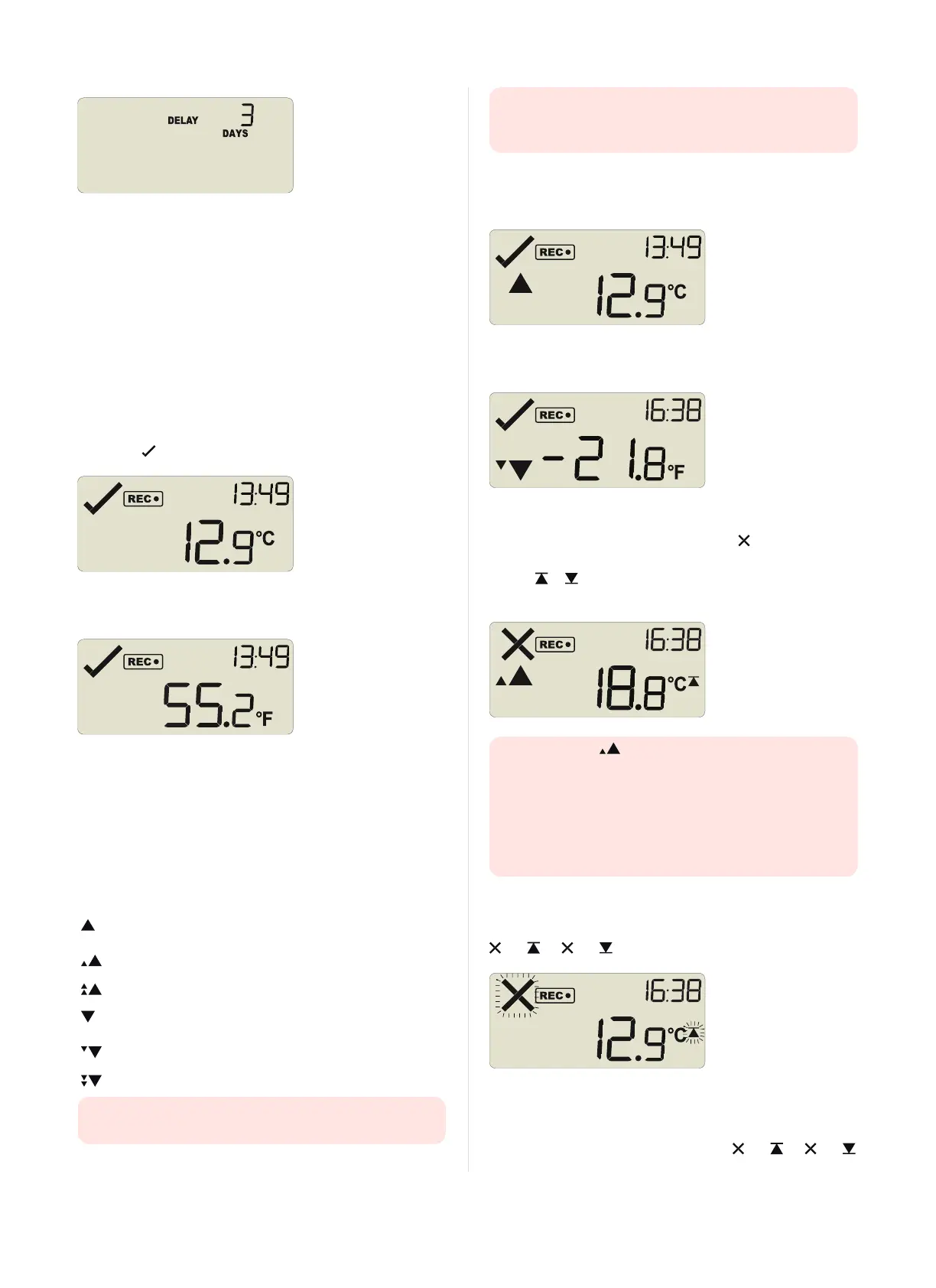
If a user presses the START/Mark button during the start delay
phase, the start delay value is reset to its originally configured value.
Automatic date/time start
If you configured the UTRID-16 for a date/time start, it will record
temperature values as soon as the entered date and time have passed.
If the recorder is still plugged into a USB port when the start time
passes, the recorded readings will show USB Paused on the PDFand
in the software.
During Recording
During normal operation the display shows the most recently recorded
temperature. The current time is also displayed in 24 hour format. A
tick symbol is shown as long as no alarm event has occured.
Temperatures can be shown in Celsius (as above) or Fahrenheit (as
below).
The temperature unit on the display is the same as used for the PDF
and CSV files. It is set during configuration.
Readings above or below alarm thresholds
If the most recently recorded temperature is above or below one of the
alarm thresholds, one or more alarm markers will be shown on the
display.
This symbol is
displayed ...
... when the most recent temperature recorded
is
above the primary upper alarm threshold, but
below the secondary
above the secondary upper alarm threshold, but
below the tertiary
above the tertiary upper alarm threshold
below the primary lower alarm threshold, but
above the secondary
below the secondary lower alarm threshold, but
above the tertiary
below the tertiary lower alarm threshold
The presence of an alarm marker on the display does NOT
indicate an alarm event. It only shows that the most recent
temperature recorded was above or below the corresponding
alarm threshold value, and the alarm was configured with a delay
value.
In this example the most recently recorded temperature is above the
primary high alarm threshold, but below a secondary threshold; an
alarm event has not been triggered:
Here, the temperature was below the secondary alarm threshold, but
above the tertiary threshold; an alarm event has not been triggered:
An alarm event was triggered
If an alarm event occurred, the alarm indicator is displayed in the
upper left corner of the display. Additionally, one of the alarm limit
markers or is displayed, to show if the event was an upper or a
lower alarm.
The alarm marker in this screen does not indicate which
alarm threshold caused the alarm, only that the most recent
temperature recorded, which you see on the display (18.8°C) was
above the secondary threshold.
To identify which of the alarm conditions cause the alarm event
you will need to review the data on screen as described in
Reviewing Alarms on page12, or open the PDF file on your PC.
Clearing an alarm
A UTRID-16 can be configured so you can clear an alarm from the
display. To do this, press and hold the START/Mark button. The
and (or and ) symbols will start to blink.
After approx. 4 seconds both symbols will remain permanently lit for
2 seconds. If you release the button during this time, the alarm will
be cleared. If the button is released earlier than 4 seconds or later
than 6 seconds, the display continues to show and (or and
Page 10 of 21 UTRID-16 Product User Guide, Revision 1, copyright © 2004-2016, LogTag
®
Recorders . All rights reserved.
www.GlobalTestSupply.com
Find Quality Products Online at: sales@GlobalTestSupply.com


 To Next Page