at the same time, it is practical to limit the number of devices to
about 10, using a powered USB hub. It is not possible to configure
different models at the same time.
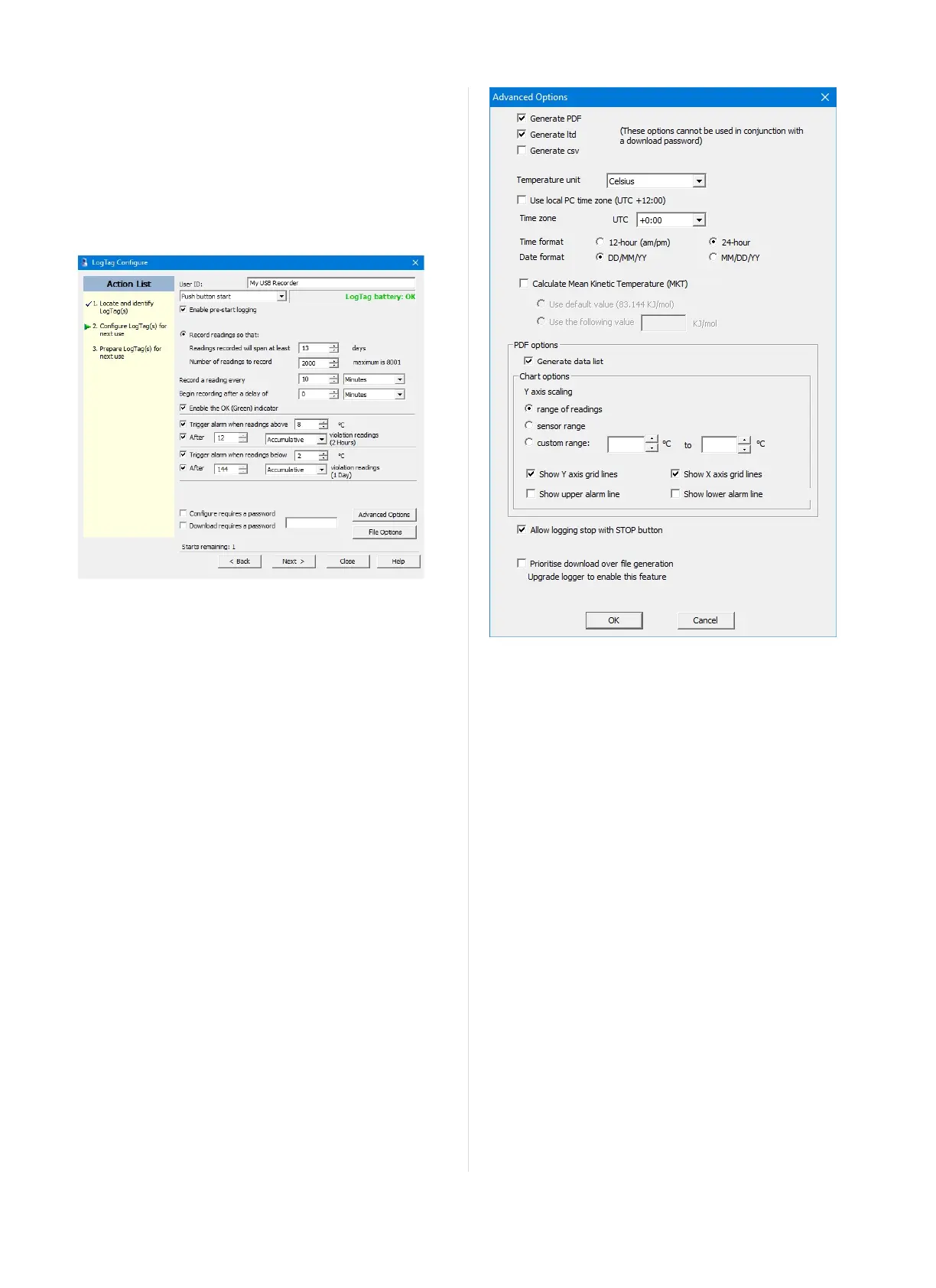
Standard Configuration Options
The standard configuration options are very similar to those of other
LogTag
®
recorder products and include settings such as User ID,
start method, pre-start recording, logging interval and duration,
start delay, temperature alarm parameters and password.
Figure 1: UTRID-16 Standard Configuration Options
For detailed information about each parameter please read the section
about Configuring a LogTag
®
for logging in LogTag
®
Analyzer’s
User Guide or press F1 for help.
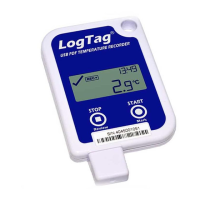
File Configuration Options
Ckick File Options for additional configuration settings. These
settings decide which files -if any- are generated at the end of the trip
and also determine the appearance and contents of the generated
files.
Figure 2: UTRID-16 advanced configuration screen
Parameters that influence the appearance of all files are
l setting of the temperature units used in the files
l date and time format
l Time zone and MKT values
Parameters specifically influencing the appearance of the PDF file are
l scaling parameters for the chart
l showing or hiding gridlines
l showing or hiding alarm threshold lines
l creation of the data list
You can also set whether or not the recorder can be stopped using the
STOP/Review button, and if the communication with LogTag
®
Analyzer should be prioritised over the generation of files when the
unit is plugged into a computer.
Enter the desired options and click Close to accept the new values.
This returns you to the standard configuration dialogue.
Advanced Configuration Options
Select Advanced Options for additional display configuration
settings. These settings determine how some of the elements are
displayed on the screen and set certain options specific to the UTRID-
16.
Page 5 of 21 UTRID-16 Product User Guide, Revision 1, copyright © 2004-2016, LogTag
®
Recorders . All rights reserved.
www.GlobalTestSupply.com
Find Quality Products Online at: sales@GlobalTestSupply.com


 To Next Page