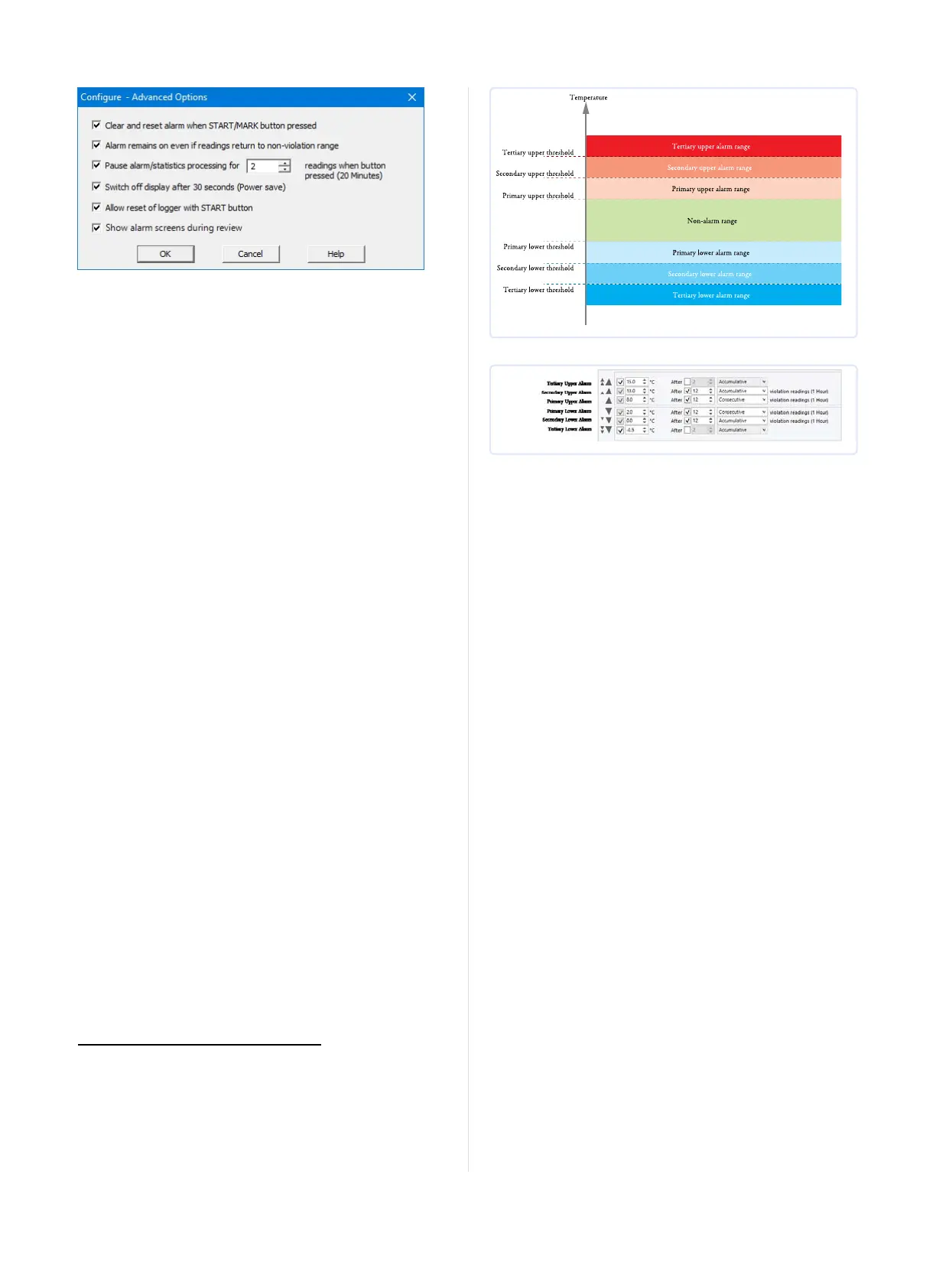
Figure 3: UTRID-16 advanced configuration screen
Parameters that influence the appearance of the display are
l Pause alarm/statistics processing (see Paused Readings on page1)
l Switch off display after 30 seconds (Power save, see Power Save
on page1)
l showing the alarm screens during review (Reviewing Day
Statistics on the UTRID-16 on page1)
Parameters influencing specific behaviour of the UTRID-16 are
l
clear and reset alarm when the START/Mark button is pressed
l leaving the alarm turned on, even if readings return to the normal
temperature range again
l
allowing the user to reset the recorder with the START/Mark
button
Enter the desired options and click OK to accept the new values. This
returns you to the standard configuration dialogue.
Alarm Configuration Options
LogTag
®
Analyzer allows up to 6 different alarm trigger conditions
when configuring a UTRID-16 for recording, depending on the model.
Each alarm trigger condition consists of a threshold temperature
value, an activation type (which can be instant, consecutive or
accumulative
3
) and a delay time, if it is not an instant alarm.
If an alarm trigger condition requires readings to exceed an upper
threshold temperature it is called an upper alarm. If an alarm trigger
condition requires readings to go below lower thresholds it is called a
lower alarm.
An alarm event is generated, when either of the entered alarm
conditions is triggered.
The UTRID-16 can have up to three upper alarms, and up to three
lower alarms.
3
l
Instant = one temperature reading is above (below) the threshold
l
Consecutive = temperature readings are above (below) the threshold for the
time defined in the activation delay without interruption
l
Accumulative = temperature readings are above (below) the threshold for the
total time defined in the activation delay time, but may not necessarily be
sequential.
Figure 4: Alarm ranges and thresholds
Figure 5: Representation in LogTag
®
Analyzer
You need to observe some basic rules when entering alarm conditions
into the configuration screen in LogTag
®
Analyzer:
l A primary alarm condition must be entered before the
corresponding secondary alarm condition.
l Equally, primary and secondary alarm conditions must be entered
before the corresponding tertiary alarm condition.
l You can enter a different number of upper and lower conditions,
or only upper, or only lower conditions, or none at all.
l A secondary upper alarm cannot be entered with a lower
threshold value than the primary upper alarm.
l A tertiary upper alarm cannot be entered with a lower threshold
value than the secondary alarm. Threshold values can, however,
be equal and combined with different time-to-activation values.
For example, you can enter a primary upper alarm with 8°C
threshold and 10 accumulative readings, plus an alarm with 8°C
threshold and 5 consecutive readings. In this instance the alam
will be triggered, if either 10 readings in total are above 8°C, or 5
consecutive readings above 8°C have occurred.
Any alarm condition that is activated will be shown on the PDF, in
the software and on the display.
The sections about Recorders with Multiple Alarms on page1 and
Reviewing Alarms on page12 show examples of how this is
represented and reviewed on the display.
Finalising the configuration
l
Click Next to upload the configuration data to the UTRID-16.
l
When the configuration is complete, unplug the UTRID-16 from
the USB socket and replace the protective cap.
If you wish to configure more UTRID-16 units with the same
configuration, insert the next recorder into the USB socket, wait until
it is ready for configuration and click Again. Alternatively you can use
the Profile function to configure multiple units with the same
settings.
You can upload the configuration to a UTRID-16 recorder as often as
required.
Page 6 of 21 UTRID-16 Product User Guide, Revision 1, copyright © 2004-2016, LogTag
®
Recorders . All rights reserved.
www.GlobalTestSupply.com
Find Quality Products Online at: sales@GlobalTestSupply.com


 To Next Page