) symbols. In any case an inspection mark will be recorded against the
next temperature reading taken.
An alarm cannot be cleared once the UTRID-16 has stopped
recording. Alarms resulting from an accumulation of readings can
also not be cleared.
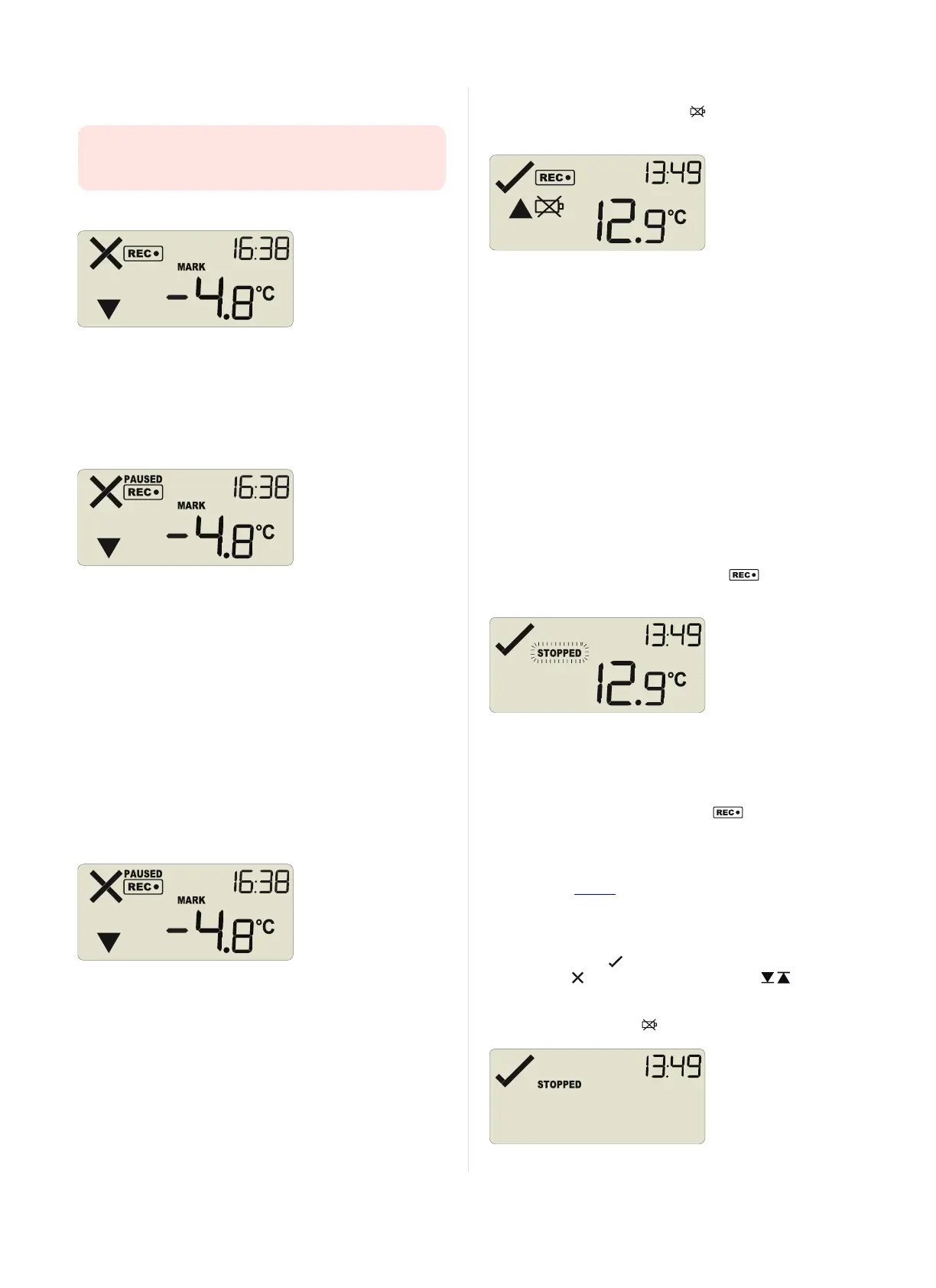
Setting an Inspection Mark
When you press the START/Mark button while the UTRID-16 is
recording temperature, an inspection mark is recorded against the
next temperature reading. The MARK symbol appears and remains
shown until the next reading is taken.
If the Paused Readings function is enabled, you will also see the
PAUSED symbol.
Paused Readings
During configuration of the UTRID-16 you can set the option to ignore
a set number of readings for alarm- and statistics calculations after
either button is pressed. The readings are still shown on the graph
and in the data listing, but their value is ignored when determining
alarm conditions, minimum/maximum values and MKT calculations.
This function is useful when you wish to review readings during the
recorder's operation (or clear an alarm), but you do not wish to trigger
an alarm due to your handling the product. It allows the recorder to
acclimatise to the environmental conditions again, before further
readings are processed.
After a button press the display shows the word PAUSED above the
recording symbol. PAUSED will turn off as soon as the last ignored
reading has been recorded.
Paused readings are marked with a blue dot on the graph, and a $
sign next to the reading in the data list.
The option is set in the advanced options dialogue in LogTag
®
Analyzer and is expressed in multiples of the logging interval.
The length of time the recorder shows PAUSED is therefore
dependent on when during the log interval you press one of the
buttons.
Battery Low while recording
If the battery is low while the UTRID-16 is still recording
temperatures, the battery low symbol is shown in addition to any
other currently displayed information.
Stopping the UTRID-16
Automatically
The UTRID-16 automatically stops recording temperature when the
maximum number of readings specified during configuration has been
reached. Your unit can also be set up to stop when it is inserted into a
USB socket. This option needs to be set up at the factory and cannot
be changed during configuration with LogTag
®
Analyzer. Your
distributor can supply more information about this option.
Manually
You can configure a UTRID-16 so it can be stopped with the STOP
button. This feature is useful when you take the recorder out of a
shipment and don’t want to falsify the statistics with readings taken
after the shipment completion. The stop function is enabled in the
Advanced Options dialogue during configuration.
Press and hold the STOP/Review button. immediately
disappears, and the STOPPED symbol blinks for 4 seconds.
The symbol then shows permanently for 2 seconds. If you release the
button during this time, the recorder stops taking temperature
readings.
If the button is released while STOPPED is still blinking, or you
wait until it disappears, the display shows again, and the
recorder continues recording data. In this case an inspection mark
will be recorded in the data against the next temperature reading.
The MARK symbol will show, and the PAUSED symbol also shows
if this feature is enabled.
Recorder has stopped
Once the recorder has stopped, the display will show:
l
The STOPPED symbol
l
The OK indicator ( )if no alarm was recorded
l
The alarm ( )and one or both alarm threshold( ) indicators,
if an alarm was recorded during the trip
l The current time
l
The battery low symbol ( ), if the battery is low.
Page 11 of 21 UTRID-16 Product User Guide, Revision 1, copyright © 2004-2016, LogTag
®
Recorders . All rights reserved.
www.GlobalTestSupply.com
Find Quality Products Online at: sales@GlobalTestSupply.com


 To Next Page