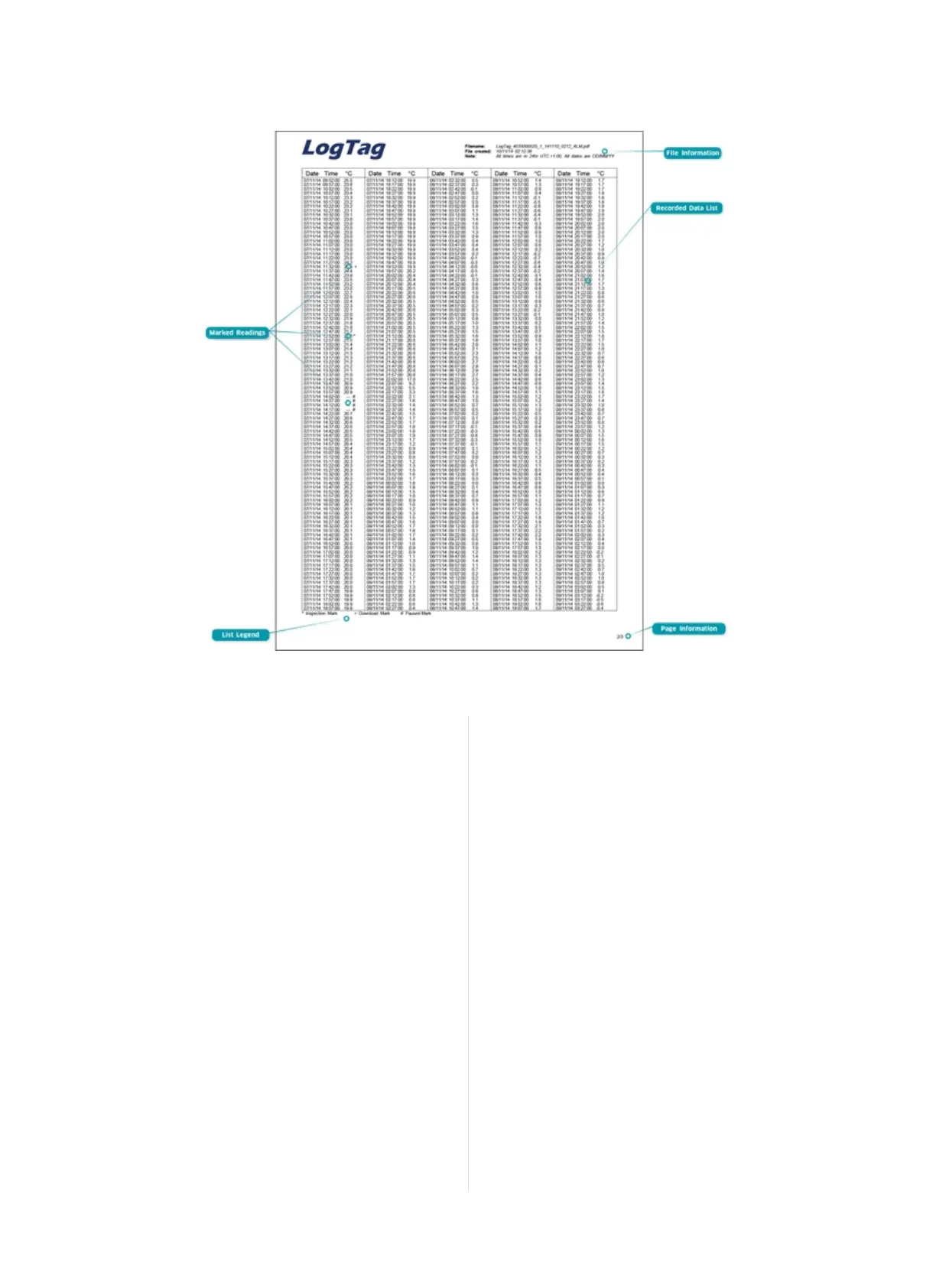
File information
The information from the report page is repeated here.
Recorded Data list
The Data list shows a single row for each recorded reading, along with
the with date, time and temperature values, plus any special events
that were recorded against this reading.
Marked readings
In the data list readings are marked after the temperature value...
l ...with a + symbol where the UTRID-16 has been downloaded
with LogTag
®
Analyzer.
l ...with a * symbol where an inspection mark has been placed with
the START/Mark or STOP/Review button.
l ...with a $ symbol where readings were paused as a result of a
button press.
l ...with a # symbol where the recorder was plugged into a USB
port at the time it would otherwise have taken a reading.
List legend
Shows the symbols for download marks, inspections marks,
paused and USB paused readings if they appear in the data.
Page information
Curent page number and total number of pages appear on every page.
Tips and Tricks
Configuration
When configuring a USB recorder, allow enough time for the unit to
acclimatise to the target environment, particularly if you have
configured an upper alarm. This can be best achieved with a start
delay, or a date/time start if you know when the shipment takes
place.
Make sure you remove your UTRID-16 from the USB socket when you
use a date/time start, so it starts at the time you want, rather than
when unplugged from the port.
During the trip
Always replace the USB protective cap before placing the UTRID-16
with the goods. While recording, make sure the UTRID-16's protective
cap is facing down. The protection rating can only be achieved when
used in this orientation. For applications requiring a higher IP rating
the unit should be used in the protective case, available as an
accessory.
Page 17 of 21 UTRID-16 Product User Guide, Revision 1, copyright © 2004-2016, LogTag
®
Recorders . All rights reserved.
Figure 9: Sample Data List
Data Evaluation - Data List
www.GlobalTestSupply.com
Find Quality Products Online at: sales@GlobalTestSupply.com


 To Next Page