
 Need help?
Do you have a question about the LogTag Recorders UTRID-16 and is the answer not in the manual?
Details LogTag® Recorders' standard warranty terms and conditions regarding liability.
Information on the expected operational lifespan of the UTRID-16 recorder under specific conditions.
Statement clarifying the recorder's function in monitoring temperature exposure, not product quality.
Explanation of text formatting conventions used throughout the document for clarity.
List of essential equipment needed to operate and configure the UTRID-16 temperature recorder.
Details on the physical and functional features of the UTRID-16, including case and buttons.
Information on the software needed for configuration and evaluation of the UTRID-16.
Steps and options for configuring the UTRID-16 recorder using LogTag® Analyzer software.
Details on the standard parameters available for configuring the UTRID-16 recorder.
Settings that determine the format, content, and generation of output files.
Options for customizing display settings and recorder-specific operational features.
Guide to setting up multiple alarm trigger conditions, including thresholds and activation types.
Steps to complete the recorder configuration and upload settings.
Explanation of the X and ✓ symbols indicating alarm status or normal operation.
Description of symbols indicating the recorder's current operation state (READY, REC, STOPPED).
Explanation of the MARK symbol indicating an inspection mark in recorded data.
How the clock display shows current time, start delay, or duration.
Explanation of MIN and MAX symbols for recorded temperature extremes.
Symbols indicating when temperatures exceed or fall below alarm thresholds.
Indicates whether temperature is displayed in Celsius (°C) or Fahrenheit (°F).
Shows the last recorded temperature on the display during operation.
Arrows indicating if temperature is above or below specified alarm limits.
Symbol that appears when the UTRID-16 has a low battery.
Steps to configure the recorder using the Push Button Start method.
How to start the UTRID-16 using push button or date/time start methods.
Indication of low battery status on the display.
How alarm markers appear on the display for temperature deviations from thresholds.
How the display indicates a triggered alarm event with specific symbols.
Steps to clear an alarm from the UTRID-16 display using the button.
How to set an inspection mark in the data using the START/Mark button.
Explanation of the 'Paused Readings' function and its effect on data calculations.
Automatic stopping and manual stopping procedures for the recorder.
Driver installation and requirements for Windows operating systems when connecting via USB.
Details about the USB composite device driver used for communication.
How to interpret the alarm status indicator (red X or green) in the report.
Information about the generated PDF file, including naming conventions.
General information about the recorder's settings, trip details, and start method.
Summary of alarm occurrences and related statistical data during the trip.
Explanation of the graphical representation of recorded data and its parameters.
Explanation of symbols indicating download, inspection, or paused events on charts.
How USB connection periods are represented as gaps in the data chart.
How upper alarm thresholds are displayed on the chart using dashed lines.
How lower alarm thresholds are displayed on the chart using dashed lines.
Guide to interpreting the detailed list of recorded data, including marked readings.
Explanation of symbols used in the data list for marked readings.
Indicates current and total page numbers for navigating the document.
Advice on configuring the recorder for environmental acclimatization and start times.
Advice on using the protective cap and handling the recorder during transit.
Detailed table of standard alarm parameters and their configuration options.
Parameters for configuring multiple alarm conditions on the recorder.
Settings that control the display behavior and options of the recorder.
The specific model number of the device.
The operational range for temperature measurement.
The ambient temperature range for operating the recorder.
The recommended temperature range for storing the recorder.
The acceptable ambient humidity levels for the recorder during transport and use.
The precision of temperature readings.
The accuracy specifications for temperature measurements across different ranges.
The type of temperature sensor used and its reaction time.
The accuracy of the real-time clock and its temperature coefficient.
The number of readings the recorder can store and its memory type.
The configurable interval between temperature readings.
The methods available for starting the recorder's logging operation.
The types and number of alarms supported by the recorder.
Resistance to vibration and shock based on industry standards.
Compliance with electromagnetic compatibility directives and FCC regulations.
Environmental protection rating (IP rating) of the recorder.
The material used for the recorder's casing and its physical dimensions.
The type of battery used and its estimated lifespan under normal usage.
The weight of the UTRID-16 recorder.
Information about the recorder's calibration traceability to accredited laboratories.
Features related to the generation and content of PDF reports.
Time taken to download data from the recorder.
Software versions needed and USB compatibility details.
List of optional accessories available for the UTRID-16.
Actions to take before replacing the recorder's battery to prevent data loss.
Instructions for safely removing the existing battery from the recorder.
Steps for correctly inserting the new battery into the compartment.
The LogTag UTRID-16 is a versatile USB PDF temperature recorder equipped with a built-in display, designed for multi-use applications. Its primary function is to monitor temperature and generate comprehensive reports without requiring proprietary software or hardware at the destination. Users can review statistical data directly on the device's display, eliminating the need for a PC for basic checks. For detailed analysis and configuration, the UTRID-16 integrates seamlessly with LogTag Analyzer software.
The UTRID-16 records temperature data and can be configured to generate various file types upon connection to a USB port, including PDF, CSV, and LogTag's native LTD files. The PDF file provides a direct, universally accessible report viewable with standard PDF software like Acrobat Reader. CSV files can be imported into spreadsheet programs for further manipulation, while LTD files offer detailed analysis and report generation within LogTag Analyzer, including the ability to combine charts from multiple recorders. The device's internal memory stores up to 16,129 real-time temperature values, allowing for extended monitoring periods.
The recorder can be configured to start recording in several ways: via a push button, which may include a start delay or pre-start readings, or at a specific date and time. Pre-start readings are a valuable feature that allows the device to begin recording as soon as it's unplugged from the USB port, preventing data loss if the user forgets to manually start the unit. While pre-start readings are not included in the PDF report, they are accessible through LogTag Analyzer.
Alarm functions are a critical aspect of the UTRID-16. It supports up to six different alarm trigger conditions (three upper and three lower alarms), each configurable with a threshold temperature, activation type (instant, consecutive, or accumulative), and a delay time. When an alarm condition is met, the device displays an alarm indicator (X) and relevant alarm limit markers. The display also shows the duration for which temperatures were above or below the set thresholds, providing immediate visual feedback on critical temperature excursions.
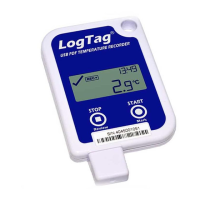
The UTRID-16 features a familiar LogTag case layout with an integrated USB plug. The display shows the last recorded temperature, current time, and various indicators for recording status, alarms, and battery level.
The UTRID-16 is designed with user-friendly maintenance in mind, particularly regarding its power source.
 General
| Model | UTRID-16 |
|---|---|
| Type | Temperature Data Logger |
| Accuracy | ±0.5 °C |
| Resolution | 0.1 °C |
| Memory Capacity | 16, 000 readings |
| Sensor Type | Internal Thermistor |
| Logging Interval | 1 second to 24 hours |
| Interface | USB |
| Software | LogTag Analyzer |
| Certifications | CE, RoHS |
| Temperature Range | -40°C to +85°C |
| Alarm Function | Yes |

 To Next Page