The recorder has stopped, and no alarms were recorded during the
trip.
Here, the recorder has stopped, and an upper alarm was recorded
during the trip.
Reviewing Alarms
At any time you can review the recorded statistics by briefly pressing
the STOP/Review button. You can do this while the recorder is
still taking temperature readings, or when it has already stopped, but
not when it is plugged into a USB port.
After each subsequent press of STOP/Review the next review
screen is shown. The number of screens available for review depends
on the number of configured alarms, and whether or not the alarm
review screens have been enabled. If no alarms are configured, or the
alarm review screens are disabled, only the MIN and MAX screens
appear. If 6 alarms are configured and the alarm review screens are
enabled (which is the maximum), 8 screens will appear.
You can terminate the review at any time by pressing
START/Mark, or by waiting 30 seconds without pressing any
button.
STOP
Review
STOP
Review
STOP
Review
STOP
Review
STOP
Review
STOP
Review
STOP
Review
STOP
Review
STOP
Review
START
Mark
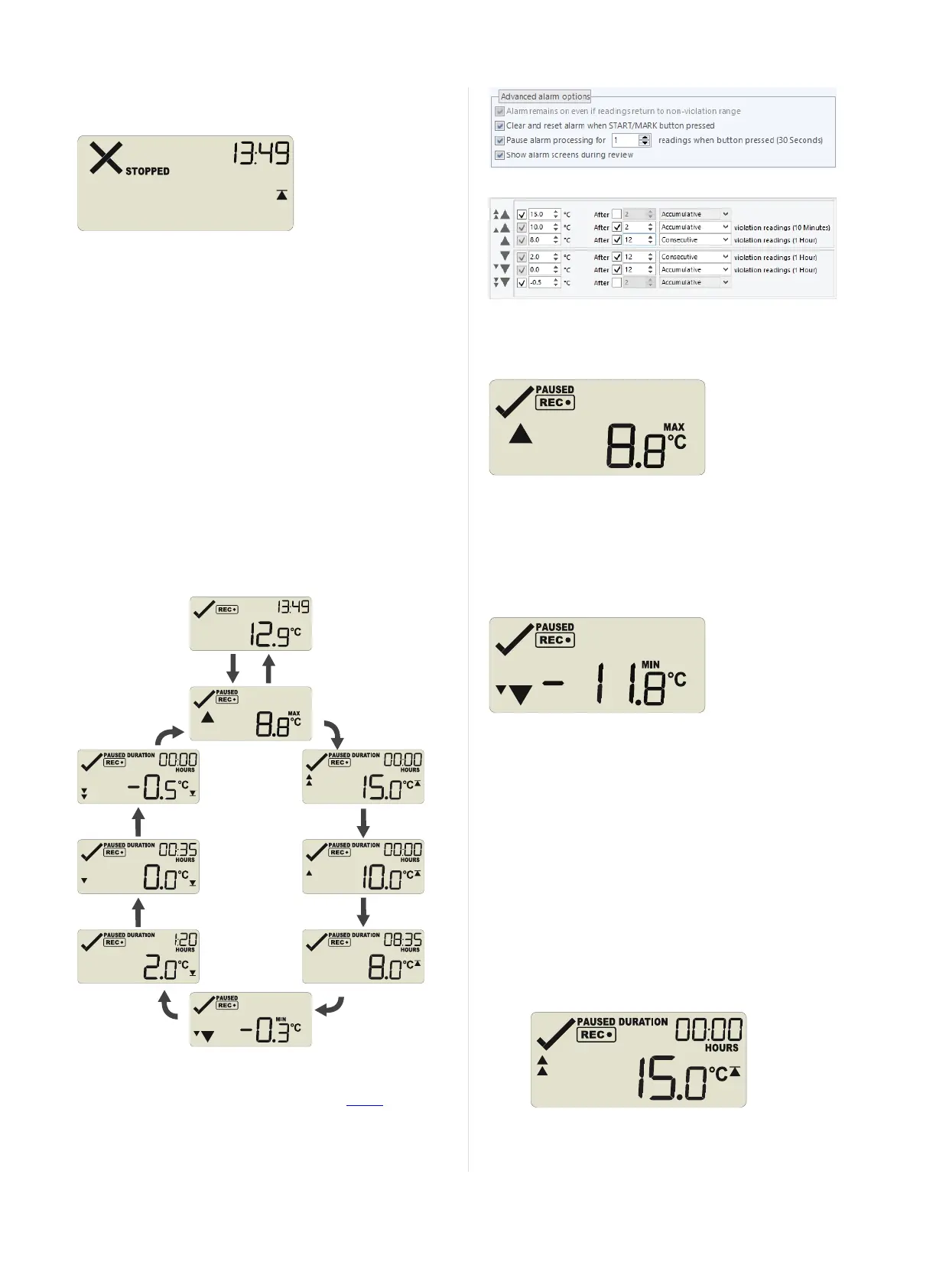
Figure 6: Review cycle with all alarms enabled
The sample screens assume you have activated the Paused
functionality and have enabled the alarm review screens:
In the example following alarm settings are used:
Figure 7: Alarm configuration settings in LogTag
®
Analyzer
On first press of STOP/Review the Maximum Reading screen
appears.
The clock disappears, and the MAX symbol is shown along with the
maximum temperature recorded. If this temperature was above or
below one of the alarm thresholds, the corresponding alarm marker is
also shown. Here, the maximum was above the primary threshold.
When you press STOP/Review again, the Minimum Reading
screen appears.
If this temperature was above or below one of the alarm thresholds,
the corresponding alarm marker is also shown. Here, the minimum
was below the tertiary threshold.
If the alarm review screens are enabled, the next screens show the
enabled alarm threshold values in descending order, starting with the
upper most alarm threshold. Up to six screens will be shown,
depending on how many alarms were enabled during configuration.
The Minimum Reading screen is shown after the primary upper and
before the primary lower alarm screen.
1.
In this example the tertiary upper alarm is enabled, indicated
by the alarm threshold marker shown in combination with
the two small alarm arrows. The DURATION symbol is
shown, and the clock shows the total number of hours and
minutes above the threshold, instead of the time.
Page 12 of 21 UTRID-16 Product User Guide, Revision 1, copyright © 2004-2016, LogTag
®
Recorders . All rights reserved.
www.GlobalTestSupply.com
Find Quality Products Online at: sales@GlobalTestSupply.com


 To Next Page