LogTag’s UTRID-16 is a fully configurable, multi-use USB PDF
temperature recorder with a built-in display, that can create
temperature reports without the need to install proprietary software
or hardware at the destination. Select statistical data can be reviewed
directly on the display without the need for a PC. The recorder can be
configured using LogTag
®
Analyzer, and is then placed with the
goods to be monitored. At the destination the UTRID-16 can be
plugged straight into a computer’s USB port and generates a PDF file,
which can be accessed using PDF software such as Acrobat Reader.
Checklist - Required Equipment
l LogTag
®
UTRID-16 temperature recorder. It is recommended that
you connect each USB PDF Temperature Recorder with Display
via a permanently plugged in USB extension cable to protect your
computer’s USB socket.
l A computer running Windows XP or later, Mac OSX or Linux.
l For configuration - a PC running Windows XP SP3 or later and
LogTag
®
Analyzer installed.
Features
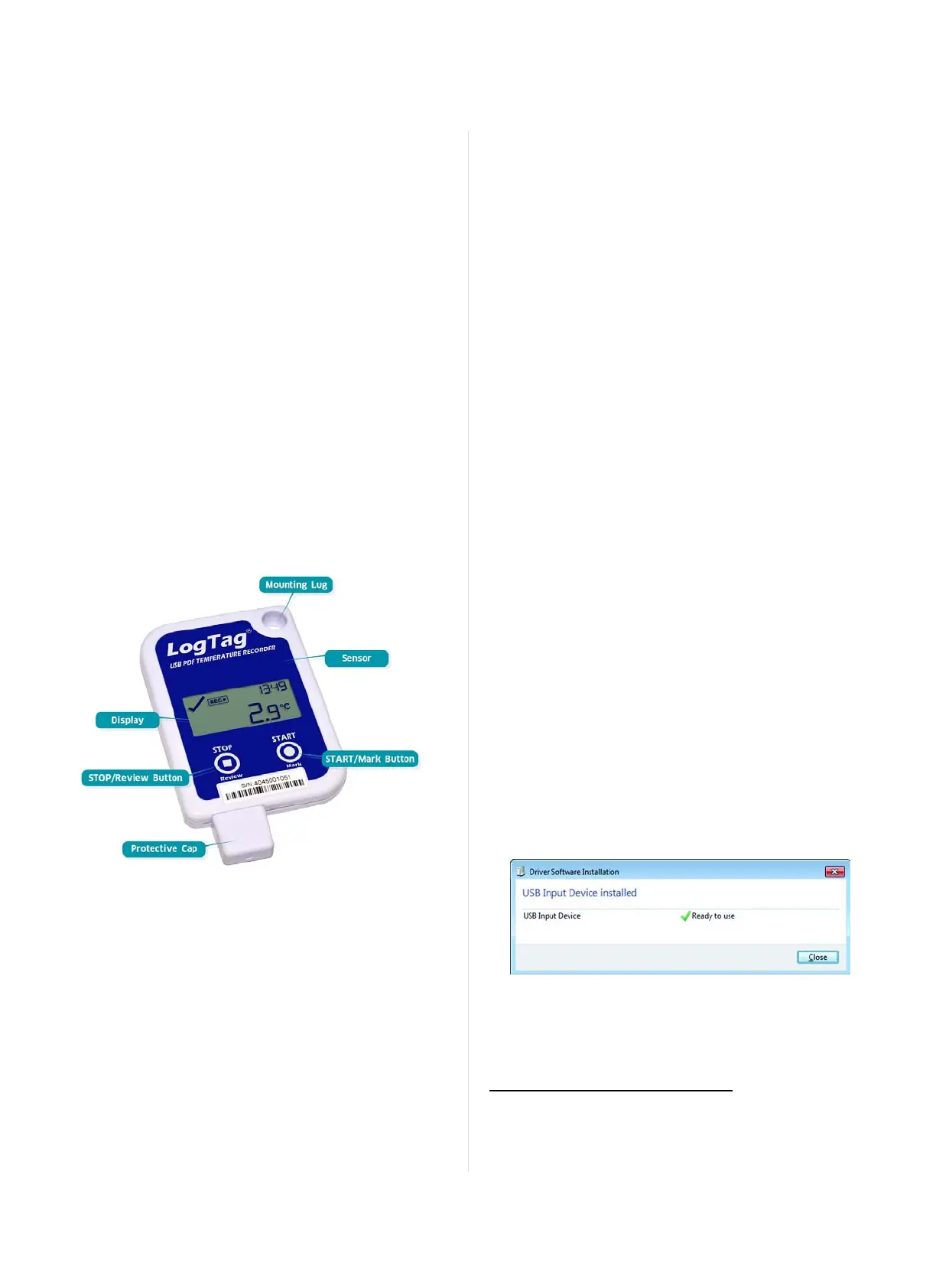
The UTRID-16 USB PDF temperature recorder features the familiar
LogTag case layout with an additional USB plug at the bottom.
Case
l Mounting lug for secure fastening of recorder to fixtures
l USB plug with potective cap - shields USB connector from
moisture and dirt
l Temperature sensor located inside case
l Durable polycarbonate case, IP64
Buttons
l
START/Mark button; can be used to start the unit or place an
inspection mark in the data listing
l
STOP/Review button; can be used to stop the unit and to
review data recorded during the trip.
Display
l Shows last recorded temperature and information about alerts
l Allows reviewing statistical data
Software Requirements
Software requirements vary depending on the type of file you want
the UTRID-16 to generate when plugged into a USB port.
l If you wish to configure UTRID-16 products you will need to
download the LogTag
®
Analyzer software from LogTag
®
’s web
site at http://www.logtagrecorders.com/software/download.php.
Follow the instruction to install and start the software.
l
If you only plan on evaluating data, plug the UTRID-16 into a
computer‘s USB socket. Depending on the settings made during
configuration, a number of files will be generated
1
and made
available to you in a new drive:
o
A PDF file; you can open the file directly from the recorder‘s
USB memory storage with Acrobat Reader 4.0 or later, or any
other compatible PDF reader software of your choice.
o
A CSV file; this file can be imported into a spreadsheet
program such as Microsoft Excel.
o
An LTD file; LTD files are LogTag
®
Analyzer's native,
encrypted data files. You can open this file in LogTag
®
Analyzer, where you can analyze data in detail and generate
report files. Here, you can also combine charts from multiple
recorders for comparison.
l You can also download data directly into LogTag
®
Analyzer
without accessing the recorder‘s USB memory storage.
Configuring the UTRID-16
UTRID-16 products can be ordered pre-configured, ready to start.
Different profiles are available; if none of these suit or the UTRID-16
needs different configuration settings to those already installed, the
unit can be configured using LogTag
®
Analyzer.
l
Start the LogTag
®
Analyzer software.
l
Remove the protective cap and insert the UTRID-16 into a USB
port. You will receive a message that a new USB device has been
found, and a generic driver will be installed
2
.
l
Once the driver is installed and the UTRID-16 is ready (indicated
by the letters USB blinking on the display), it can receive
configuration data. Click LogTag - Configure; LogTag
®
Analyzer
will scan all USB ports and display the configuration options for
connected UTRID-16‘s. Although you can configure many devices
1
Depending on the configuration, the UTRID-16 may produce all, some or none of
the files.
2
Depending on the factory configuration additional drivers may be installed at this
time.
Page 4 of 21 UTRID-16 Product User Guide, Revision 1, copyright © 2004-2016, LogTag
®
Recorders . All rights reserved.
Introduction
www.GlobalTestSupply.com
Find Quality Products Online at: sales@GlobalTestSupply.com


 To Next Page