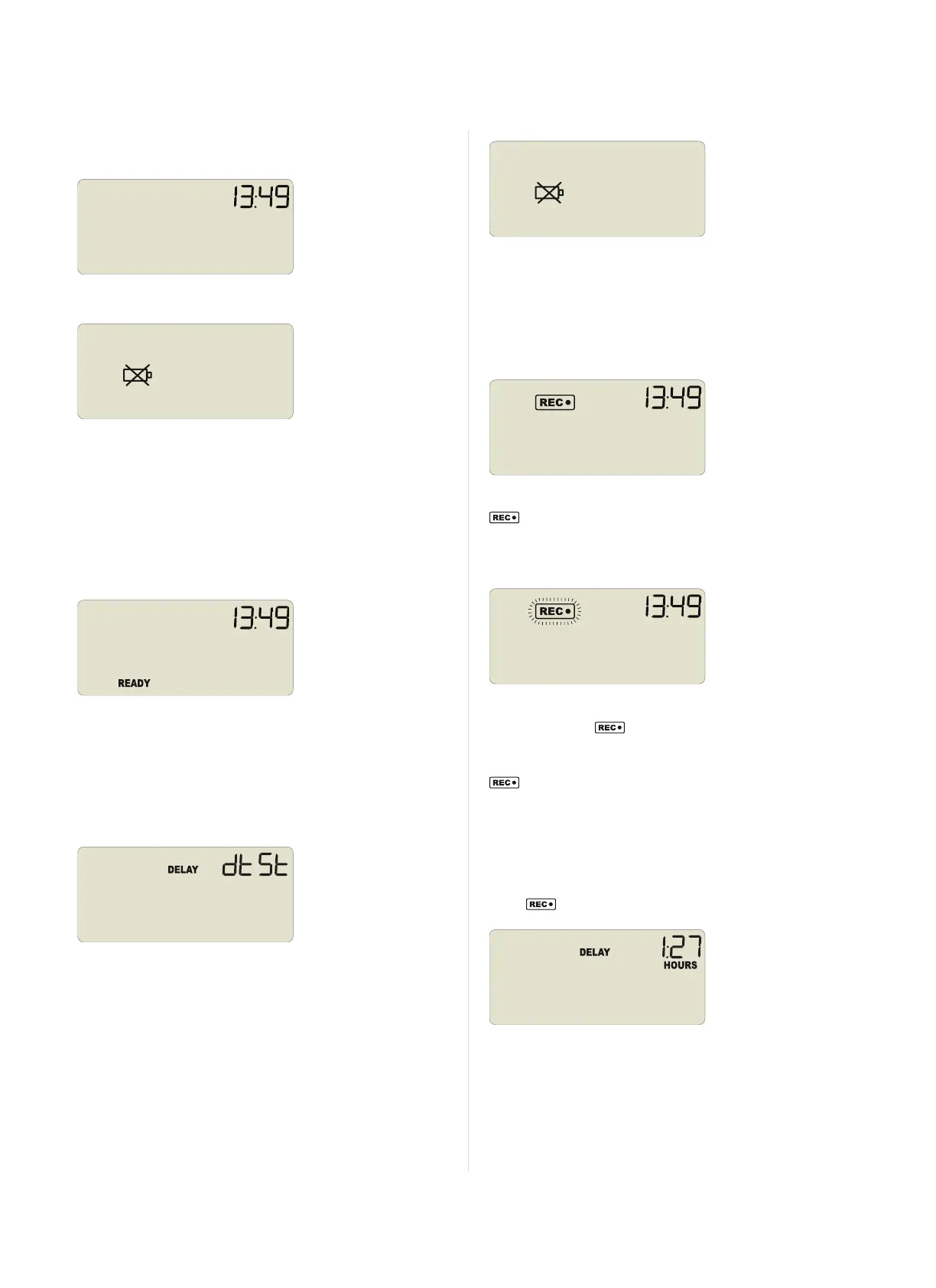
You will receive your UTRID-16 hibernated, i.e. in a state of low
power consumption. Pressing either button will briefly show the time:
Should the battery be low, the display will show:
The following sections show how to operate the product, and what
information you can expect to see on the display.
Configuring the Recorder
Push Button Start
After configuration with LogTag
®
Analyzer for push button start the
word READY is shown, together with the current time in 24 hour
format.
Optionally you can configure the unit with a start delay, and pre-start
readings. These opotions are not shown on the display.
Date and Time Start
The recorder can also be configured to start at a specific time and
date. You will see the word DELAY and the letters dtSt instead of
the clock.
Pre-start readings and start delay options are not available for a
date/time start.
Low Battery
If the recorder has a low battery after configuration, the low battery
symbol is shown instead of the time.
The recorder cannot be started until the battery has been replaced.
Please see "Appendix 1 - Battery Replacement" on pagei for further
details.
Starting the Recorder
Push button start, quickstart enabled
Press the START/Mark button until READY disappears and the
symbol is shown. The UTRID-16 now records temperature data.
This start option works the same as in LogTag
®
's LED products.
Push button start, quickstart disabled
Press and hold the START/Mark button. READY immediately
disappears, and the symbol blinks for 4 seconds. The symbol
then shows permanently for 2 seconds. If you release the button
during this time, the recorder starts taking temperature readings. The
symbol remains shown. If the button is released earlier than 4
seconds or later than 6 seconds, the display shows READY again, and
the recorder does not start.
Push Button Start with Start Delay
If the recorder was configured for push button start with a start delay
(regardless of quickstart settings), the word DELAY is shown instead
of the symbol.
The delay time is shown in hours and minutes, if it is less than 24:00
hours, and the word HOURS is shown.
The time counts down and the UTRID-16 starts recording when it
reaches 0:00.
If the start delay is greater than 24 hours the word DAYS is shown
along with the number of full days remaining.
Page 9 of 21 UTRID-16 Product User Guide, Revision 1, copyright © 2004-2016, LogTag
®
Recorders . All rights reserved.
Operating the Recorder
www.GlobalTestSupply.com
Find Quality Products Online at: sales@GlobalTestSupply.com


 To Next Page