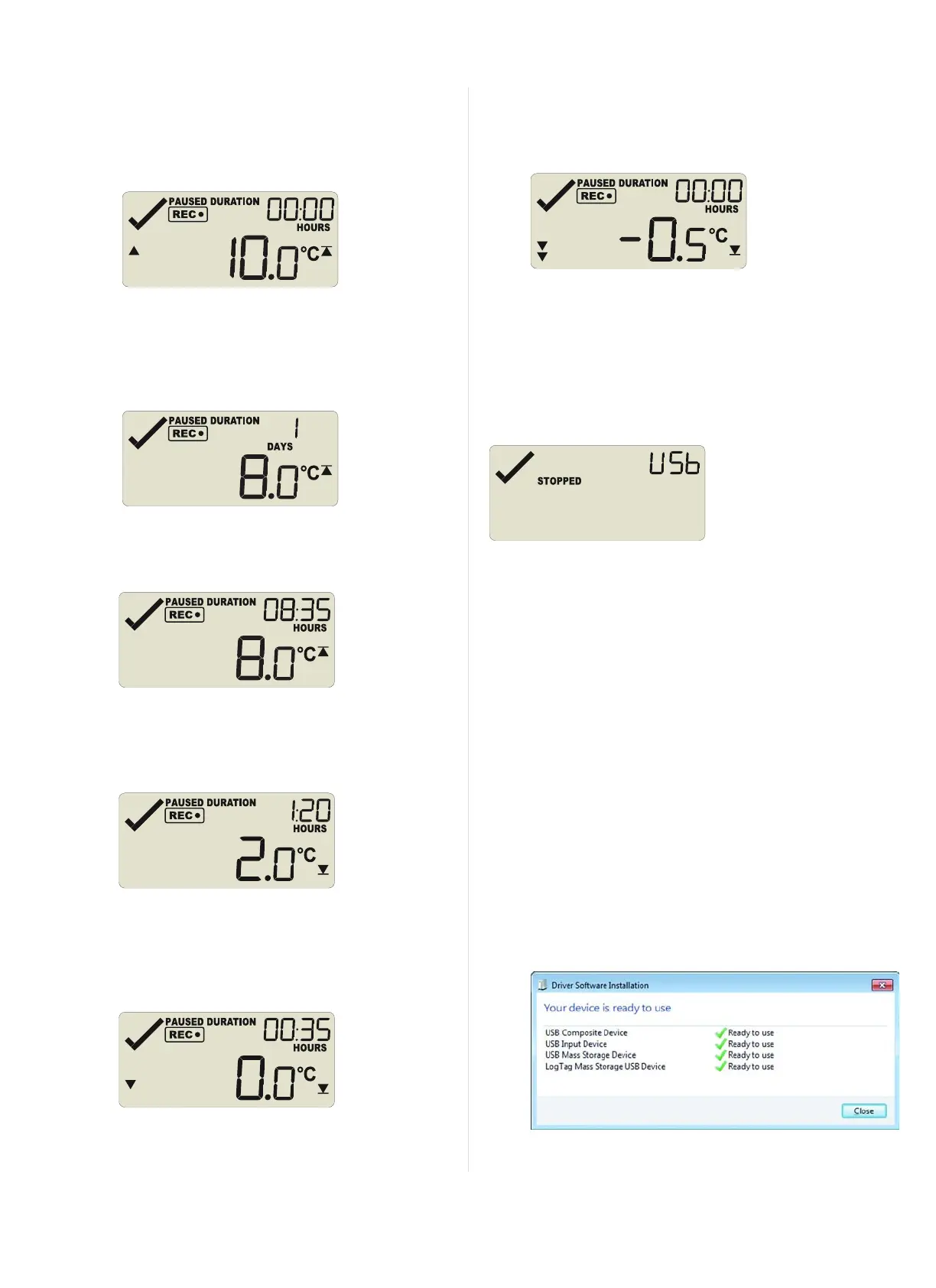
You can see how long the recorded temperature was above
this threshold. Here, the 15°C threshold was not exceeded.
2.
The secondary upper alarm is shown next, indicated by the
alarm threshold marker shown in combination with a single
small alarm arrow.
As with the previous alarm the 10°C threshold was not
exceeded.
3.
The primary upper alarm is shown next, indicated by the
alarm threshold marker shown without any small alarm
arrows.
In this example the temperature was above 8°C for 1 day, 8
hours and 35 minutes. If the duration is longer than 24 hours,
the display will alternate between showing days and hours.
4.
The primary lower alarm is shown next, indicated by the
alarm threshold marker shown without any small alarm
arrows.
In this example, the temperature was lower than the primary
threshold for 1 hour and 20 minutes.
5.
The secondary lower alarm is shown next, indicated by the
alarm threshold marker shown without one small alarm
arrow.
In this example, the temperature was lower than the
secondary threshold for 35 minutes.
6.
The tertiary lower alarm is shown next, indicated by the
alarm threshold marker shown with two small alarm arrows.
In this example, the temperature was not lower than the
tertiary threshold.
Plugging the UTRID-16 into a USB port
As soon as you plug the UTRID-16 into a USB port, the word USb
appears and remains permanently on until all files have been
generated.
When complete, USb starts blinking once per second.
What happens on your computer depends on the operating system of
the computer, the settings made during configuration and whether or
not LogTag
®
Analyzer is running.
Microsoft Windows
Up to four drivers will now be installed, depending on the UTRID-16's
configuration.
All drivers are part of the operating system and will typically not
require administrator privileges for your computer.
1. Mass Storage Device
2.
LogTag Mass Storage USB Device
These two devices are required so you can access the data files
in the same way as a USB memory stick. These drivers will
not be installed if the UTRID-16 does not generate files.
3.
USB Input Device (HID)
This device is used for communication to LogTag
®
Analyzer
and its driver will always be installed, even if LogTag
®
Analyzer is not present on the computer.
4.
USB Composite Device
Page 13 of 21 UTRID-16 Product User Guide, Revision 1, copyright © 2004-2016, LogTag
®
Recorders . All rights reserved.
www.GlobalTestSupply.com
Find Quality Products Online at: sales@GlobalTestSupply.com


 To Next Page