39
EN
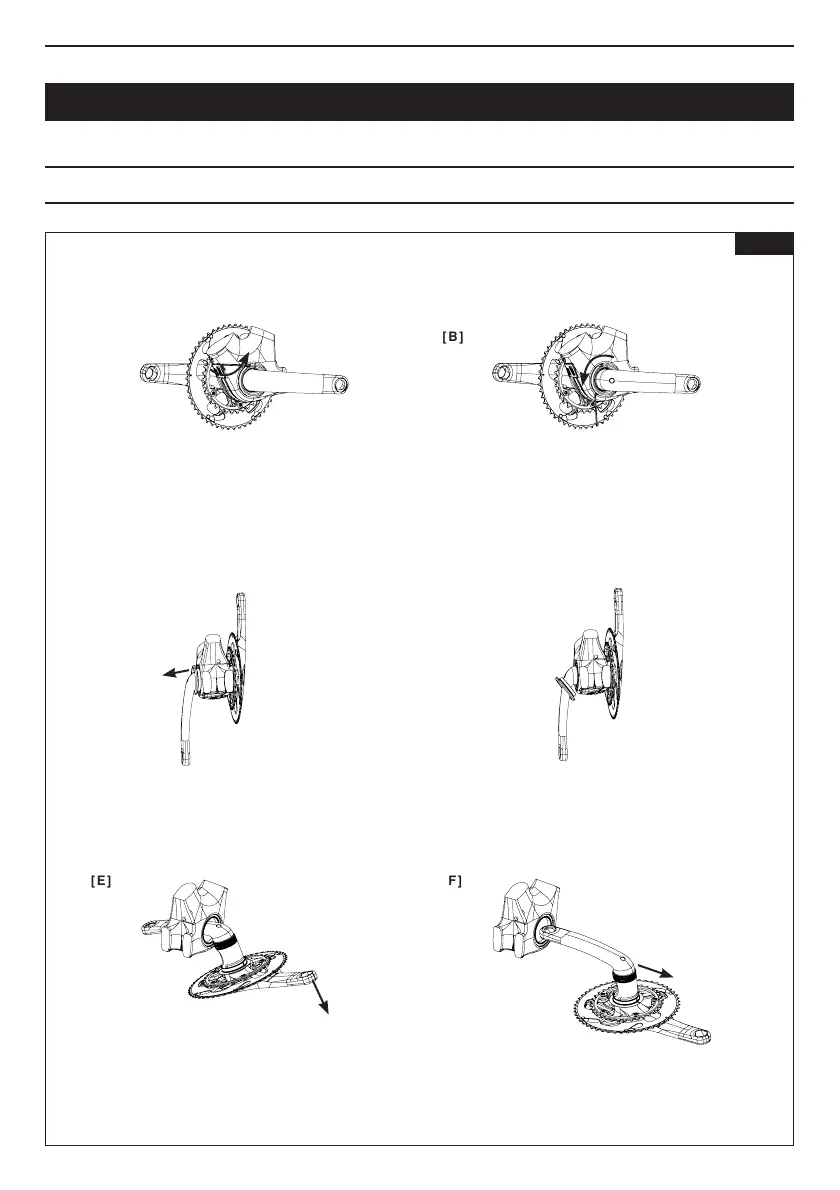
Removethecranksetfromtheframe.Checkthatthe
2x6810bearingsremaininplaceintheframe.
Insertthe2.5mmAllenkeyintotheholeoppositethe
lockingscrewanduseittoturnthenut.
Becarefulnottodamagethecranksetortheframeas
youloosenthenutwiththeAllenkey.
Removethenutbytheleftcrank.
Removethecranksetfromtheframe,takingcarenot
toscratchthecranksetwiththebearingsortheframe
withthechainrings.
Takea2.5mmAllenkeyandunscrewthescrewinthe
leftnut.
Becarefultokeep thescrewonthenut andensure
thatthenutdoesnotinterferewiththeframe.
Loosentheleftnutuntilitreleasesthebearing.
DISMANTLING THE CRANKSET
[ E ]
[ A ]
[ C ]
[ F ]
[ B ]
[ D ]
Fig 13



 To Next Page