Page 14 of 35
3.4 Password and batch code screens
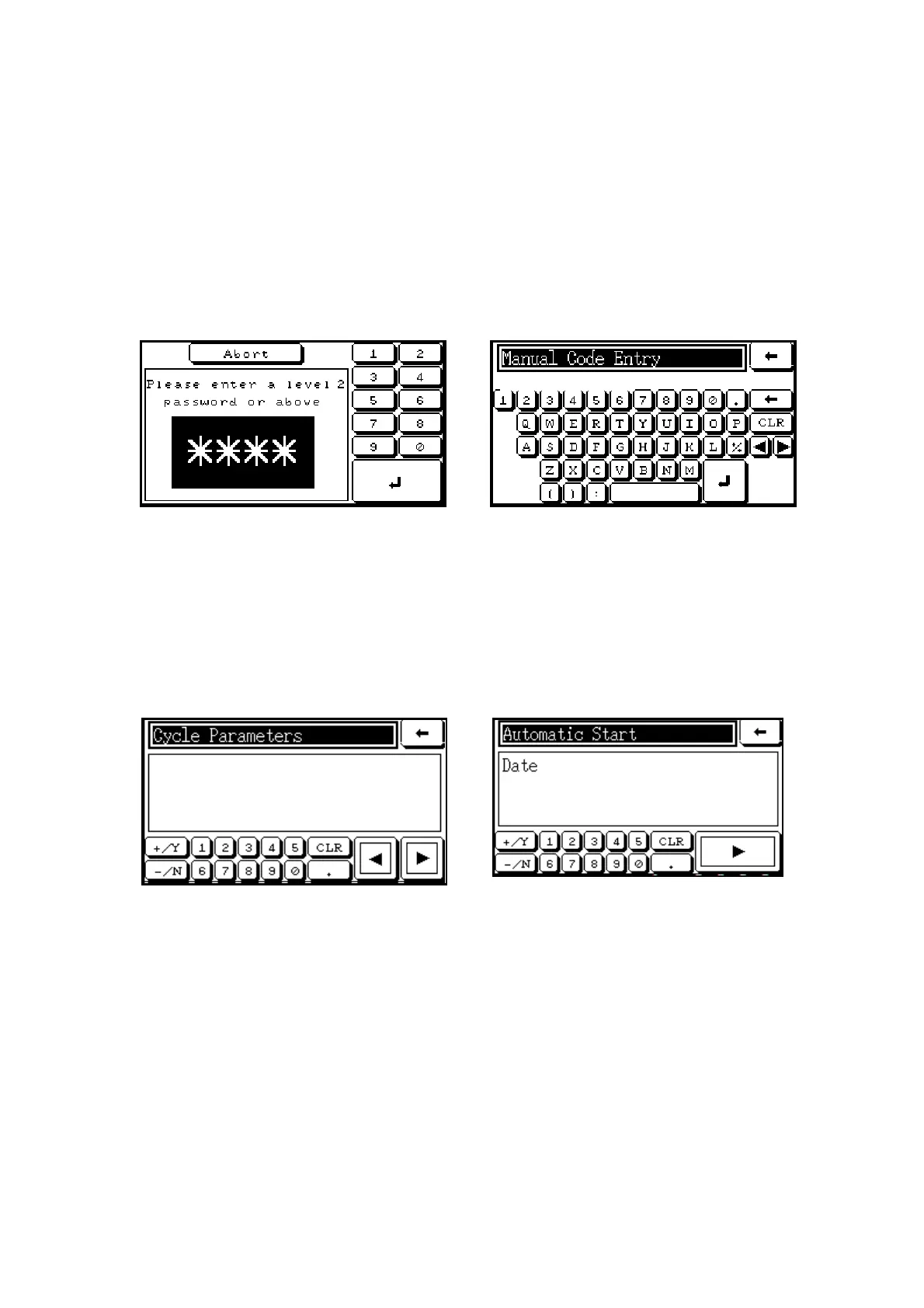
A password may be required to gain access to some menus or operations. In such cases, the
screen shown below on the left will appear. The password is entered on the numeric keypad,
followed by touching the
enter button. If an invalid password is entered, a warning screen
will appear.
If a cycle is programmed to require a batch code, the screen shown below on the right will
appear when the START button is touched. The batch code can be entered using the
onscreen keypad, and the cycle will start when the
enter button is touched.
3.5 Parameter screens
Parameter Screens show the values for each of the parameters (or variables) in the cycle. They
appear in either ‘browse’ or ‘sequential’ mode. The ‘browse’ screen illustrated below on the left
has and buttons, so that the user can move back and forth between the different
Parameter Screens. The ‘sequential’ screen illustrated below on the right only has a button,
so that each Parameter Screen appears in a predetermined sequence, as when a cycle is being
started.
Sterilize Time
0900 Secs
The Parameter Screens may be edited to change the value of a parameter (or variable) on the
screen, either by using the onscreen keypad or, in the case of screens with multiple-choice
options, by selecting a value using the
+
YES
and
-
NO
buttons. The return button is
touched to quit a parameter set after editing, or to abort the cycle start sequence.



 To Next Page