LK-T21 Technical Manual
[Name] Select bit-image mode
[Format] ASCII ESC * m n
L nH d1...dk
Hex 1B 2A m n
L nH d1...dk
Decimal 27 42 m n
L nH d1...dk
[Range] m = 0, 1, 32, 33
0≤n
L ≤255
0≤n
H ≤3
0≤d ≤255
[Description] Selects a bit-image mode using m for the number of dots specified by nL and nH, as follows:
Vertical Direction Horizontal Direction
m Mode
NO. of Dots Dot Density Dot Density Number of (Data(K)
0 8-dot single-density 8 60 DPI 90 DPI nL + nH x 256
1 8-dot double-density 8 60 DPI 180 DPI nL + nH x 256
32 24-dot single-density 24 180 DPI 90 DPI (nL + nH x 256) x 3
33 24-dot double-density 24 180 DPI 180 DPI (nL + nH x 256) x 3
[dpi : dots per 25.4 mm{1”}]
[Details] ·If the values of m is out of the specified range, nL and data following are
processed as normal data.
·The nL and nH indicate the number of dots of the bit image in the horizontal direction. The
number of dots is calculated by nL + nH x 256.
·If the bit-image data input exceeds the number of dots to be printed on a line, the excess data is
ignored.
·d indicates the bit-image data. Set a corresponding bit of 1 to print a dot or to 0 to not print a dot.
·If the width of the printing area set by GS L and GS W less than the width required by the data
sent with the ESC *command the following will be performed on the line in question (but the
printing cannot exceed the maximum printable area) :
The width of the printing area is extended to the right to accommodate the amount of ①
data.
If step does not provide suffici②① ent width for the data, the left margin is reduced to
accommodate the data.
·After printing a bit image, the printer returns to normal data processing mode.
·This command is not affected by print modes(emphasized, double-strike, underline, character
size or white/black reverse printing), except upside-down printing mode.
·Refer to Figure 3.12.3 for the bit image development position in page mode.
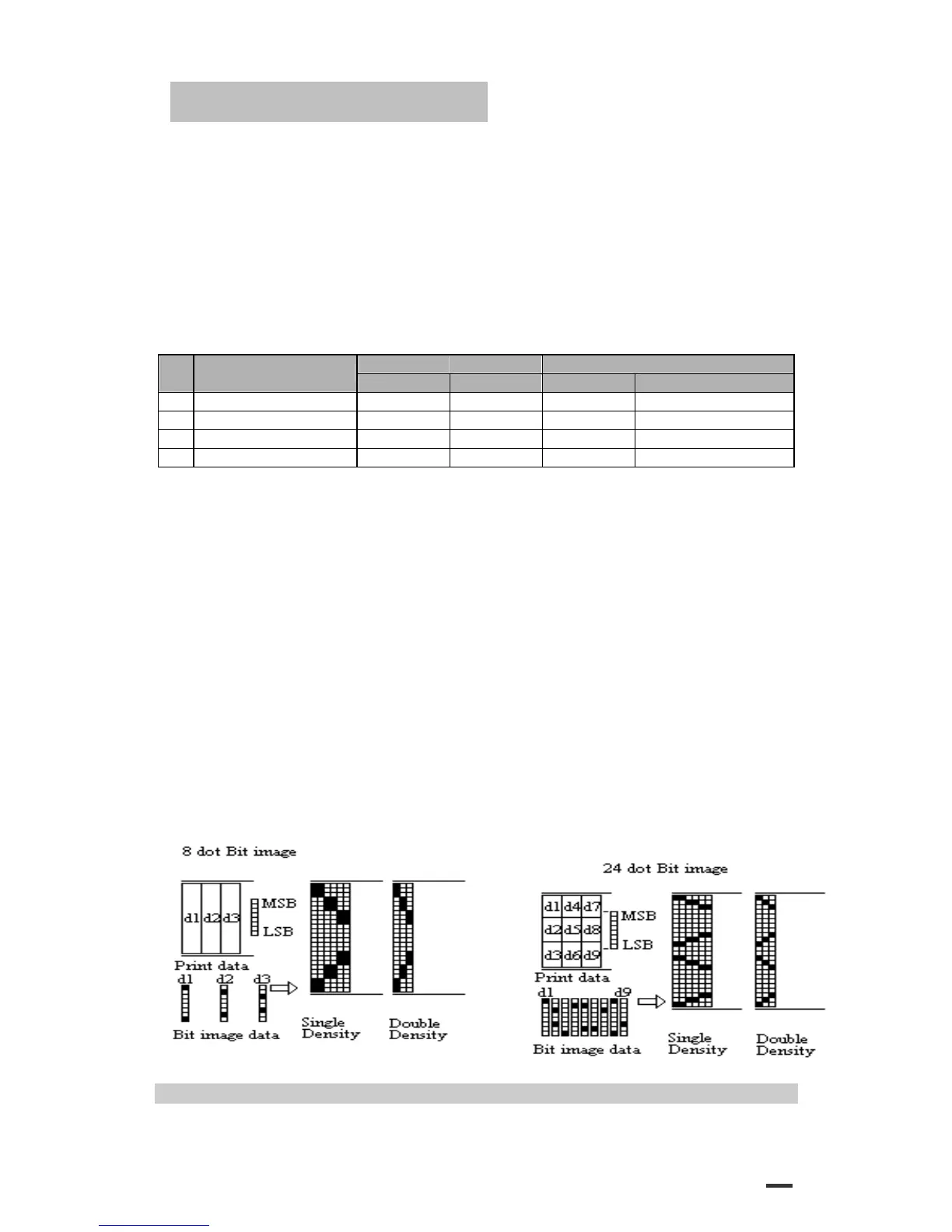
·The relationship between the image data and the dots to be printed is as follows:
·When 8-dot bit image is selected:
ESC - n
33


 To Next Page