EasyManua.ls Logo

LXNAV PowerMouse - Powermouse Configuration by Using Flarm Configuration Tool

LXNAV PowerMouse
43 pages
Print Icon
To Next Page IconTo Next Page
To Previous Page IconTo Previous Page
Loading...
Rev #35 March 2024
Page 33 of 43
7.3.3 PowerMouse configuration by using Flarm configuration tool
PowerMouse can be configured by Flarm Tool software which can be found here:
https://flarm.com/support/tools-software/flarm-configuration-tool/
In Farm tool are not supported all features, that can be configured for
PowerMouse.
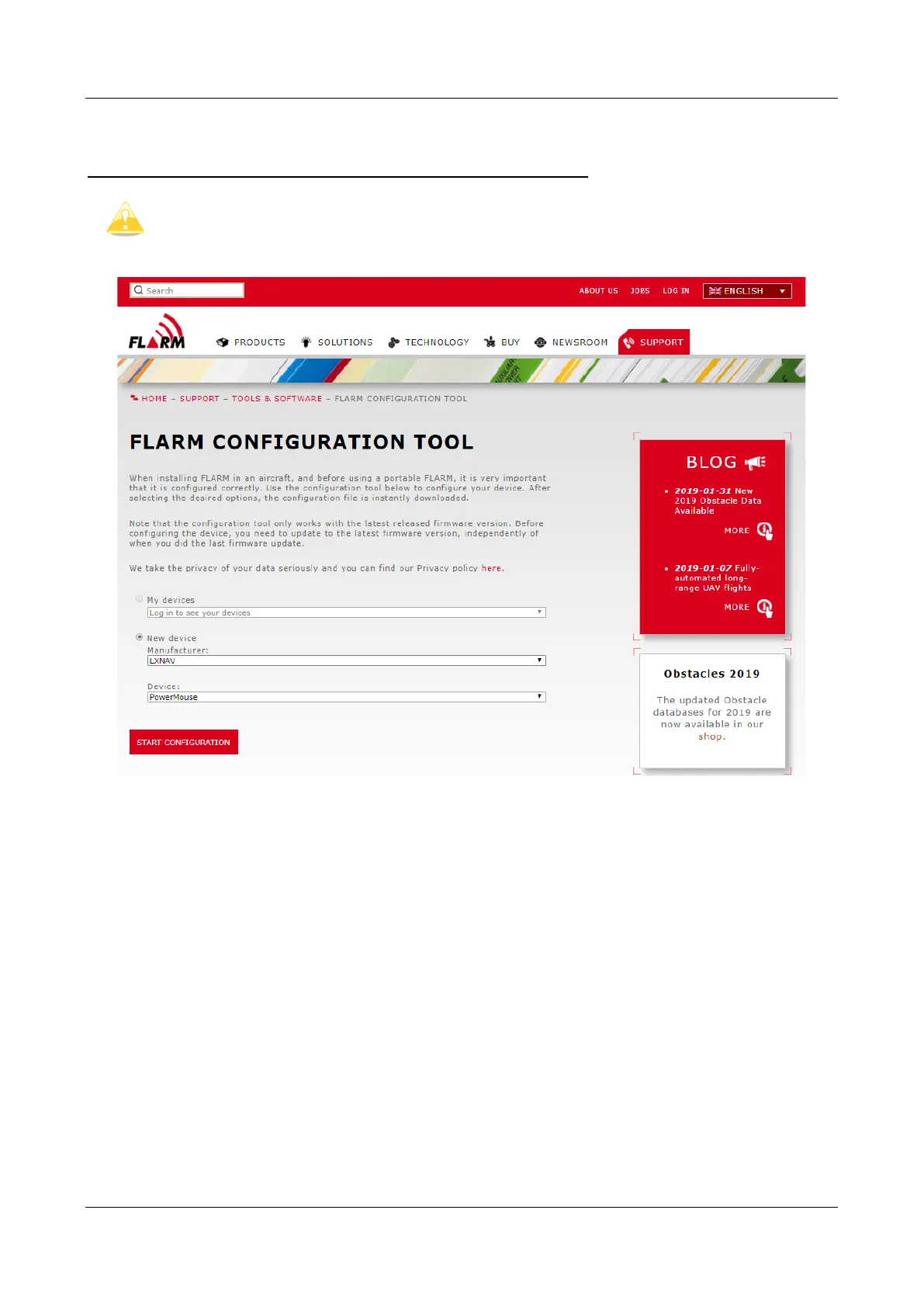
Create Config file:
Select “New device” and choose “LXNAV” and “PowerMouse”
Click on the button: Start configuration
Edit configuration file:
After pressing button described above multiple options will show.
Configure and adjust them to your liking
More settings are available by checking “Show advance settings”

Table of Contents

Other manuals for LXNAV PowerMouse

Related product manuals