Rev #35 March 2024
Page 36 of 43
To load this file into PowerMouse, save it on the USD memory stick. To load this file into
PowerMouse, insert USB key into USB slot on PowerMouse and switch on PowerMouse. File will be
automatically loaded into device.
7.4 OGN registration
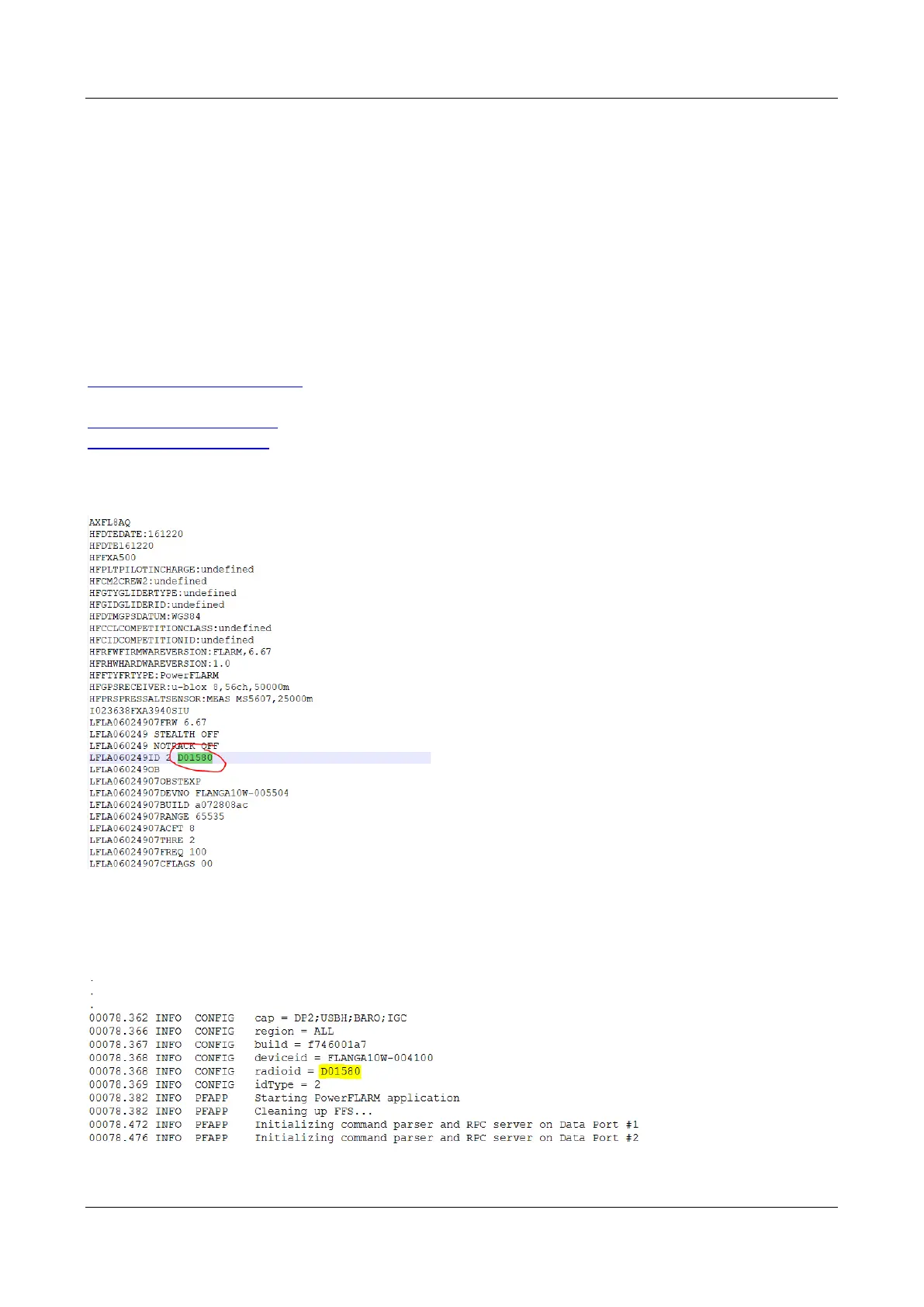
Flarm can be registered to Open Glider Network (OGN). For registration, you will need Flarm ID
number. It is 6 digit hexadecimal code. It can be found on several places.
- IGC file
- Flarm config file (flarmcfg.txt)
For OGN registration, please visit following web site:
http://wiki.glidernet.org/ddb
After successful registration, your flarm device will be visible on several OGN portals.
https://live.glidernet.org/
https://glidertracker.de/
7.4.1 IGC file
If you open IGC file with notepad, you must search for ID as follows
7.4.2 Flarm CFG file
If you plug into PowerMouse empty USB memory stick, a NGAxxxxx.TXT file will be copied on it, and
where xxxxx is internal serial of FLARM module. If you open the file, you will find Flarm ID at the
bottom as follows:


 To Next Page