INSTALLATION INSTRUCTIONS
3.5 Replacing Fuel and Diesel Exhaust Fluid (DEF) Display Module
The new display modu le h as improved reliability. Refer to your Ma c Do n Dealer if softw are update is nee ded.
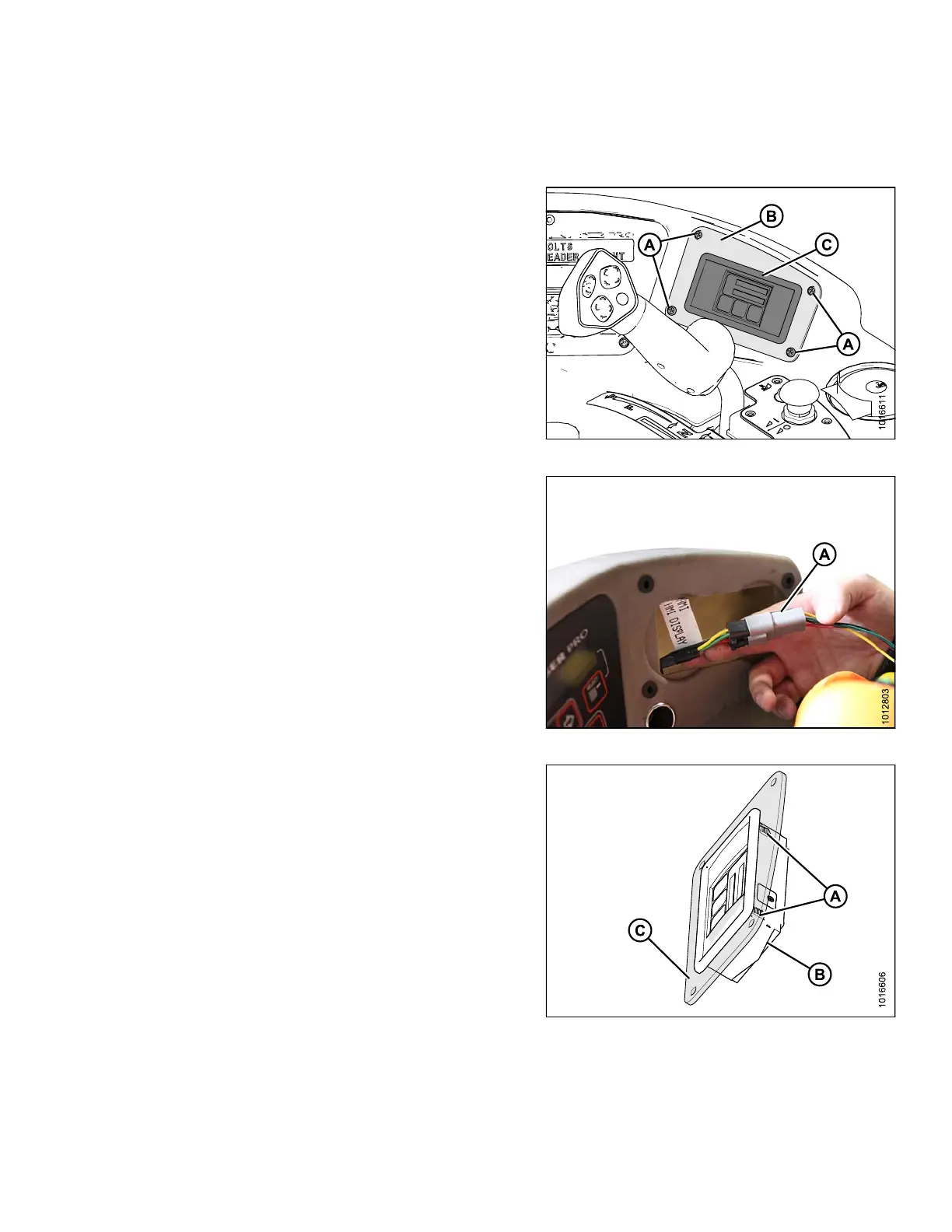
1. Using a Phillips head screwdriver, remove four
screws (A) securing DEF panel (B) and display
module (C) to windrower console. Retain screws for
reinstallation later.
Figure 3.18: DEF Display Module
2. Remove DEF panel and display module from
windrower console by sliding backwards out of
console. Be careful not to pull on the electrical
connector (A) protruding from the rear of the DEF
display module.
3. Unplug the electrical connection (A) on the rear of the
DEF module and set the module aside.
NOTE:
Remember the orientation of the DEF display
module by the position of the electrical connector
at the back of the DEF display module.
Figure 3.19: DEF Electrical Connection
4. Release the clips (A) on the rear of the DEF module (B)
holding module to panel (C), and remove DEF module
from the panel.
NOTE:
DEF pa
nel made transparent in illustration to
show
the clips.
Figure 3.20: DEF Module
167730
17
Revision B



 To Next Page