3 Installation Instructions
3.1 Replacing Aspirator
CAUTION
To avoid bodily injury or death from unexpected startup of machine, always stop the engine and remove
the key from the ignition before leaving the operator’s seat for any reason.
1. Park windrower on level ground. Stop engine and
remove key from ignition.
2. Open hood to the highest position. For
instructions, refer to windrower operat or’s manual or
technical manual.
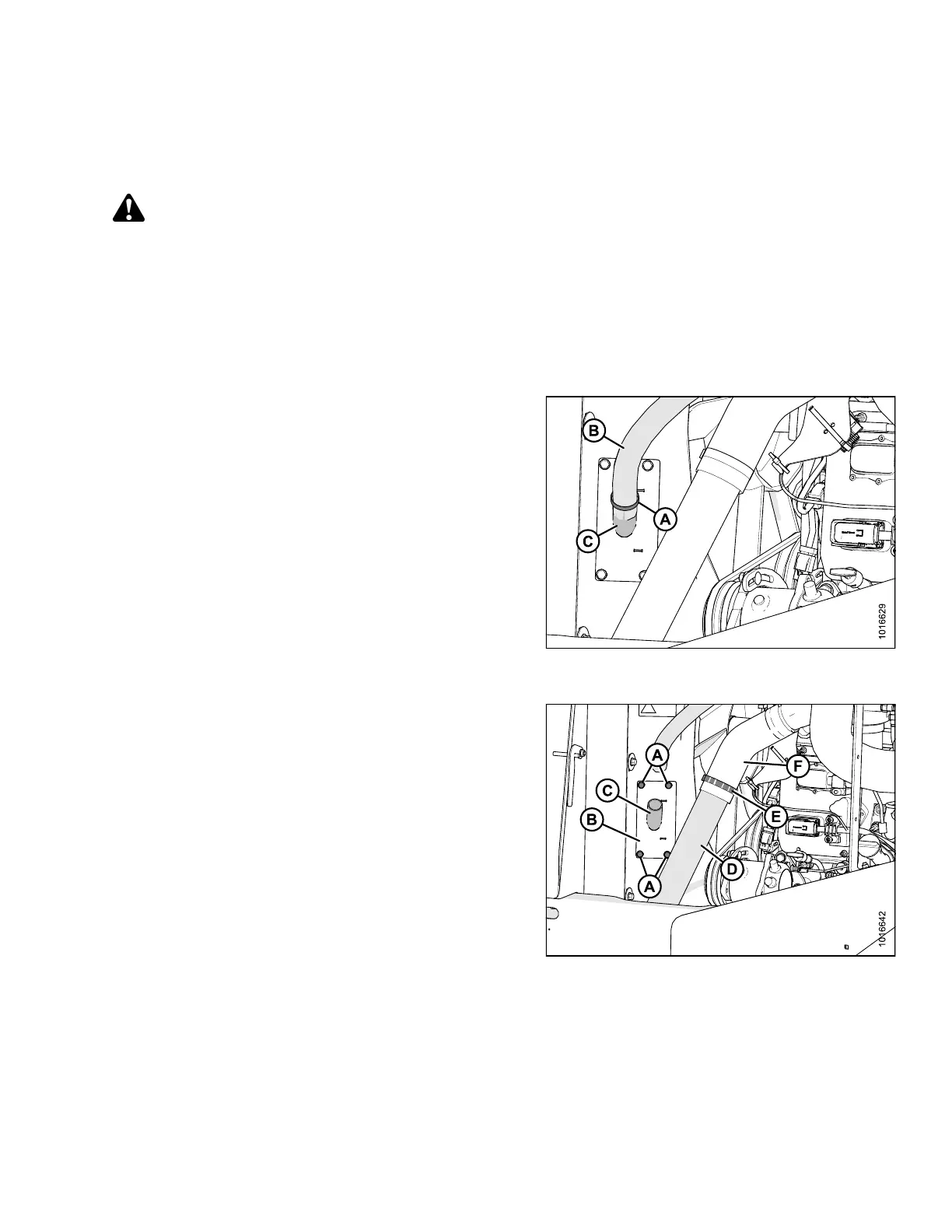
3. Using 1/4 in. wrench or socket, loosen clamp (A) at
the bottom end of aspirator duct (B) and pull duct off
aspirator assembly (C).
Figure 3.1: A spirator Duct and Charge Air
Cooler (CAC) Connectors
4. Using an impact gun or air ratchet with 1/2 in. socket,
remove fo u r bolts (A) and plate (B) securing aspirator
assembly (C) to fan shroud.
NOTE:
If access to lower right bolt is difficult due to the
position of cool side charge air cooler (CAC) tube (D),
follow these steps:
a. Using a 7/16 in. socket, loosen clamp (E) at the
bottom end of CAC connector (F).
b. Pull CAC tube (D) and CAC connector (F) apart
and push C AC tube (D) as required in order to gain
access to the remaining bolt.
c. Leave CAC tube (D) disconnected while
completing the rest of the replacement procedure.
d. Retain clamp and bolts for use later.
Figure 3.2: C AC Connectors
167730 9 Revision B



 To Next Page