147762 16 Revision C
3.2 Installing Auxiliary Lighting Chassis Harness
To install the auxiliary lighting chassis harness (MD #183558) provided in the kit, follow these steps:
NOTE:
You may need to remove and replace some of the existing cable ties. New cable ties in two lengths have been provided in
the kit for this purpose. Use them as needed.
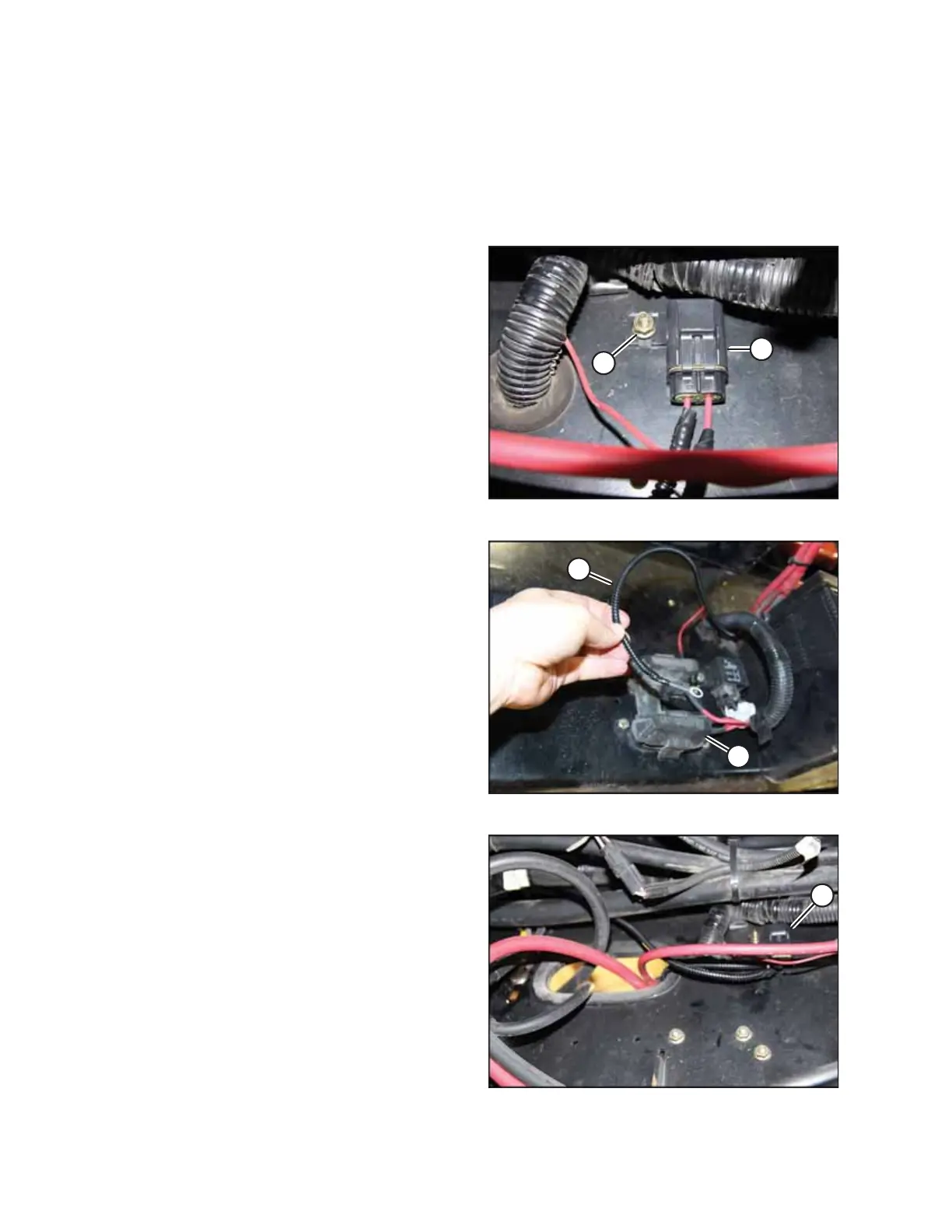
Figure 3.21: Fuse Holder Mounted inside Frame Rail
1. Using a #10 machine screw (MD #18577) and a flange
nut (B) (MD #21492), mount the fuse holder (A) of the
auxiliary lighting chassis harness (MD #183558) in an
existing hole inside the right frame rail, in between the hole
leading to the battery and the battery main disconnect
switch. The harness, screw, and nut are all provided in
the kit.
Figure 3.22: Main Fuse F-M1
2. Open fuse cover (B).
3. Route the short wire (A) from the fuse holder through a
hole in the frame and connect to main fuse F-M1 at (B).
4. Close fuse cover (B).
Figure 3.23: Long Wire Routed from Fuse Holder
5. Route the long wire from the fuse holder (A) along the path
of the chassis harness to the roof connections near the
receiver drier.
INSTALLATION INSTRUCTIONS



 To Next Page