CAB DISPLAY MODULE (CDM)
NOTE:
Reel Speed Control Lock is displayed with installation of the optional Expansion Module (MD #B4666). For more
information, refer to the windrower operator ’s manual or the windrower technical manual.
1. Turn ignition key to RUN, or start the engine.
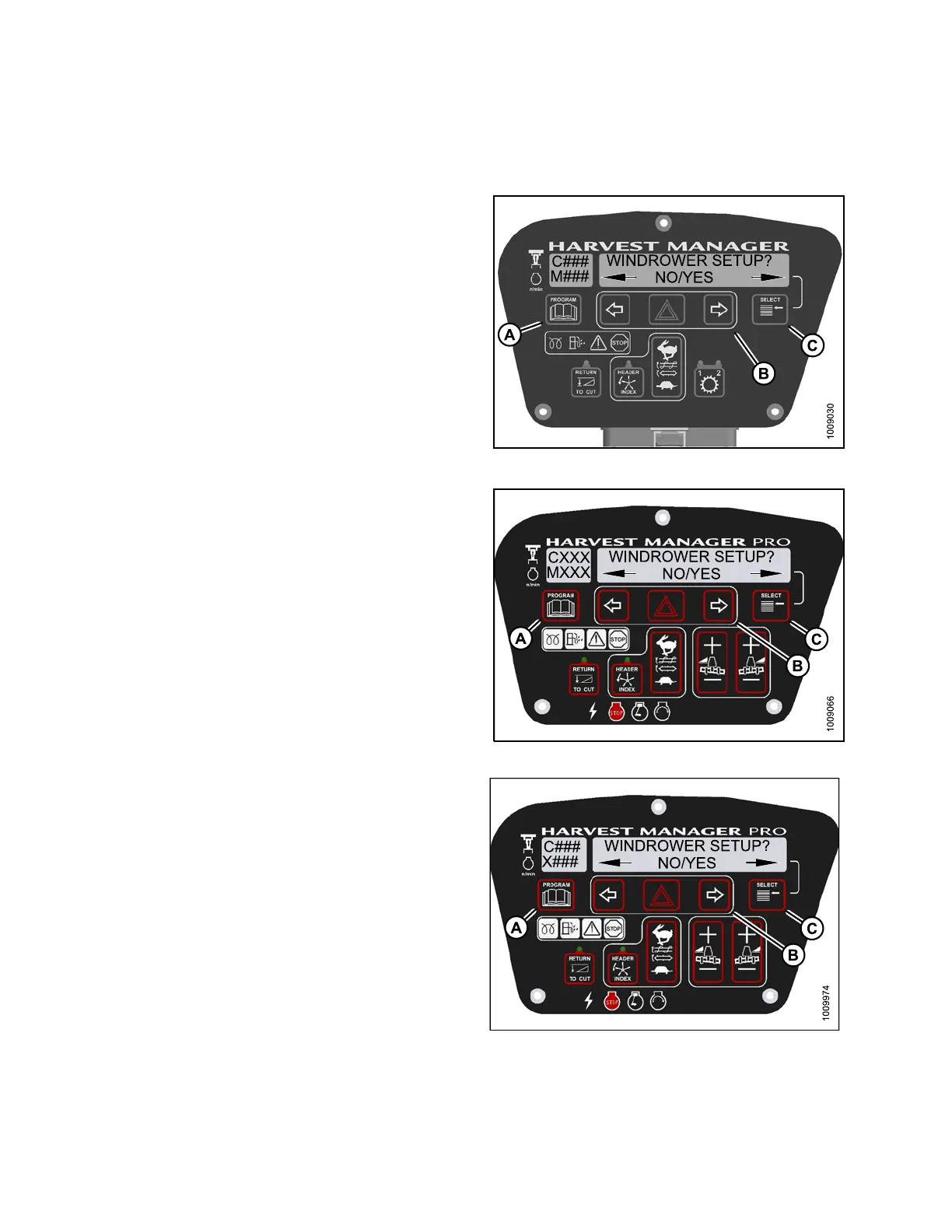
2. Press PROGRAM (A) and SELECT (C) on cab display
module (CDM) to enter Programming Mode.
• WINDROWER SETUP? is displayed on the
upper line.
• NO/YES is displayed on the lower line.
3. Press right (B) arrowto select YE S. PressSELE CT (C).
• SET K NIFE SPEED? is displayed on the upper line.
• SELECT HEADER TYPE? is displayed on the
upper line.
Figure 4.
194: M105 CDM P rogramming Buttons
Figur
e 4.195: M155 CDM Programming Buttons
Figure 4.196: M205 CDM P rogramming Buttons
147962 238 Revision A



 To Next Page